
Step 1 : Select Location
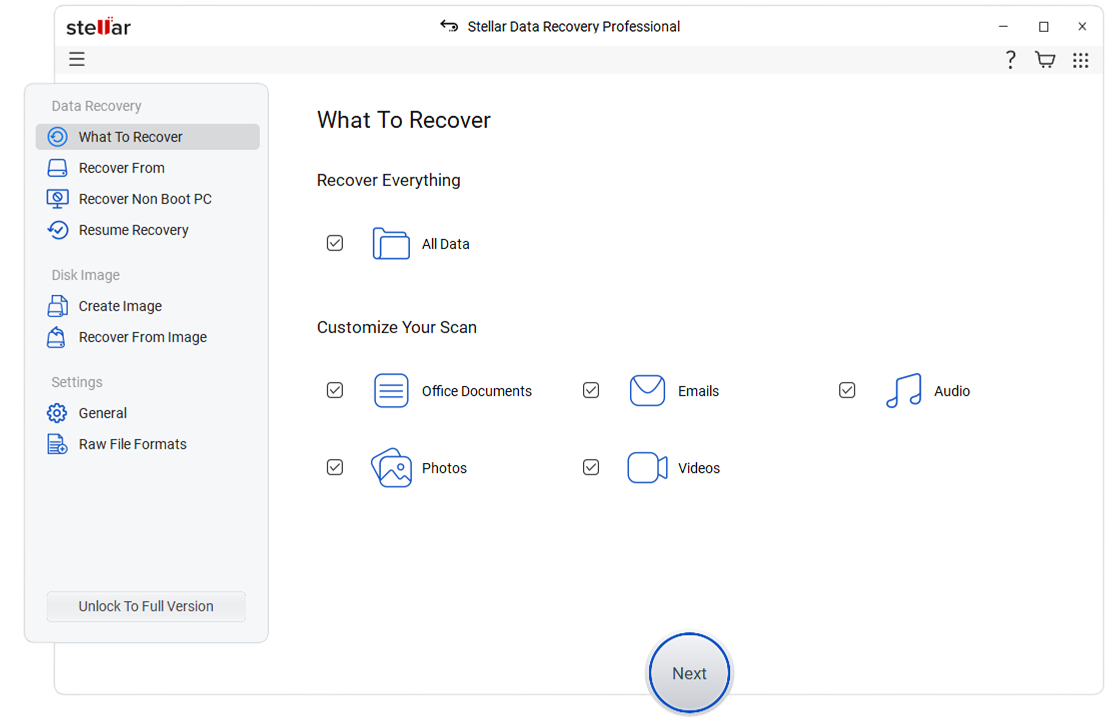
Select the type of data that you want to recover and click 'Next.'

 Features
 How it Works?
 Reviews
* Free download to scan and preview your lost or deleted data.


"Data recovery can be a pain, but “Stellar Data Recovery” takes most of that pain away. Keep this app for a rainy day of data recovery."

Get your hands back on the accidentally or intentionally deleted files and folders quickly from Windows PCs, laptops, and hard drives.

No matter how and why you formatted your HDDs, SSDs, USBs or SD cards, you can still perform formatted hard drive recovery.

In a few clicks, recover your files lost permanently due to an emptied Recycle Bin with this professional data recovery software.

Regain your access to your drive's deleted or lost partitions using the ‘Can’t Find Drive’ feature of Stellar Data Recovery Professional software.

Clone your severely damaged hard drive to perform secure data recovery and prevent any further damage to the drive.

Create a recovery drive to boot into the crashed or non-booting Windows systems due to BSoD, or system errors and regain access to your data.

JPEG, JPG, PNG, TIFF, TIF, BMP, GIF, PSD, RAW, CRW, CR2, NEF, ORF, SR2, MRW, DCR , WMF, RGB, 3DM, 3DMF, 3FR, ABM, AFX, ANI, ART, ARW, BIZ, BLD, SWF, SVG , RAF, DNG, etc.

AVI, FLA, FLV, M4V, MOV, MP4, WMV, MKV, 3G2, 3GP, 3GP2, 3GPP, AMV, ANM, ASF, ASX, SWF, MPG, RM/RMVB, MPEG, etc.

DOC, DOCX, RTF, XLS, XLSX, XLSB, PPT, PPTX, PPS, PDF, CWK, HTML, HTM, INDD, EPS, DOT, DOTX, XLSB, XLT, XLTX, POT, PPSX, etc.
AIF/AIFF, M4A, MP3, WAV, WMA, MID/MIDI, OGG, AAC, Etc.

ZIP, RAR, ARJ, CAB, 7Z, LZA, RPM, TAR, BZ2, HQX, SIT, SITX, etc.

MSG, PST, OST, EML, EMLX, MBOX, EPUB, JIS, KEY, LOG, MPS, 3DA, 3DS, 3TF, 3WS, ABD, etc.
Select the type of data that you want to recover and click 'Next.'
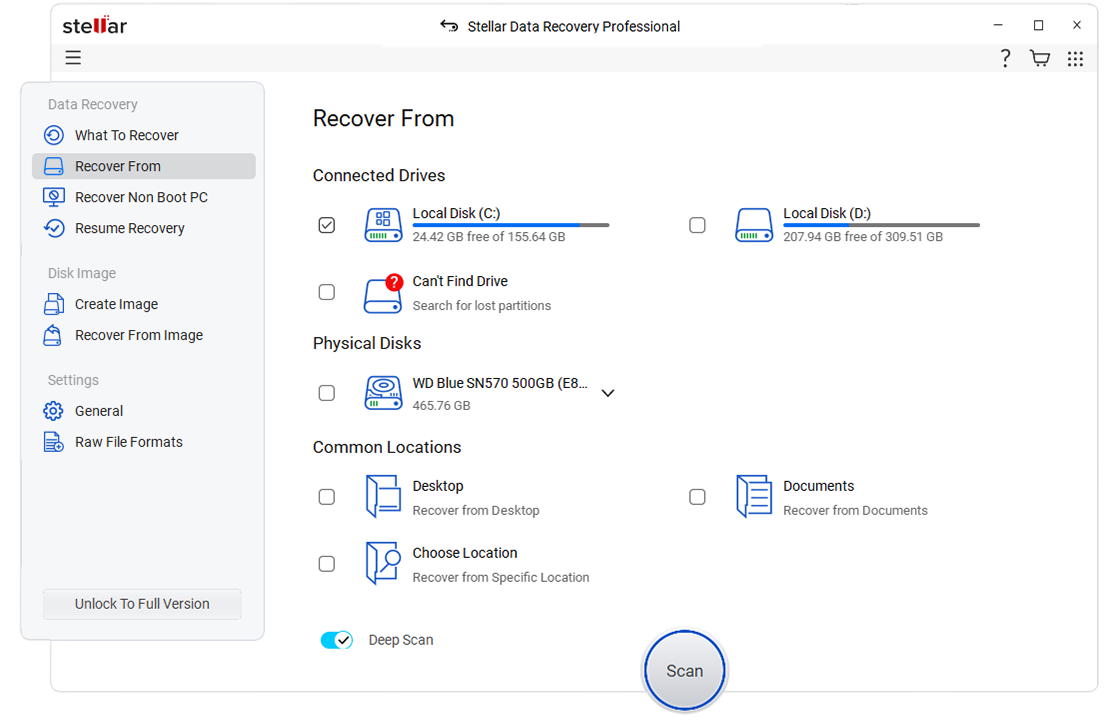
Select the folder location or drive volume and click 'Scan.'
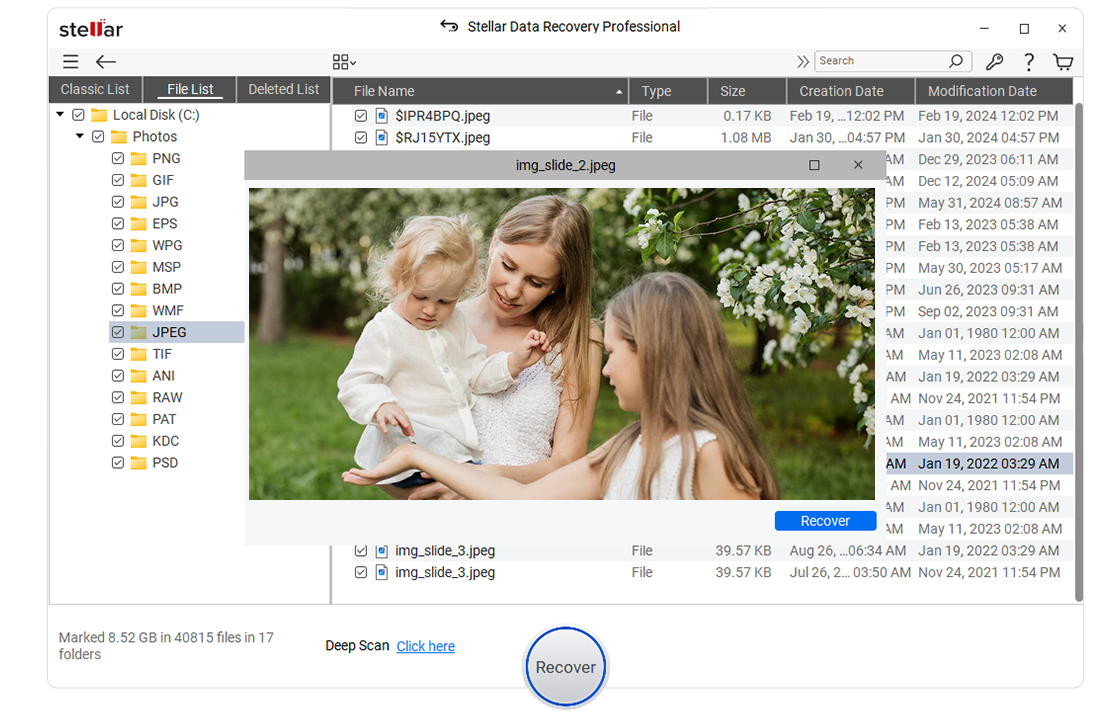
Select files after the scan and click 'Recover' to save recovered data.
The high-tech data recovery tool can easily recover lost data from almost any
devices or storage media.
 PC/Mac
  Hard Disk/SSD
 SD/Memory Card
 USB
USB Digital Camera
 Removable Drives


Stellar Data Recovery review: A fast, highly customizable file recovery tool.
Stellar Data Recovery is one of the best data recovery tools we’ve used, with highly customizable searches, a huge file-type library, and deep scan abilities.

It has just one job, and it does that to perfection: recovering data of all kinds.
Stellar Data Recovery’s strongest point, after its data recovery and repair capabilities of course, is its simplicity.

Stellar set out to create software that is designed for the people that prefer the DIY method of fixing things.
Stellar Data Recovery Premium for Windows is the best place to start for your data recovery mission. It’s the only software in the world that has the ability to recover your data as well as repair your video and image files.

Best For High Volumes Of Files
Stellar Data Recovery is the best data recovery software for businesses that need to recover large amounts of data. It offers a wide range of features, including the ability to recover data from SSDs, and it has a very high success rate.
* Free download to scan and preview your lost or deleted data.
0M+
Customers
0+
Years of Excellence
0+
R&D Engineers
0+
Countries
0+
Partners
0+
Awards Received
Technology You Can Trust Data Care Experts Since 1993
Stellar Data Recovery Inc.
10301 Northwest Freeway Suite 314,
Houston, Texas 77092-8227,
United States


 Installation
 Uninstallation
 EULA
EULA