 Company
 Leadership
  Media Coverage
 Press Releases
 Career
  Case Studies
 Blogs
Blogs  Articles
  Videos
  Buy Now
 Free Download


 Features
 Testimonials
 How it Works?
 Price
Price Reviews
 Specs
Specs Help
Help FAQ
FAQ



Step 1
: Select File Type
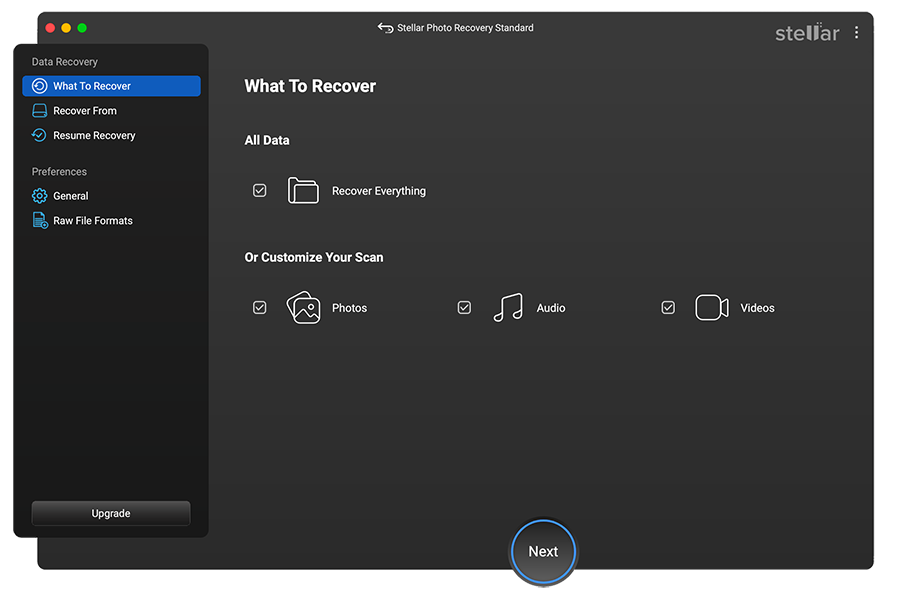
Select the type of media files that you need to recover, and click 'Add'.
 For Individuals
For Individuals
 Data Recovery
 File Repair
 Data Erasure
  For Business
For Business
 Email Repair
 Email Converter
 Email Migration
 File & Database Repair Data RecoveryData Erasure
 Toolkit
 Forensic
 Lab Services
  Our Partners
  About
About Resources
 Support
  Contact us
 Recover your lost photos, audio and video files from multiple storage devices using our powerful and accurate photo recovery software for Mac.

*Software works only on your Desktop/Laptop

"Stellar Photo Recovery is an excellent choice as a tool to mitigate the risks of Photo Loss."

Stellar Photo Recovery for Mac v12.7.0.0 Launched
Enhanced RAW and new file format support for more comprehensive, reliable recovery result you can trust. See What’s New

STELLAR PHOTO RECOVERY FOR MAC
Stellar Photo Recovery for Mac is a reliable and trusted free software to recover lost or deleted photos, audio, and video files from Mac and supported storage devices. It efficiently restores media files across multiple file formats and handles various data loss scenarios.











ONE-STOP SOLUTION FOR ALL PHOTO RECOVERY NEEDS

Retrieve images in any file format by using this efficient Mac photo recovery software. The DIY tool also retrieves lost or deleted videos and audio files from various devices, including digital cameras, USB flash drives, SD cards, Mac-based hard drives, and volumes.

Now easily recover photos, audio, and video files from an encrypted drive or volume using this accurate photo recovery software for Mac. It works on all the drives that have been encrypted by an encryption tool such as Drive Utility, FileVault, and others.

The disk imaging capabilities of the Mac photo recovery software create exact images of a storage drive containing ‘bad’ sectors. The software safely scans these disk images and recovers deleted multimedia files without risking further damage or failure of the original source drive.

The advanced photo recovery software for Mac lets you pause an on-going scan and save the scan progress. You can resume the scan at a more convenient time without the need to restart the scan from the beginning.
SUCCESS STORIES
MORE AWESOME FEATURES

If you cannot find your media files in the normal scan, select ‘Deep Scan’ to scan Mac storage drives based on file signatures. This feature lets the Stellar Photo Recovery for Mac tool scan every sector and block of the storage drives in order to find lost or deleted multimedia files.

The software facilitates safe RAW photo recovery on Mac from popular camera brands including Nikon, Canon, Sony, Panasonic, Fuji, Kodak, etc. It recovers lost camera RAW image files such as SR2, CR2, NEF, RAF, K25, etc. The tool can also restore deleted iPhone/ iPad photos and videos.

The DIY tool is compatible with Mac powered by M1, M2, and M3 chips and T2 security chip. You can scan the Mac storage media without disabling the SIP or adding the KEXT. The tool runs perfectly on a wide range of macOS editions including the latest macOS Sequoia 15.

The software helps to personalize your photo recovery experience. It supports three UI themes- Vibrant, Dark, and Light. Software will auto-detect the theme and launch as per Dark Theme or Light Theme.

If you cannot find specific file types in the predefined list of supported file types in the software, you can edit any existing file type or add any new file header manually. With this feature, you can easily scan for more file types, thus increasing the utility of the Mac photo recovery tool.

The DIY tool supports the recovery of Unicode files and hence, eliminating the need for a converter or any other supporting software. The exclusive feature makes the software one of the most versatile tools for Unicode file recovery on Mac.

You can scan an entire Mac drive or a specific location to recover your media files. This saves considerable time if you know the exact location on the drive from where you can recover the files. Similarly, you can scan the storage media using file types & formats to find the recoverable files.

The recovered multimedia files can be viewed in three different styles - Classic Tree, File Type, and Deleted List. The deleted files can be previewed while the scan is running. This helps enhance the preview and restore options making the recovery process simpler and faster.
Software Walkthrough
Select the type of media files that you need to recover, and click 'Add'.
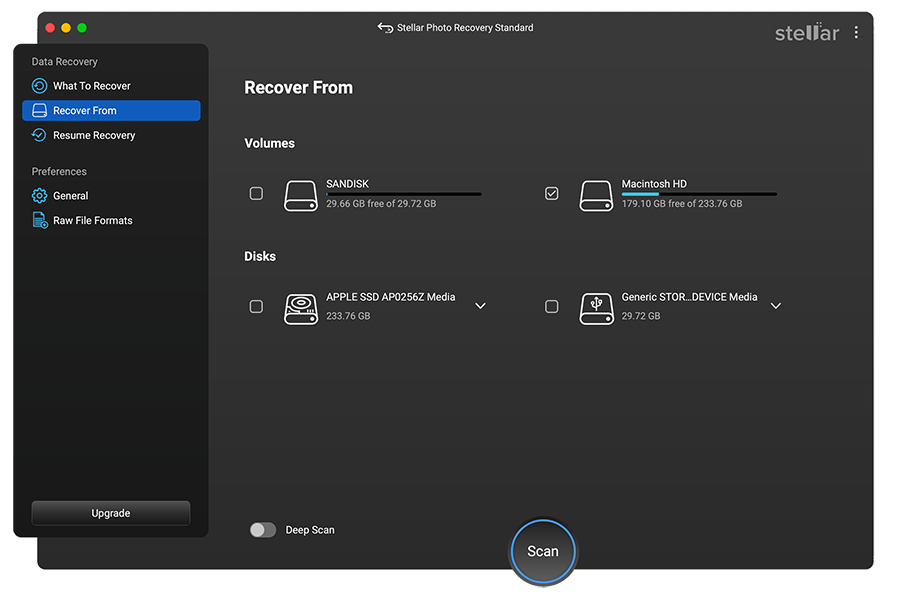
Select the drive, volume, or external media from which you need to restore media files. Click 'Scan'.
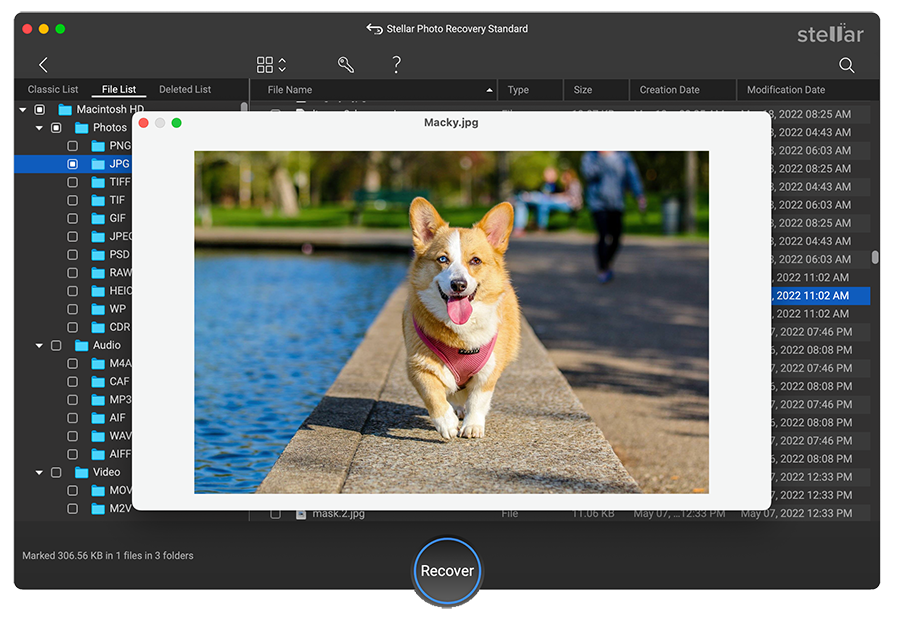
Preview the recovered files during the scan, and click ‘Recover’ to save them at a desired location.
PRICING
CUSTOMER REVIEWS




Stellar Photo Recovery has the potential to rescue you from most data loss scenarios, and with incredible ease.
Rescue deleted images or video from any memory card or hard drive - it's no problem with Stellar Photo Recovery.
See Digital Camera World Review

An Easy Way to Reclaim Your Precious Photos.
Stellar Photo Recovery is a fantastic option for photographers and videographers looking to recover files.
See Digital Photography School Review

We found the software to be capable of recovering files from an old storage drive that we had previously discarded as unusable.
We found the software to be capable of recovering files from an old CompactFlash card that we had previously discarded as unusable.
See Photo Review Review

Stellar Photo Recovery does what it promises to do, and pretty quickly too.
Inexpensive and effective way to recover precious photos and files that have seemingly been lost forever.
See Photography Blog Review
DATA SHEET

| Version: | 12.7.0.0 |
| License: | Single System |
| Edition: | Standard, Professional, Premium, & Technician |
| Language Supported: | English, Deutsch, Français, Italiano, Español, 日本語 |
| Release Date: | May 2026 |
| Memory: | 4 GB minimum (8 GB recommended) |
| Hard Disk: | 250 MB of free space |
| Operating System: (64 Bit only) |
macOS Tahoe 26, Sequoia 15, Sonoma 14, Ventura, Monterey, Big Sur, Catalina 10.15, 10.14 & 10.13 |
TRY BEFORE YOU BUY
USEFUL ARTICLES
FIND YOUR ANSWERS
If your media files are stored in the SD card of your Android phone, then Stellar Photo Recovery can retrieve them. However, if the photos and videos are stored in the internal memory of an Android phone, then Stellar Photo Recovery cannot recover them.
For retrieving photos from the internal memory of an Android phone, use professional Android data recovery software.
Following are the new updates in the Stellar Photo Recovery for Mac version v12.3.0.0.
Using Stellar Photo Recovery for Mac, you can easily recover your photos from a formatted USB drive. Just follow these simple steps.
The error is displayed mostly when the SD card is in a 'locked' position. Check to see whether your memory card is in the unlocked position. Flick the right switch on your memory card, and you can 'lock' or 'unlock' your memory card. If the card is already unlocked, there might be a corruption issue. In such cases, use professional Mac photo recovery software like Stellar Photo Recovery for Mac.
You can get deleted music files back from the SD card using Stellar Photo Recovery software. Simply install and run the software on your system. The software will scan the connected SD Card and recover the lost or deleted music files in your desired location.
Whenever you cannot find your file 'format' in the list of supported file types by the Mac photo recovery software, you can edit the existing file formats or add new file types of your choice. Click here to see the steps.
This kind of issue usually gets corrected by formatting the card in the camera. However, sometimes, the reason may also be camera and card incompatibility. In that case, update your gear with the latest firmware. If the issue is still there, run Stellar Photo Recovery Mac software to recover your images.
You can create an image of an entire or selected range of the hard drive or card and save it to recover photos, videos, and audio files later. Follow the below steps to Create an Image of the drive:
To recover pictures from the Image file, perform the below steps:
To recover photos from saved scan information on Mac, follow the below steps:
No. You must save the image of the drive at another location, as saving the image file on the same media leads to overwriting and permanent data loss.
Yes. Do not remove your SD card during the scan or recovery process. Detach your card or other media only after the recovery process is 100% complete.
The latest Stellar Photo Recovery supports all known and unknown multimedia file types. The software supports the recovery of lost or deleted raster images, vector files, MXF movies, HD-MOV, Adobe EPS, and RAW file formats of cameras. You can even add new file types if your required media file type is not in the predefined list of supported formats.
Absolutely. The free version of Stellar Photo Recovery for Mac lets you restore up to 10 photos, videos, or audio files without any charge, with a maximum file size of 100 MB each.
WHY STELLAR® IS GLOBAL LEADER
0M+
Customers
0+
Years of Excellence
0+
R&D Engineers
0+
Countries
0+
PARTNERS
0+
Awards Received





Listening...

 Installation
  Uninstallation
  EULA
EULA Knowledge Base
