 Stellar Phoenix PPT Password Recovery
Step 1:- Home screen of Stellar Phoenix PowerPoint Password Recovery is shown above. Provide the approximate minimum and maximum length of the lost PowerPoint password in the 'Password Length' section.
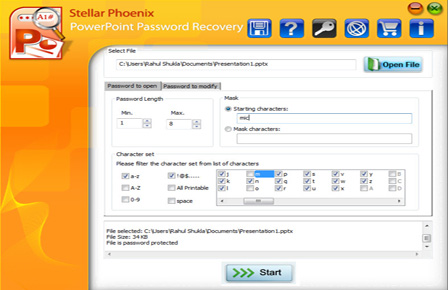
Step 2:- In the 'Mask' section, you can specify the initial characters of the password or put a '?' in place of the unknown characters to simplify and quicken the password search process.

Step 3:- 'Process Dialog' showing the dynamic progress bar and other useful information, such as process start time, current speed, approximate completion time etc.