
What is Ntoskrnl.exe Error and How to Fix It?
October 28, 2025| 7 min read


STELLAR DATA RECOVERY FOR WINDOWS
A partition missing from File Explorer usually still exists on the drive, even if it is no longer visible. The underlying files remain intact until they are overwritten, but Windows has lost track of the partition’s location. Stellar Data Recovery scans the drive to rebuild lost structure and recover your critical data.
Free Download 100% Secure
A partition can disappear when its partition table entries or boot sector become damaged or are deleted. Here’s why it happens:
A partition may be accidentally deleted in Disk Management or a third-party partitioning tool, causing its space to appear as Unallocated. The data may remain on the drive until it is overwritten.
Malware, partitioning errors, or system failures can damage the MBR or GPT partition table, preventing Windows from locating existing partitions.
A crash, power failure, or forced restart during a partition resize or merge can leave the partition structure damaged and the volume inaccessible.
A Windows installation or disk-layout change can result in a partition being deleted or becoming inaccessible, particularly if the wrong partition is selected during setup.
Running DiskPart's clean command on the wrong disk removes its partition information, making its volumes disappear from Windows. The data may remain recoverable if it hasn't been overwritten.
A power failure, interrupted write, or improper USB disconnection can damage the file system, causing Windows to identify the partition as RAW and prompt you to format it.
Bad sectors affecting critical disk areas or a failing drive can make a partition inaccessible or cause the entire disk to disappear intermittently.
Windows may fail to assign a drive letter or a recent system change may remove one. The partition can still exist with its data intact, but it won't appear in File Explorer.
Windows may mark a disk as Offline or display it as Not Initialized following a system issue or hardware change, preventing its partitions from appearing in File Explorer.
A drive formatted with a file system Windows doesn't natively support may not be accessible through File Explorer, even when the partition and its data remain intact.
Do not save files, install software, or format the drive before attempting recovery. New writes can overwrite data you may still be able to recover.
Lost a Partition? Here’s How to Get Your Data Back
Recovering data from a lost partition takes more than a standard file scan. Stellar searches for missing partitions, handles damaged file systems, and helps you recover your files without writing to the affected drive.
Before you begin, install Stellar on a different drive and prepare another drive to save the recovered files. Use Stellar’s Create Image feature to create a disk image of the affected drive, especially if you suspect it’s failing. If Windows prompts you to format the drive, click Cancel.
Download the free version and install it anywhere except the affected disk. Every file written to that disk, including an installer, can overwrite what you’re trying to recover.
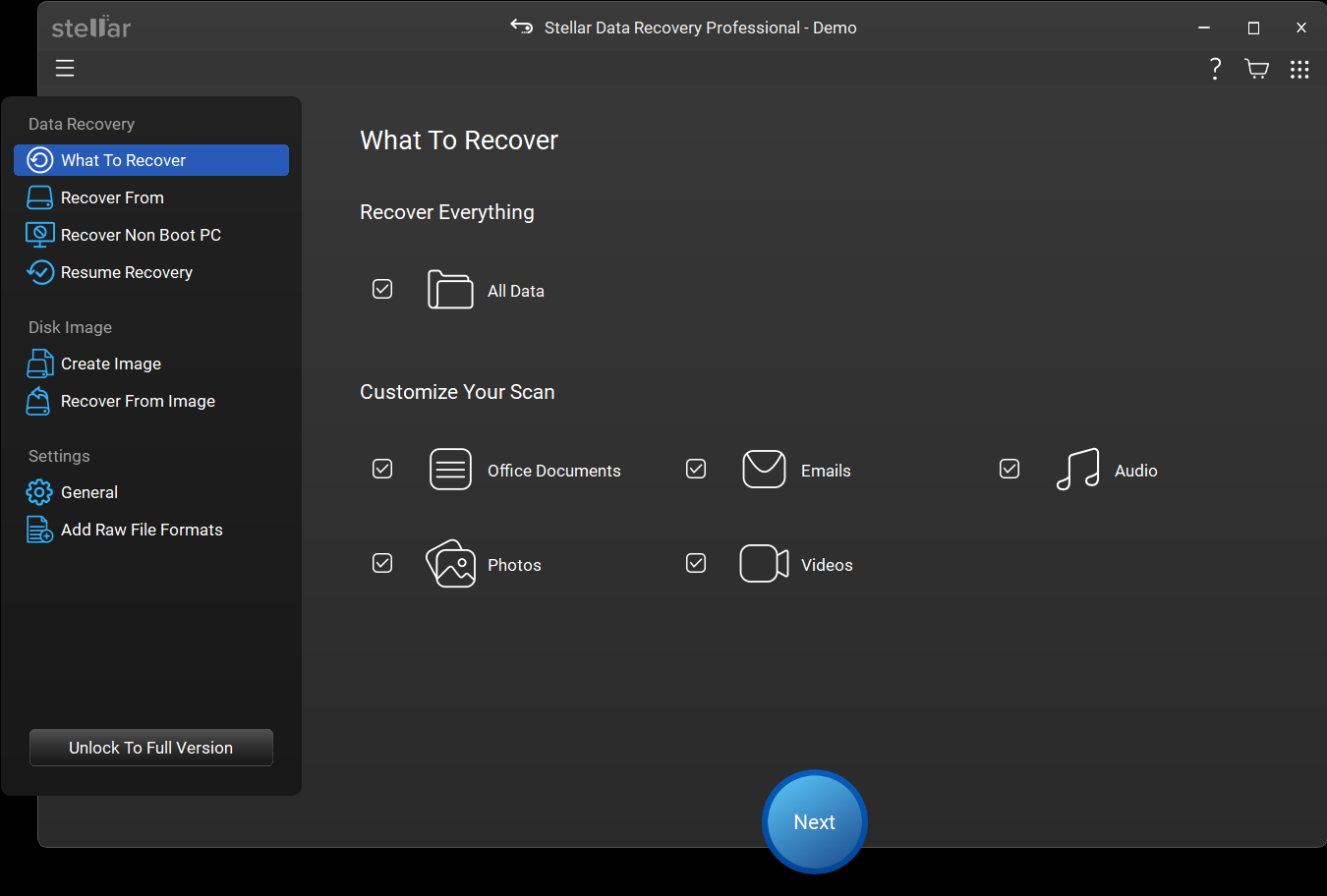
On What To Recover, keep All Data ticked under Recover Everything, or narrow it under Customize Your Scan to Office Documents, Emails, Audio, Photos or Videos. Click Next. Narrowing speeds up the scan on a large disk.
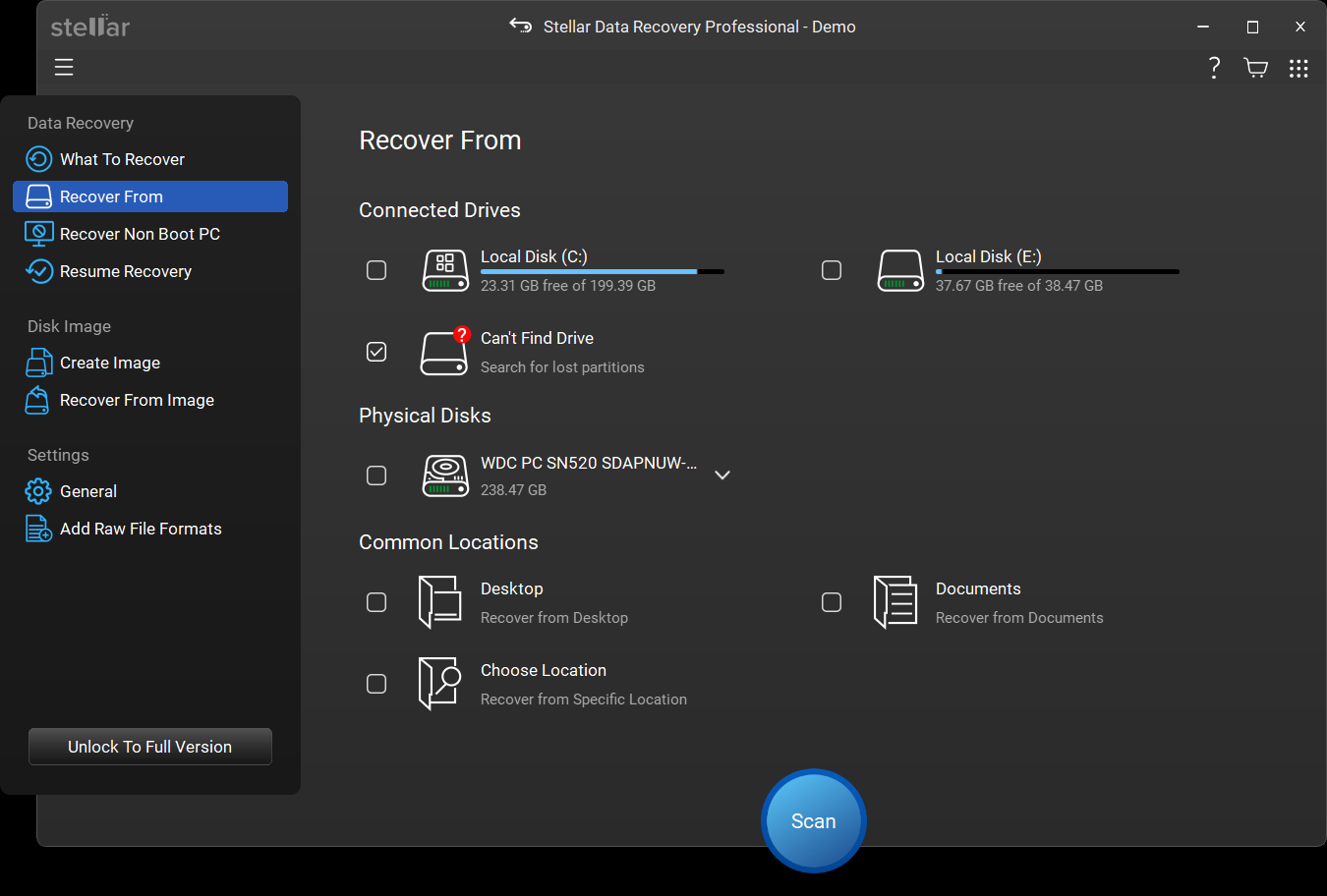
On Recover From, tick Can’t Find Drive under Connected Drives and click Scan. This tells Stellar to look for lost partitions, not just deleted files.
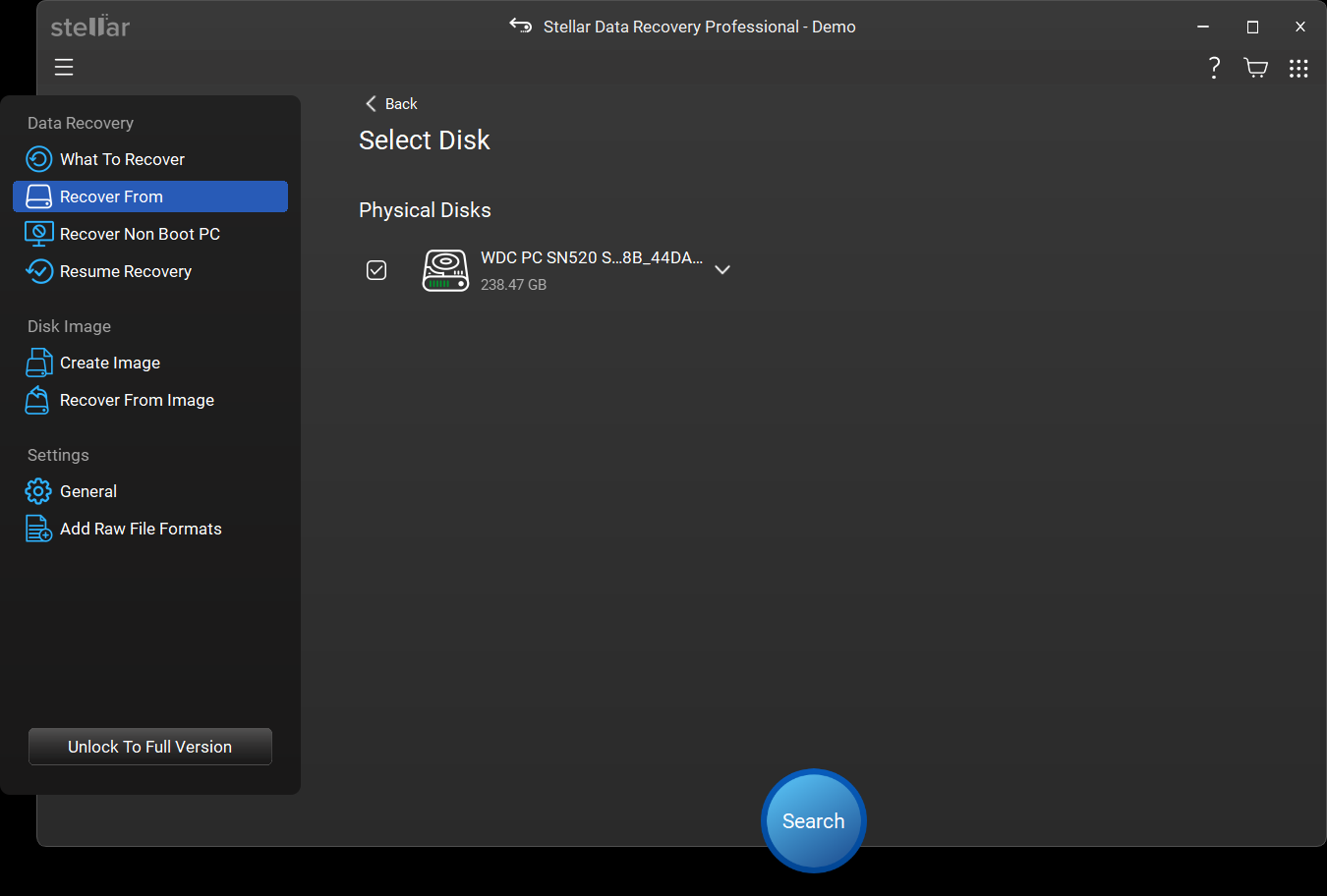
On Select Disk, tick the physical disk that held the partition and click Search. Stellar reads the disk sector by sector and adds each partition to the list as it finds it, with a running count of lost partitions found.
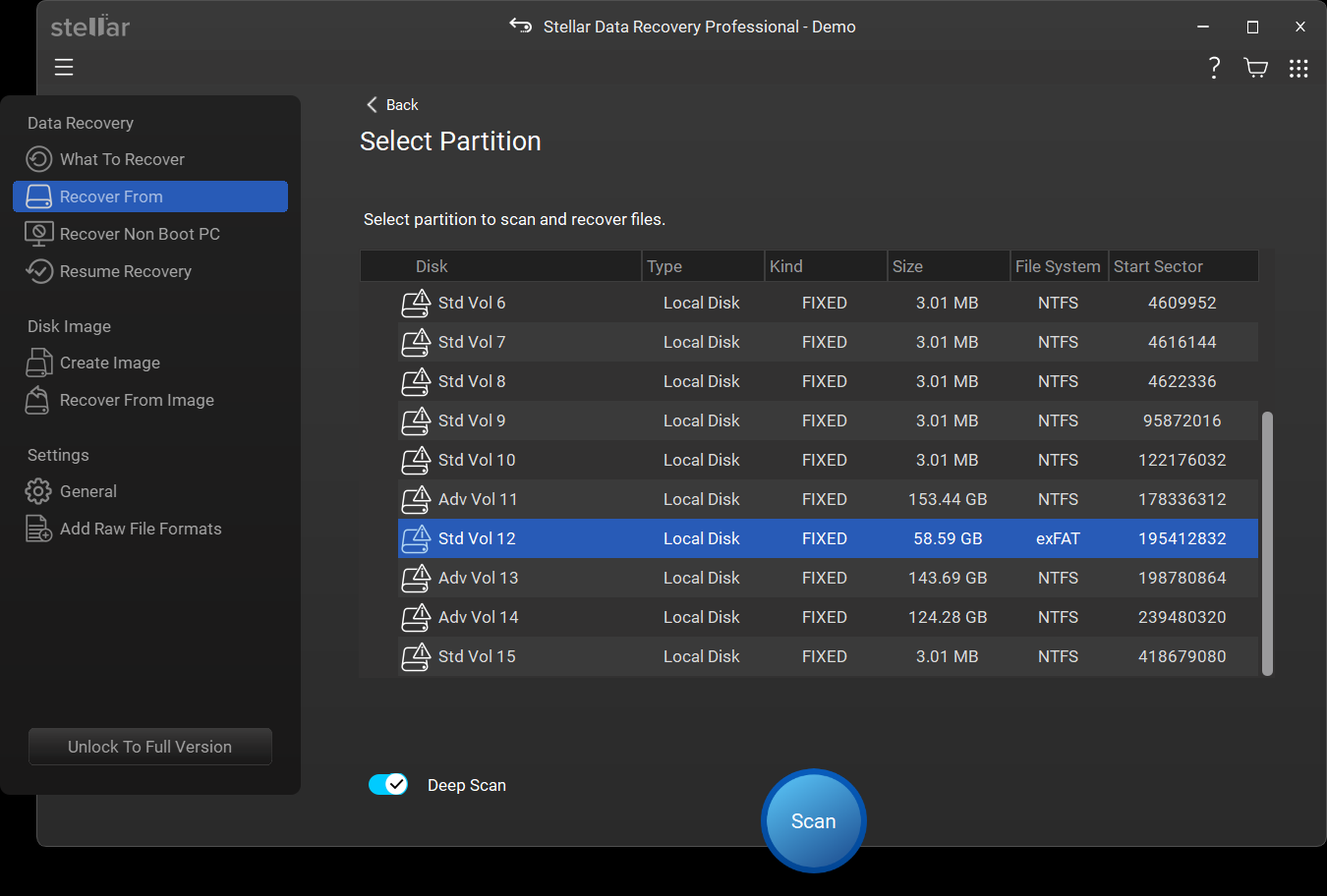
The Select Partition list shows every partition found, with its size, file system and start sector. Your current partitions appear too, so look for the size you remember that doesn’t match a drive you can already see. Entries of a few megabytes are usually remnants of old layouts, not the volume you lost. If yours isn’t listed, click Click here beside Extensive Partition Search for a deeper pass.
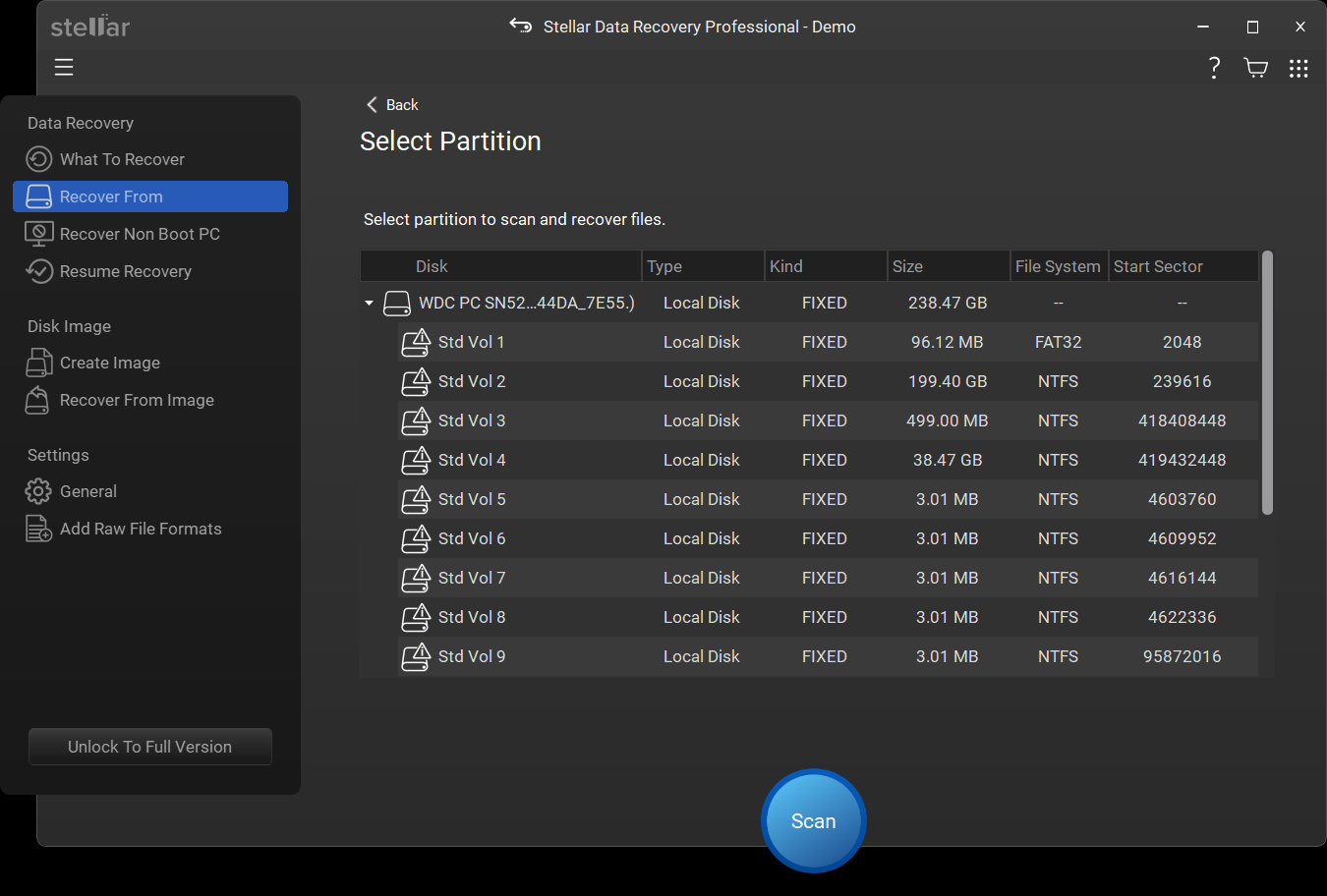
Select it, switch on Deep Scan for the most thorough search, and click Scan. Deep Scan takes longer, but it also finds files by signature when the file system is damaged.
Results are organized in three views: Classic List shows the original folder tree, File List groups files by type, and Deleted List shows only deleted files. Files found by signature sit in Raw Data, folders whose original location was lost sit in Lost Folders. Double-click any file to preview it.
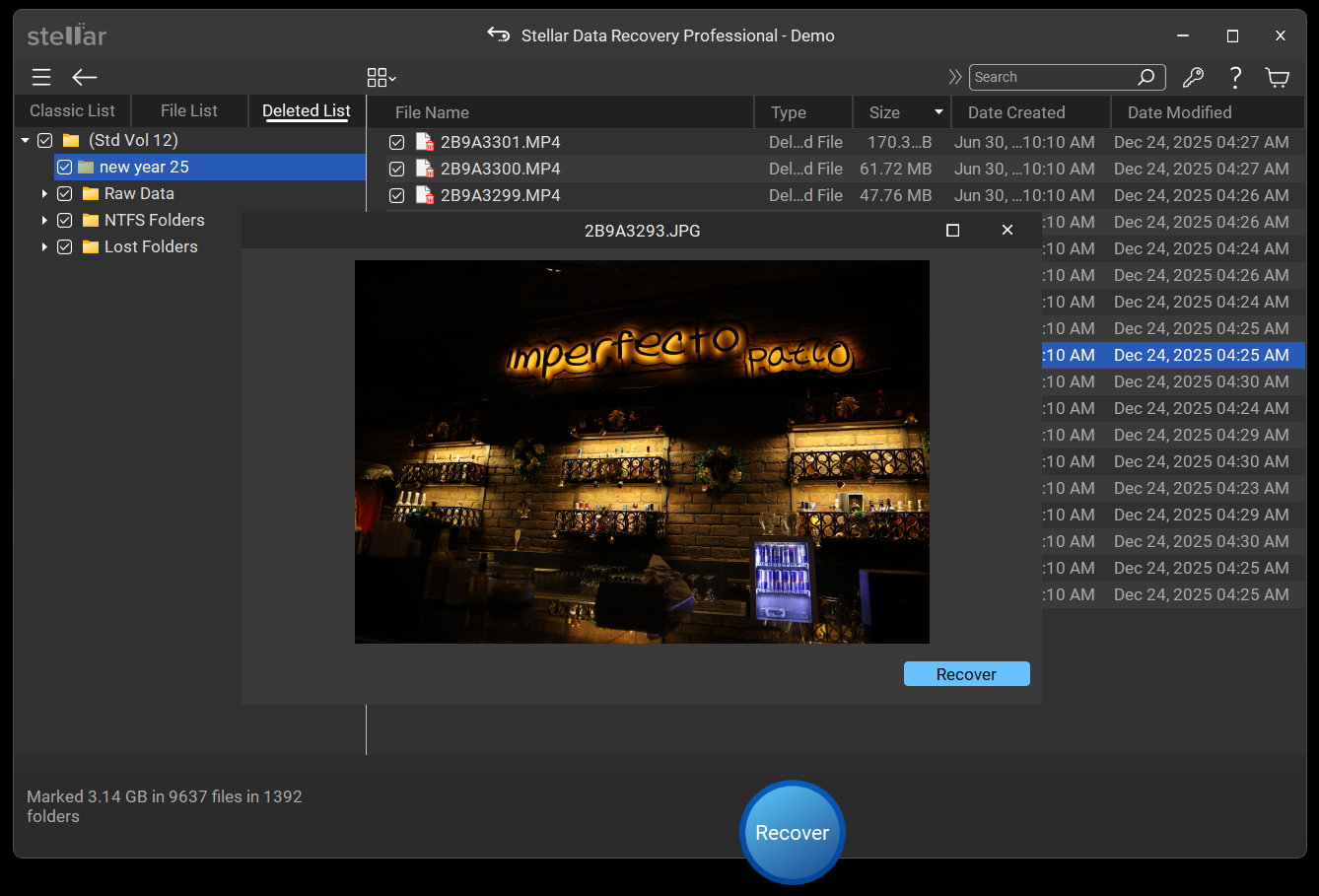
Select the files and folders you need, click Recover, and choose a location on another drive. The free version saves up to 1 GB. Once your files are safe on another drive, you can recreate the partition in Disk Management and copy them back. If the loss followed clicking noises, slow reads or bad sectors, open Drive Monitor first: a failing drive shouldn’t hold your only copy again.
Stellar recognizes hundreds of file formats, so you can recover a lost partition in full or search it for just one kind of file. If you’re working with a format it doesn’t recognize, you can Add Raw File Formats from sample files.
Documents : DOC, DOCX (Microsoft Word), XLS, XLSX (Microsoft Excel), PPT, PPTX (Microsoft PowerPoint), PDF, ODT, ODS (OpenDocument), RTF, TXT
Photos : JPEG, PNG, TIFF, BMP, GIF, PSD (Adobe Photoshop). Camera RAW: CR2 (Canon), NEF (Nikon), ARW (Sony), ORF (Olympus), RAF (Fujifilm), DNG
Videos : MP4, MOV (QuickTime), AVI, MKV, WMV (Windows Media Video), M4V, MTS (AVCHD), 3GP
Audio : MP3, WAV, AAC, M4A, WMA (Windows Media Audio), OGG, AIFF, MIDI
Emails : PST (Microsoft Outlook), MSG, EML, MBOX, NSF (Lotus Notes), DBX (Outlook Express)
Archives : ZIP, RAR, 7Z (7-Zip), TAR, CAB (Windows Cabinet File), BZ2
Stellar recovers lost partitions from any drive Windows can detect, internal or external:
Hard Drives (HDD) : Seagate®, WD®, Toshiba®, HGST®, Samsung® and more
Solid-State Drives (SSD)* : SATA and NVMe SSDs from Samsung®, WD®, Crucial®, Kingston®, SK hynix® and more
External Drives : Seagate®, WD®, LaCie®, Toshiba®, Samsung® and more
USB Flash Drives : SanDisk®, Kingston®, Samsung®, PNY®, Transcend® and more
Memory Cards : SD, microSD and CF cards from SanDisk®, Lexar®, Samsung®, Kingston® and more
Desktops and Laptops : Dell®, HP®, Lenovo®, Acer®, ASUS® and more, including PCs that won’t boot
RAID Arrays : RAID 0, RAID 5 and RAID 6 (Technician edition)
* Recovery from SSDs depends on whether TRIM has already cleared the data.
Stellar can find and recover all types of partitions used by Windows
NTFS partitions
The default for Windows system drives and most internal disks. Stellar recovers NTFS partitions that have been deleted, lost, or turned RAW.
FAT16 and FAT32 partitions
Still common on USB drives, memory cards and older disks, and used for the small EFI system partition every modern PC starts from.
exFAT partitions
Used on large USB drives, external SSDs and SDXC cards because it handles files over 4 GB and works on both Windows and Mac.
MBR disks
Older disks record their partitions in a master boot record at the very start of the drive. When it’s damaged or erased, Stellar searches the rest of the disk for the partitions it used to describe.
GPT disks
Modern PCs use a GUID Partition Table, which records partitions differently. Stellar searches GPT disks the same way, including NVMe drives.
RAW partitions
A partition Windows shows as RAW has lost its readable file system, not its files. Deep Scan recovers them by their signatures.
Unallocated space
When Disk Management shows a partition as Unallocated, that space usually still holds its files. Can’t Find Drive scans it for the partition that used to be there.
BitLocker-encrypted partitions
Enter the BitLocker password when Stellar asks for it, and it unlocks the volume and recovers as usual. Without the password, no software can read an encrypted partition.
Your chances depend far more on what happened to the partition than on which software you use. Here’s what to expect in the most common situations:
Partition deleted, but not overwritten
The best case. Deleting a partition removes only its entry from the partition table and leaves the files untouched, so recovery is usually complete.
Lost after a crash, power cut or failed resize
Usually recoverable. If the partition tool had already started moving data when it stopped, some files may come back damaged, which is why you should preview before you recover.
DiskPart clean on the wrong disk
Usually recoverable, because clean removes partition information but leaves the data. clean all is a different command: it writes zeros to every sector, and nothing can be recovered after it.
Partition turned RAW
Usually recoverable. RAW normally means a damaged boot sector or file table, not missing data. Don’t format the partition until your files are safely back.
Formatted partition
A quick format resets the file table but leaves the files, so most can be recovered, though some may lose their original names. A full format writes zeros across the entire partition, and its data can’t be recovered.
Windows reinstalled or new data written
Partly recoverable. Whatever the new files overwrote is gone for good; everything else can still be found.
Partition on an SSD
Harder. Most SSDs use TRIM, a command that lets the drive erase freed space, sometimes, within minutes. Scan as soon as you notice the loss, and don’t write anything to the drive.
Some partition problems don’t need recovery software at all. If one of these fits your situation, try it first. We’ll tell you when it doesn’t fit.
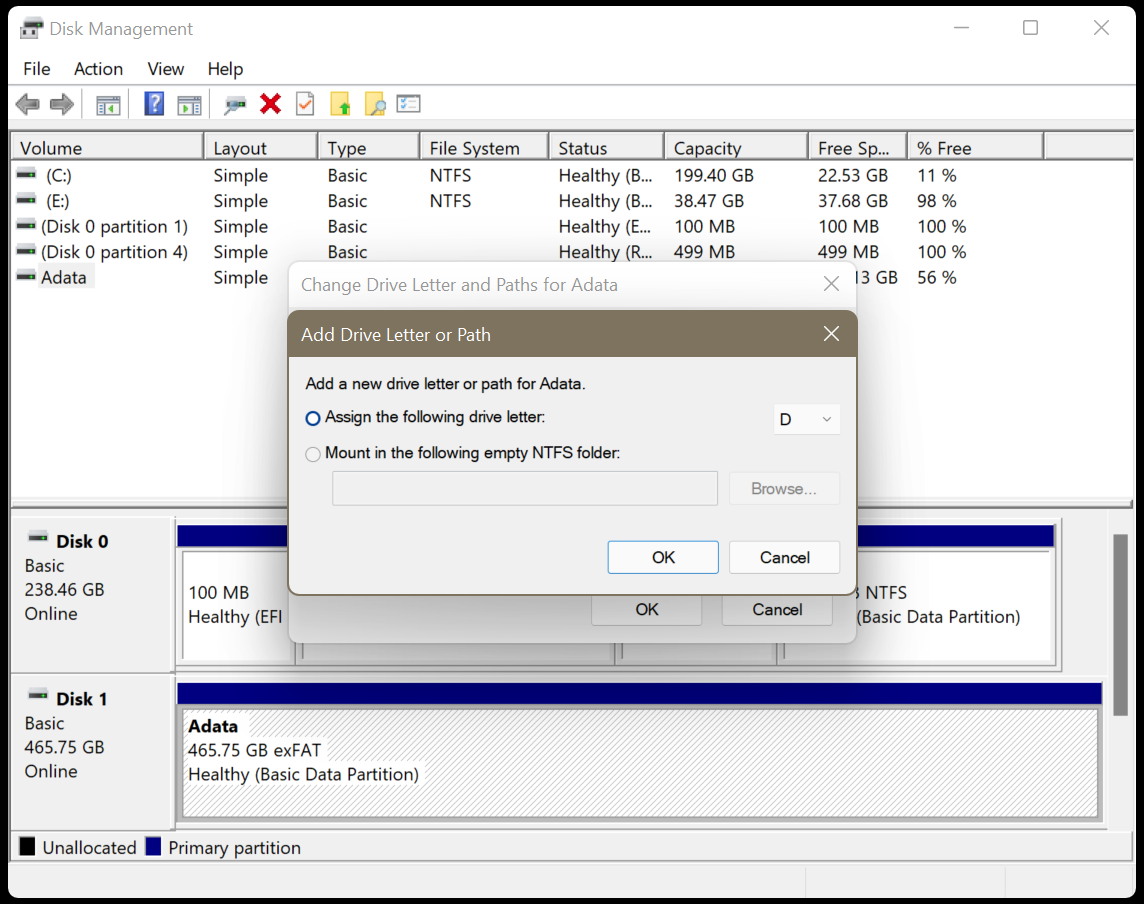
If the partition appears in Disk Management with a size and file system (NTFS, FAT32 or exFAT) but has no letter, so File Explorer can’t show it. Assign it a drive letter:
CHKDSK scans a partition for file system errors and fixes logical issues that prevent Windows from accessing it. Note that the /f switch writes to the drive to repair it, which can push orphaned data into a found.000 folder and rewrite metadata. Recover your files first, and only run CHKDSK once that's done.

Senior Content Writer
This article was written by Rishabh Singh , a Senior Content Writer at Stellar Data Recovery.
October 28, 2025| 7 min read






 7 min read