In SQL Server versions prior to 2019, the recovery (Full, Bulk-logged, and Simple) rely on the ARIES model for basic database engine operations. Under this data recovery process if a long-running query is killed or if the system shuts down abnormally while a transaction is active, the database engine has to execute a strict three-phase recovery process upon restart. As a result, the transaction enters a prolonged rollback state, which increases database recovery time. To reduce the extended recovery time and long rollback phases, Microsoft introduces Accelerated Database Recovery (ADR) in SQL Server 2019.
ADR has completely redesigned the database recovery process to enable immediate transaction rollbacks. In simple words, rolling back a query without ADR causes the database to take more time to recover, whereas rolling back with ADR completes the roll back process quickly.
SQL Server 2025 introduces ADR support for tempdb, extending instant rollbacks to temporary workloads. Previously, queries using temporary tables could bloat the transaction log or take a long time to cancel. Enabling ADR for tempdb ensures temporary queries roll back immediately while keeping the transaction log clean and compact.
How to Enable ADR in SQL Server?
The ADR feature is not enabled by default in SQL Server. You can check its status by using the following command:
SELECT name, is_accelerated_database_recovery_on
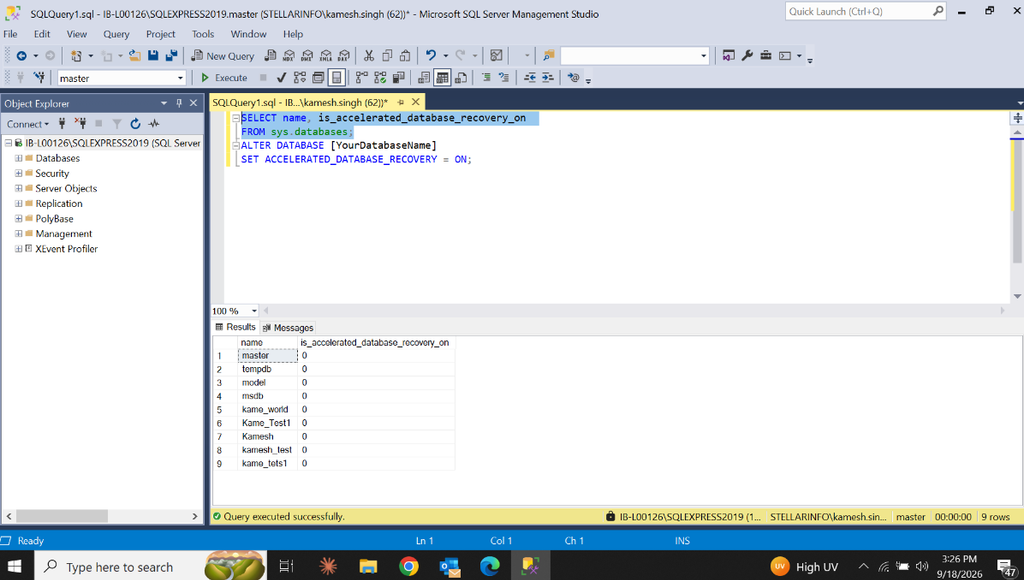
If it shows 0, this means the ADR is disabled.
To enable the Accelerated Database Recovery (ADR) feature, you can run the following command:
ALTER DATABASE [YourDatabaseName]
SET ACCELERATED_DATABASE_RECOVERY = ON;
How ADR Works in SQL Server?
The ADR process follows the same three phases as the traditional recovery process: Analysis, Redo, and Undo. However, it completely redesigns how these phases operate to overcome the performance issues of the old model. In ADR, instead of scanning the transaction log backward from the oldest active transaction, the engine only processes the log from the last successful checkpoint. For this, it introduced new components in these phases: Persistent Version Store (PVS), Logical Revert, and Secondary Log Stream (SLOG).
Analysis Phase: During this phase, the engine usually scans the main transaction log to see what was happening after a crash. It checks the successful and failed transactions. But under ADR, this phase is reconstructed with secondary log stream (SLOG). It works in-memory with very low data volume. It stores log records of only non-versioned operations onto the checklist. As it prevents forcing the engine to scan the entire history, it keeps your primary log file small, even a massive transaction is running.
Redo Phase: In ADR, the REDO phase is totally changed to reduce the recovery time. It changes the location where the engine starts reading the main transaction log file and divides the single log scan into two sub-phases:
- The engine reads only from the SLOG. It reads non-versioned operations from the oldest uncommitted transaction up to the last checkpoints. Since SLOG contains less records, it makes the recovery process fast.
- The engine reads the primary transaction log from the last successful checkpoint to the end to replay all remaining committed operations.
Undo Phase: This phase divides the work between the SLOG and Logical Revert. It uses the SLOG to undo only un-versioned operations and Logical Revert via the Persistent Version Store (PVS) to perform row-level, version-based undo. This makes recovery time constant and instantaneous, completely unaffected by the size or duration of long-running transactions.
Previously, canceling a large query could take hours. However, ADR uses Logical Revert to instantly mark transactions as aborted and release all locks immediately, letting users get back to work without waiting. Additionally, its Aggressive Log Truncation feature allows the transaction log to be aggressively truncated even when long-running active transactions exist.
Traditional Recovery Models vs Accelerated Database Recovery (ADR)
Here is a table comparing the traditional recovery process with Accelerated Database Recovery (ADR):
| Feature | Traditional Recovery (ARIES) Model | Accelerated Database Recovery (ADR) |
| Recovery Phase | Analysis, Redo, and Undo | Analysis, Redo (2 sub-phases), and Undo |
| Analysis Phase Scope | Scans forward from the last checkpoint to the end of the log | Same as traditional, but reconstructs the SLOG and copies non-versioned records |
| Redo Phase Scope | Scans forward from the oldest uncommitted transaction to the log end | Divided into two parts: Redo from the SLOGRedo from the last checkpoint to the log end |
| Undo Phase Scope | Scans the log sequentially. Takes long time for large transactions | Instantaneous. Uses SLOG and PVS versioning |
| Recovery & Rollback Time | Long-running transactions cause slow rollbacks and long recovery time | Rollback becomes a logical operation, not page-by-page undo. Recovery is nearly instantaneous, regardless of transaction size |
| Version Storage Location | Use tempdb for traditional row-versioning workloads | Stores row versions inside the user databaseRow‑level undo mechanism Version‑based undo |
| Transaction Log Size | As the log cannot be truncated, there is high risk of bloat | Less risk of transaction log bloat as the log is truncated aggressively |
Benefits of SQL Server Accelerated Database Recovery (ADR)
Enabling ADR in SQL Server provides several advantages for database performance and availability such as:
Fast and Consistent Database Recovery: When ADR is enabled, it scans only a minimal, fixed portion of the transaction log using the SLOG. This makes rollback instantaneous and crash recovery faster, regardless of the size or number of active transactions in the system.
Instantaneous Transaction Rollback: It does not take long time to roll back/cancel the lengthy transaction. It completes an active transaction immediately, no matter how long the transaction has been running or how many updates it made.
Aggressive Log Truncation: Prevents the transaction log from growing out of control by aggressively truncating it even when active, long-running transactions are present.
Instant Lock Release: The internal Logical Revert process releases all database locks immediately after a transaction is aborted, preventing blocking issues.
Resource Isolation and Availability: As it stores row versions directly in the database itself (via PVS) rather than using shared tempdb storage, it enables better resource isolation and improves the availability of readable secondary databases.
Better Database Performance: ADR skips the time-consuming, row-by-row reading by using the SLOG in the redo phase. The SLOG accelerates this phase because it processes only non-versioned operations. This increases database performance.
Accelerated Database Recovery (ADR) depends completely on the internal Persistent Version Store (PVS) to enable instant transaction rollbacks. However, this dependency introduces various operational risks. For example, if the PVS metadata desynchronizes or becomes corrupted, it can lead to severe storage bloat, silent data corruption, and physical heap corruption.
While these bugs were seen in early versions of SQL Server 2019, database administrators can still face structural integrity issues related to the PVS-related issues in SQL Server 2022 and SQL Server 2025.
To troubleshoot, first check whether the PVS metadata issue has caused physical page corruption by running database integrity checks using DBCC CHECKDB. Here’s the command:
DBCC CHECKDB ('DBname');
Cause 1: Heap Corruption
Turning off ADR while aborted transactions are still present in a database causes physical heap corruption. This issue is specific to early release of SQL server 2019.
Solution: Install KB4531238 to Fix Heap Corruption
Download and install the latest cumulative update for SQL Server 2019. Microsoft addressed this issue in KB4531238.
Cause 2: PVS Storage Bloat and Growth
High-volume DML operations can cause the PVS to bloat if the asynchronous background cleaner thread lags behind. By default, SQL Server 2022 (16.x) uses only 1 thread to handle PVS cleanup for the entire instance.
Solution: Try Scaling Thread Count for Multi-Threaded PVS Cleanup
You can use the sys.dm_tran_persistent_version_store_stats DMV to identify if the persistent version store (PVS) size is larger than expected. If it is, you can increase this configuration settings to Multi-Threaded Version Cleanup (MTVC). It allows you to increase this thread pool so that multiple databases and large transactions can clean up in parallel. Here’s how:
EXEC sp_configure 'show advanced options', 1;
RECONFIGURE;
GO
EXEC sp_configure 'ADR Cleaner Thread Count', 2;
RECONFIGURE;
GO
Note: Microsoft recommends not to increase the configuration value as it can slow down your database by consuming more CPU and storage power. Furthermore, it will not fix the problem if a long-running transaction is already blocking the cleanup process.
Cause 3: Integrity Issue in PVS due to Database Corruption
As ADR stores the Persistent Version Store (PVS) directly inside user database files (.mdf/.ndf), corruption in these files can cause inconsistencies in PVS metadata and trigger operational failure.
Solution: Fix the Integrity Issues in PVS
If the database integrity check shows page corruption or errors like 823 or 824, then you can run the DBCC CHECKDB command to repair MDF file. If this command fails to resolve the page allocation issues, use a professionalprofessional SQL database repair tool, like Stellar Repair for MS SQL. It scan, repair, and recover the corrupt MDF file with complete precision. It helps you recover all types of pages and structures in corrupt database, including PVS pages.
Conclusion
Accelerated Database Recovery (ADR) in SQL Server improves database performance by scanning a minimal portion of the transaction log. It enhances database availability, speeds up crash recovery, and makes rollbacks instantaneous by introducing new log-handling concepts, such as Secondary Log Stream (SLOG). Above, we discussed the inner workings of ADR in detail and how to resolve common ADR-related issues. If database objects, like the Persistent Version Store (PVS) become corrupted, you can use Stellar Repair for MS SQL to precisely recover your data.
FAQs