You think you’ve just captured the perfect photo with ample good lighting. However, while looking closely, you see a harsh sun glare washing out the details and taking attention away from the subject.
An unforgettable moment ruined by a Sun glare. Happens way too often!
The good news is one can easily prevent or remove sun glare from photos. First, by using the right camera techniques while shooting, or fixing the sun-glared image during post-processing.
Here’s how despite all measures, Sun glares may appear in your photos:
- Shooting during the day when the sun rays are harshest
- Shooting around reflective surfaces like water, glass, metal, etc.
- Shooting directly under the sun or in front of strong light source
- Dirty camera lenses scatter more light
- Not using any lens hood or shading over the camera lens
While using the right camera angles and shooting tricks significantly reduces the chances of getting a Sun glare, mistakes happen and you may still end up with a washed out photo. Before you decide to discard altogether, try some proven editing tools and techniques to remove or reduce Sun glare in photos.

Editing Techniques to Fix Sun Glare in Photos
Here are some tools and apps you can try to reduce sun glare in photos during post-processing:
Method 1: Apply the Dehaze Tool
Lightroom
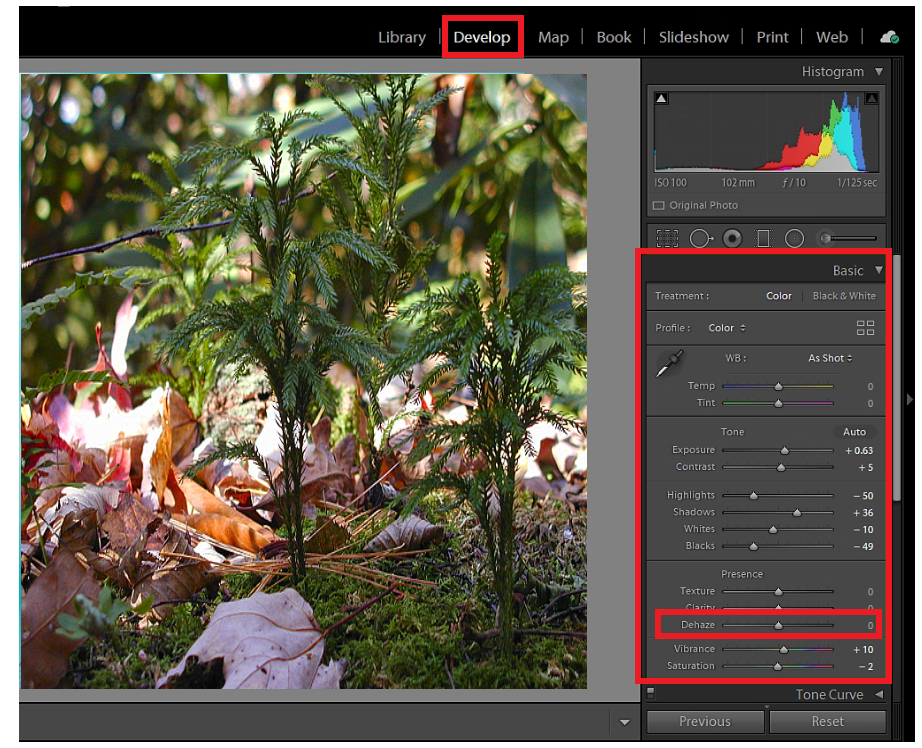
- Open the sun-glared photo in Develop module of the Lightroom.
- Go to the Basic Panel > Presence section > Dehaze slider.
- Move the slider to the right to reduce the sun glare in the photos.
Photoshop
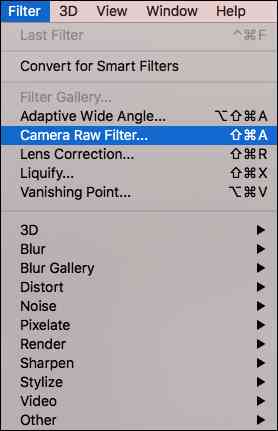
- Open the photo in Photoshop. Go to the top menu → Filter → Camera Raw Filter.
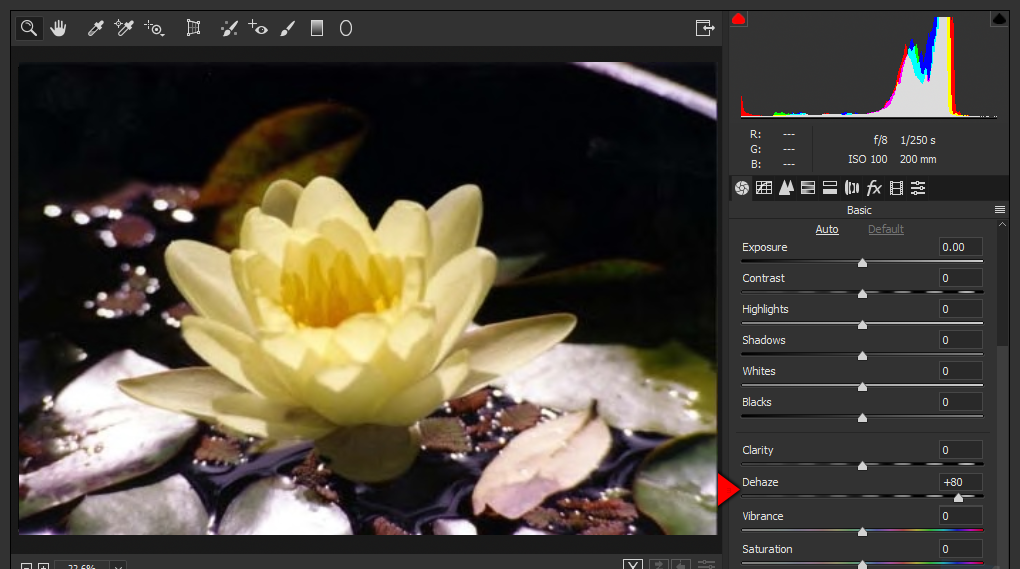
- Go to the Camera Raw panel and drag the Dehaze slider to the right until the glare fades.
Method 2: Try the Adjustment Brush
Lightroom
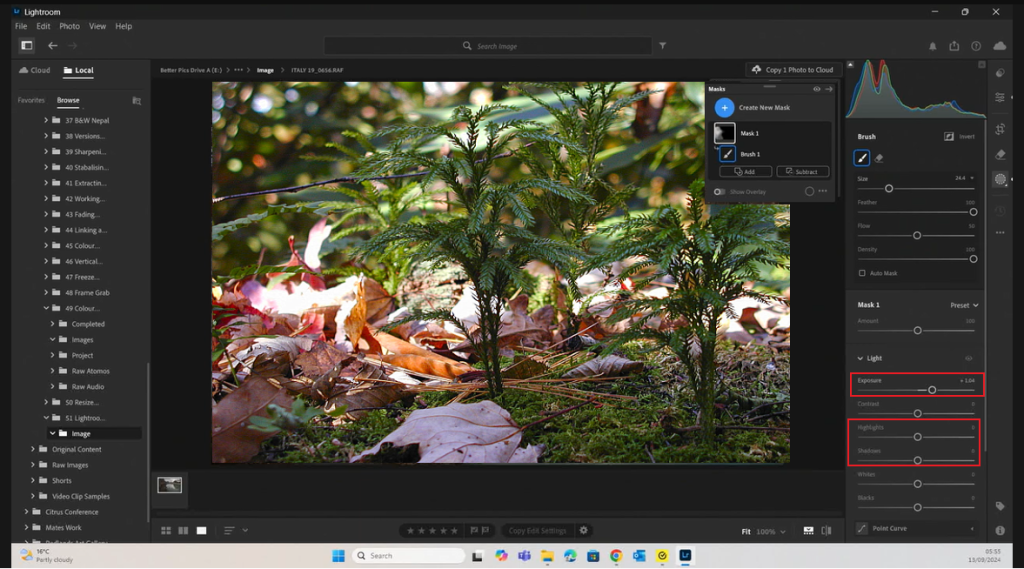
- Go to Develop module and select the Adjustment Brush from the toolbar.
- Now reduce the Highlights slider. Moreover, adjust the Exposure or Shadows to fine-tune the image so that sun-glare look softer.
Photoshop
- Go to Filter > Camera Raw Filter.
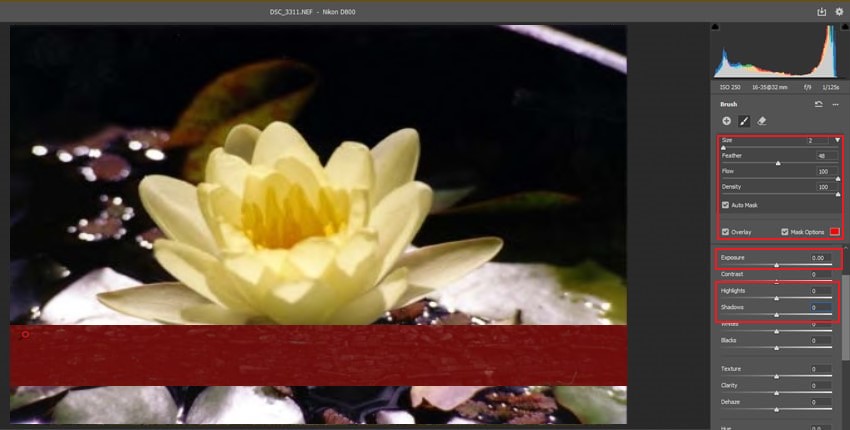
- Select the Adjustment Brush icon on the right-side of the toolbar. Use the drop-down menu, to choose the brush size and brush option. Toggle on the Auto Mask option to see where you’re painting.
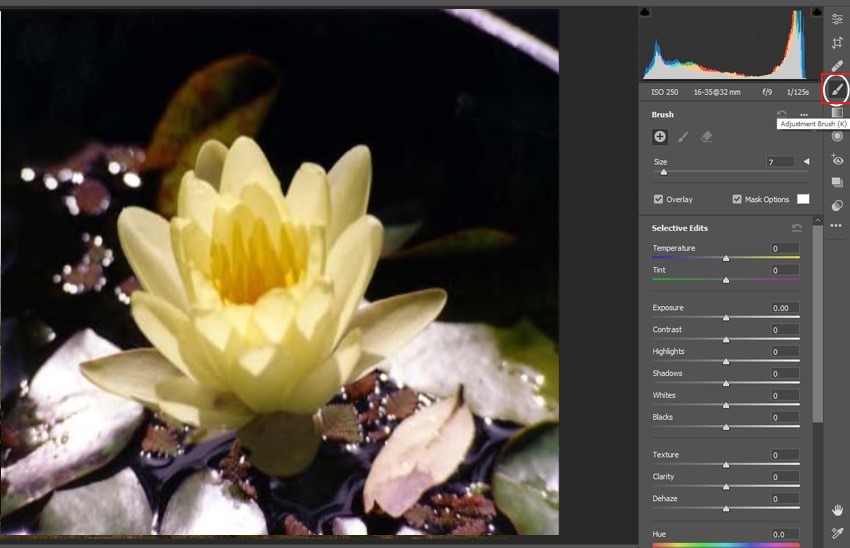
- Reduce the Highlights slider,or tweak Exposure and Shadows for a natural balance.
Method 3: Clone Stamp Tool
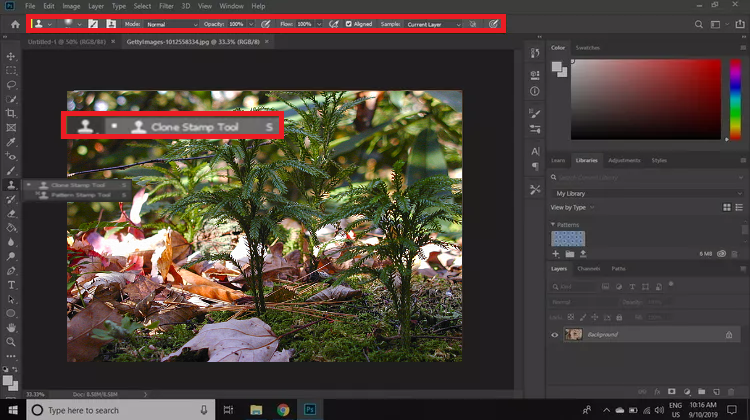
The Clone Stamp Tool in Photoshop is a perfect way for removing sun glare spots by copying pixels from a clean area of the photo and painting it over the imperfect glare.
Note: While importing or saving images fixed using Adobe Lightroom, Photoshop, or other photo editing tools, there are chances that they might get corrupt. You can repair such corrupted photos due to improper file transfer, damaged file headers, invalid structures using professional photo repair software.

Method 4: Use Mobile Editing Apps to Remove Sun Glare
If you’re editing the sun-glare photos on the smartphone, several free editing apps can help reduce or remove glare:
- Lightroom Mobile: Use the Dehaze slider to reduce glare from the image.
- LightX: It uses AI powered glare eraser tool to fix glare problems.
- Picsart: Use the Clone Tool or Healing brush to paint over the sun-glare.
- Snapseed: Use the Healing Tool to tap and remove sun glare from the photo.
Best Camera Tricks to Avoid Sun Glare
1. Change Camera Position or Angle
Try positioning the sun behind a subject or another object to prevent direct sunlight from hitting the lens.
2. Shade the Lens
To eliminate Sun glare from photos, stop the light source from falling directly into the lens. Most camera lenses come with an attached or built-in lens hood that blocks out direct sun rays or prevent them from hitting the lens directly.
Or, shield the camera lens by raising your hand, hat, or even an umbrella to avoid sunrays directly hitting the camera’s lens.
3. Use a Polarizing Filter
Attaching the polarizing filter to the camera’s lens can reduce glare by blocking sunrays from falling directly on the lens. The polarizing filter might not be able to eliminate the glare altogether, but it will improve the way photo looks.
- Circular polarizer: Best for most photography situations; especially when shooting reflections on water or glass.
- Linear polarizer: Works well for certain lenses but may interfere with autofocus or metering.
4. Adjust Camera Settings
You can control the amount of sunlight that enters your camera with the variety of exposure settings present in digital cameras that can help reduce the glare in photos.
- Choose a faster shutter speed to allow less light to fall into the camera lens.
- Manually adjust narrower aperture to control how much light enters.
- Use a lower ISO setting to prevent overexposure.
Conclusion
Sun glare in an image is a common issue, whether shooting with a DSLR, mirrorless camera, or even smartphone. The best part is one doesn’t have to be a professional photographer to fix it. A few camera adjustments or quick edits in Adobe Photoshop, Lightroom, or even free mobile apps can fix a photo ruined by Sun glare.
