Android Data Recovery

How to Recover Deleted TikTok Videos

info-icon Our content follows trusted Editorial Standards - accurate & unbiased.

Summary: Accidentally deleted TikTok videos can be recovered in several ways. If you deleted a TikTok video post, you can check the deleted menu in your account’s recent activity section on the TikTok app. You can also recover deleted or missing public posts from the apps liked videos section. If the TikTok videos were deleted from your smartphone, you can restore them from the recently deleted folder in the album or from the phone’s backup, such as Google Photos, Dropbox, or iCloud. Else you can recover the videos using an Android data recovery software. Read this blog to learn about the various recovery methods for recovering deleted TikTok videos on an Android phone, even when no backup is available.

Table of Contents

Owing to TikTok’s surging popularity, an increasing number of brands are showing willingness to collaborate with TikTok influencers. So, if you are an influence there is a high probability you may get approached by them.

Whether you are looking for brand partnership, or enjoy having a huge fan base with a good number of likes and comments on your TikTok videos, you need to be ready for the inevitable.

What if on one fine day, you have accidentally deleted your TikTok videos?

Now, before you dwell on the misery of losing your TikTok videos, check out the methods discussed below that may help you get back your deleted TikTok videos.

Restore Deleted TikTok Videos from Backup, if Available

The first place you should look for deleted TikTok videos is in the backup. It may seem obvious, but we often overlook checking the backup files. Probably, you may have set your phone to automatically upload videos to the default photos app, such as Android’s Google Photos app or iOS Photos app.

If you haven’t backed up your videos, try using the next method to recover deleted TikTok videos.

Did you know that Skype archives your chats and stores them locally on your computer (if you activate the option)? Even if you delete these messages from your computer, they can still be recovered by data recovery software.

Recover Your Liked Videos on TikTok

NOTE: This method will only work on your liked videos on TikTok. Keep in mind, that only the videos set to Public (visible to everyone) can be liked. You cannot recover Private videos.

Follow these steps to restore your liked videos on TikTok:

  • Open your TikTok application.
recover your liked Vidoes on TikTok
  • Open your TikTok profile, by clicking the person icon placed at the bottom right corner of your application.
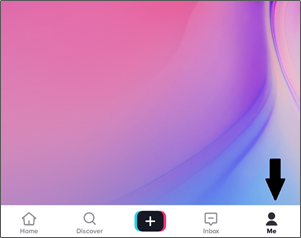
Open you TikTok Profile
  • On your TikTok profile, you will see a “Heart” icon. Click the ‘Heart’ icon to open your liked videos on TikTok.

Click heart icon on TikTok
  • From the screen that appears, click on the deleted video.

Click on the Deleted Video
  • Next, tap on the three dots (highlighted in the screenshot below) in the top right corner of your TikTok profile page.
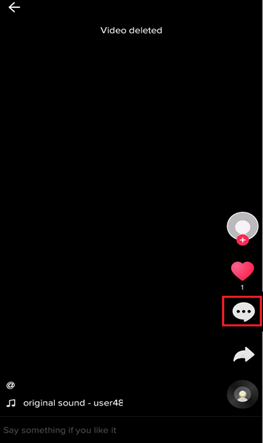
Tap the Three Dots of your TikTok Page
  • Click on ‘Save video’ option. You will now be able to see your deleted TikTok videos in your device’s gallery.
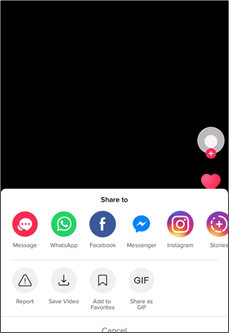
Save Video

Recover deleted TikTok videos with Android Data Recovery software

If you had saved your TikTok videos on your Android Phone or Phone’s SD card, and accidentally deleted them, you can easily recover deleted videos by using Stellar Data Recovery for Android software. This Android data recovery software helps recover all types of data including digital multimedia files such as photos, videos, and audio clips from any Android Phone, SD card, Micro SD card, etc.

Windows download button 

Stellar Data Recovery for Android software recovers all kinds of data from any Android Phone including videos lost by accidental deletion, corruption, formatting, or inaccessible SD cards.

Steps to Recover Deleted Videos from SD Card by using Stellar Data Recovery for Android Software

A word of caution: Stop using the SD card immediately after a data loss incident (such as video deletion) to prevent permanent data loss and video file corruption due to potential overwriting.

  • Download, install, and launch the trial* version of Stellar Data Recovery for Android software on your PC.
  • Connect the mobile phone’s memory card to your computer.
  • Select the type of data you want to recover & click Next.
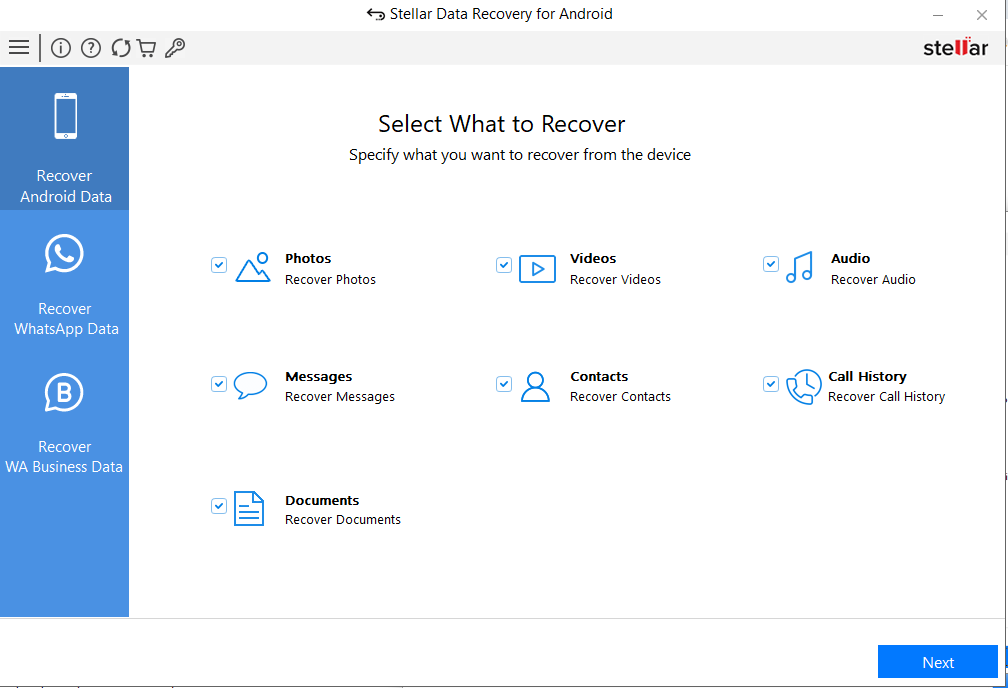
Stellar Data Recovery for Android- Choose file types
  • Once your Android® phone is connected, click Scan to initiate the scanning process.
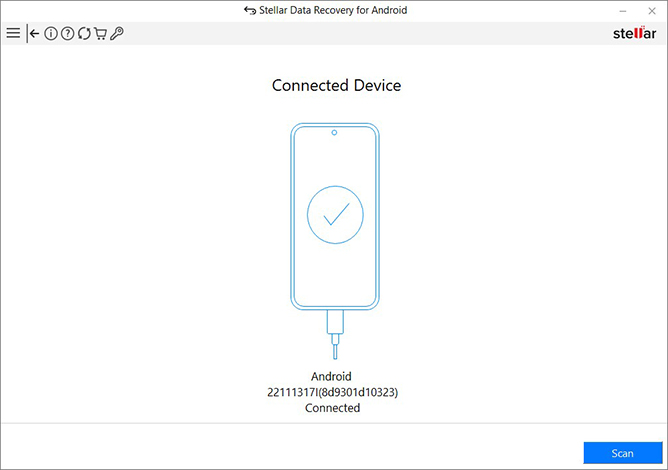
Stellar Data Recovery for Android- connect Device
  • Once the scanning is completed, preview and select the recovered data & click Save to restore them at a desired location.
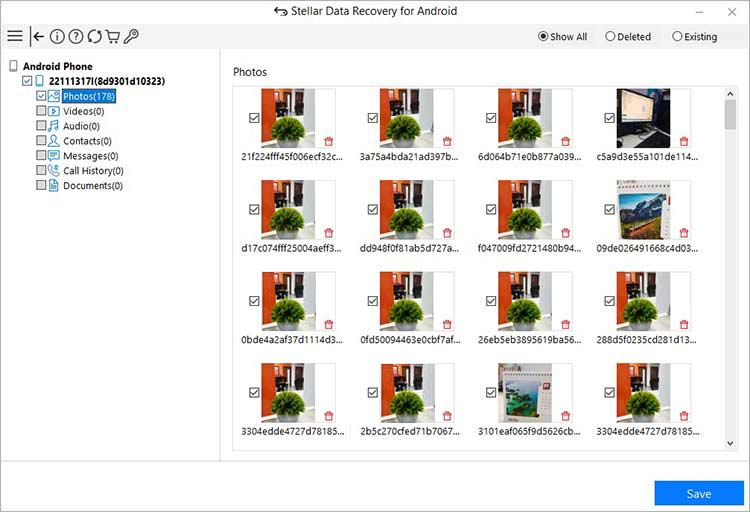
Stellar Data Recovery for Android- Preview

*The trial edition scans the media and shows a preview of all the recoverable videos. Once you are able to ascertain the effectiveness, you can save the recoverable files by activating the software.

Windows download button 

Conclusion

This post clearly explained how you could easily restore your deleted TikTok videos from the backup. Or, you can simply get the videos back from your TikTok profile page, but, this solution has a limitation as you can recover only the liked videos.

If you’ve accidentally deleted your TikTok videos stored in your Android internal memory or phone’s SD card and there’s no backup, using Stellar Data Recovery for Android software can help you restore the deleted TikTok videos in a hassle-free manner.

About The Author

Sumona Chatterjee linkdin

Sumona is a tech blogger, avid photographer, & technogeek with vast experience in writing about media file recovery tips and tutorials. She has over 10 years of experience in media file recovery/m...

26 comments

  1. Hi i edited my video by bad luck instead of keeping it to the draft i clicked post i need my full video how can i recorver it

    1. Hi Fatma, if your video was stored in your phone’s SD card before or after editing, our software can easily recover it. In case, the video is stored in your android phone, you can try another software such as Stellar Data Recovery for Android, which will help you recover lost video files from your android phone’s internal storage. Thanks!

  2. I accidentally uninstalled my Tik Tok app. Thereby all my videos which I posted all are deleted. Now I want that back how can I get them back?

    1. Hi Rohan
      Reinstall the app on your Android using the same account. It should get back your Tik Tok content.

  3. Hi, I was trying to fix the notification problem that I am not getting and I cleared TikTok data from the storage settings. Not only that it did not fix my notification problem but also deleted all the drafts. Can I get back those drafts?

    1. Hi Sampoorna,
      As mentioned in this blog you can restore deleted TikTok videos from backup, if you have one.
      If the videos were saved in SD card of your mobile phone, try our Stellar Photo Recovery software. Public videos liked by you can also be be recovered by the above shared steps.

    1. Hi Kaif
      If you have enabled back up of your chat data data to Google Drive, restore chat from there. Else you may try Stellar Android Recovery software.

  4. Hi Sumona, I’m a musical instructor and I was just a fan meeting and did Tiktok. Then I suddenly deleted Tiktok and all videos are gone. What should I do to recover?

    1. Hi Jasmyn, you can reinstall the Tiktok app. But the private videos won’t come back. If you have previous videos in the backup such as the android Google app or iOS Photos app. You can easily restore deleted Tiktok videos. Thanks

  5. I have uninstalled my tiktok app which happens to contain draft videos which I have not posted in tiktok. Tell me how can I be able to recover my draft videos on tik tok?

    1. Hi Devaraj, Please find the below steps: –
      1. Select the ‘+’ icon to capture video as you usually would.
      2. Select Upload at the bottom right of the screen.
      3. Select the video from the Gallery you want to use.
      4. Arrange the video in the timeline as required and click Next.
      5. Edit or add captions if required.
      6. Change privacy to Public or Friends Only and hit Post.
      Your video then goes live, and your chosen audience will be able to view it as usual. There isn’t a way to recover a deleted draft from the TikTok app. For More information, you can contact our support through email support[@]stellarinfo.com or call +1-877-778-6087. Thanks!

  6. I had deleted my account from TiKtok and saved videos in my memory card. But due to some reason I didn’t know what happen exactly memory card videos not play. Please help

    1. Hi Frank, We would like to inform you that you can try our software demo version if our demo version shows the repair files then Stellar Photo Recovery Premium software works. That means the files will be repaired in the same manner as you were able to see them in the preview window after the scanning is complete.

  7. I had accidentally deleted my videos and photos from my galaxy note 5 want to be recover. Please help?

    1. Hi Maegan, There are lots of ways to get back the videos and photos. I would like to suggest 2 easy solutions:
      1. If you sync your phone with Gmail. Go-to google photos and restore.
      2. Remove the SD card from your phone and put it into the PC through the card reader. Use our software demo version and see the preview of your deleted videos and photos. For more information, you can contact our support through email at support[@]stellarinfo.com or call at +1-877-778-6087. Thanks!

  8. I had missing couple of videos from my PC and I checked the recycle bin all videos are gone. Please help me to get back my videos.

    1. Hi Nasim, I would like to suggest, you can try our software demo version and see the preview of your recovered videos. Thank you very much.

Leave a comment

Your email address will not be published. Required fields are marked *

Google Trust
Related Posts

WHY STELLAR® IS GLOBAL LEADER

Why Choose Stellar?

  • 0M+

    Customers

  • 0+

    Years of Excellence

  • 0+

    R&D Engineers

  • 0+

    Countries

  • 0+

    PARTNERS

  • 0+

    Awards Received

BitRaser With 30 Years of Excellence
Technology You Can Trust
Data Care Experts since 1993
×