Exchange database file (.edb) stores users’ mailboxes and public folders on the server machine. This EDB file contains all the mailbox items of user accounts, such as emails, journals, notes, tasks, attachments, messages, calendars, contacts, etc. You (as an Exchange administrator) can view the mailboxes in the EDB file through the Exchange Admin Center (EAC).
However, when the Exchange Server is down or EDB is dismounted/offline, you cannot open it. Similarly, when the Exchange server is decommissioned, you cannot open and read the EDB file. To open or access such an EDB file, you need to first mounting it on the server. But if you want to open the EDB file without an Exchange Server, you can use an EDB viewer or converter software. One such reliable EDB converter software is Stellar Converter for EDB. Below, we will discuss this software in detail and explain the process to open EDB file using this software.
About Stellar Converter for EDB
To open EDB file without an Exchange Server, you can use Stellar Converter for EDB – a reliable EDB converter software recommended by MVPs and IT admins. This software can easily open EDB) files in any state – online, offline, or dismounted, and from a decommissioned Exchange Server. It doesn’t require an Exchange Server installation to open or read the EDB file. The software scans the EDB file and displays user mailboxes, public folders, and all other file items in an interactive interface similar to Outlook. It also offers an option to preview the items, such as emails, attachments, calendar entries, contacts, etc. The software supports all Exchange Server versions, including Exchange Server 2019, 2016, 2013, 2010, 2007, 2003, 2000, and 5.5.
Open EDB File Online Without Exchange Server
If you want to open or access an EDB file without installing Microsoft Exchange Server or Outlook, you can also use Online EDB to PST Converter by Stellar. This is a browser-based tool which allows you to upload the offline EDB file, analyze the mailbox data, view available folders and items and download the extracted mailboxes as PST files. No software installation or Exchange Server is necessary for this tool.
How to Open an EDB File Online
The EDB file can be accessed through the browser within just three easy steps:
- Upload EDB file – click Convert EDB File, sign in and upload EDB file securely
- Analyze and convert – the online converter analyzes the EDB file automatically and extracts available mailbox data
- Preview and download: preview the available mailbox folders and download converted mailboxes as individual PST files in ZIP archive
The free online converter is able to handle EDB files up to 500 MB. In case you have EDB files up to 5 GB, then you can upgrade to the Premium plan. For the larger EDB files and multiple EDB files, you should use desktop edition of the EDB converter.
Why Use Free Online EDB to PST Converter?
- No Microsoft Exchange Server installation is required
- No Outlook installation is required
- It works directly from the web browser
- It supports offline EDB files
- It allows you to preview mailbox folders and data before download
- It converts EDB mailbox data to individual PST files
- It supports Exchange EDB files from multiple Exchange Server versions
- The original EDB file is not changed during the online conversion
Convert EDB File Online and access mailbox data without requiring the original Exchange Server environment.
Process to Open EDB File using Stellar Converter for EDB
Stellar Converter for EDB can help you open or access the EDB file without an Exchange Server. You just need to download and install the software on a Windows machine, having Windows OS 10, 8.1, 8, or 7, or Windows Server 2016, 2012, or 2008. After installing the software, follow these steps to open and access the EDB file:
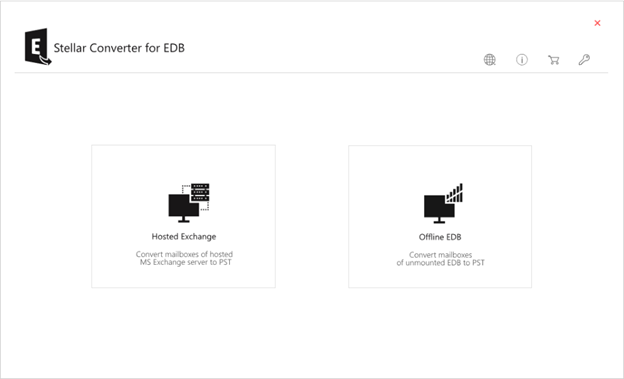
- Launch Stellar Converter for EDB and select the Offline EDB option to open dismounted or offline EDB file.
- Click on the Browse option to select the EDB file that you want to access. If you don’t remember the location of EDB file, you can use the Find option.
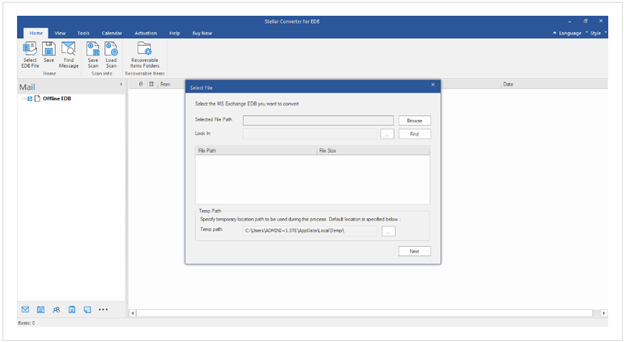
- Once you select the file, click Next to start the scanning process. Once the scan is completed, the software will list all the mailboxes and other items in the file on the interface. You can preview the mailboxes and mail items.
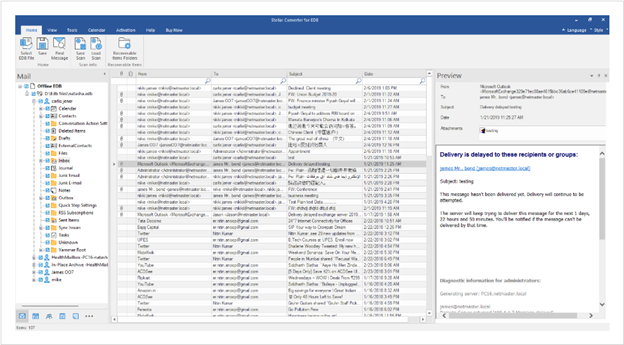
After preview, you can select the mailboxes and save them to PST and other formats, such as EML, MSG, RTF, PDF, and HTML. You can also export the mailboxes to a live Exchange Server or Microsoft 365 (Office 365) account.
Why Stellar Converter for EDB is the Best Solution to Open EDB Files without Exchange Server?
- It does not require additional permissions to access the EDB files
- It can open EDB file even the server is decommissioned or not available
- It can process up to 4 mailboxes at once when exporting to PST, live Exchange, or Microsoft 365
- It offers preview of all mailboxes and mail items in the EDB file for free
- It facilitates effortless extraction of vital Exchange mailbox data, such as emails, calendars, contacts, tasks, attachments, etc.
- It can convert EDB file data to multiple formats, such as MSG, EML RTF, HTML, and PDF
- It facilitates specific mail search and selective conversion
- It is compatible with MS Exchange 2019, 2016, 2013, 2010, 2007, 2003, 2000, and 5.5
- It supports Windows 11, 10, 8, 7, Vista, and Windows Server 2022, 2019, 2016, 2012, and 2008
Conclusion
You can open and access an EDB file through the Exchange environment when the Exchange Server is available and the database is mounted. However, if the Exchange Server is unavailable, decommissioned, or you only have an offline EDB file, you can use an EDB converter to access the mailbox data without restoring the original Exchange environment.
For smaller EDB files, free online EDB to PST Converter provides a browser-based way to upload, analyze, preview, and convert EDB mailbox data to PST without installing Exchange Server or Outlook. The free online service supports EDB files up to 500 MB, while files up to 5 GB can be processed with the Premium plan.
For larger EDB files, multiple databases, or offline processing where the data remains on the local computer, EDB to PST Converter is a suitable desktop option. It can scan EDB files, preview mailbox data, and export selected mailboxes to PST and other formats, as well as to Live Exchange or Microsoft 365.