


Quick Fixes for Excel ‘Data Source Reference Not Valid’ Issue
August 8, 2025| 7 min read



Summary: The form is misspelled or doesn’t exist error in Microsoft Access usually occurs when the application fails to recognize the form in the macro or the form is either deleted or corrupted. In this blog, we have discussed the reasons behind this error in Access, along with the solutions to fix the issue. You’ll also find about an Access repair software that can help resolve the issue by repairing the corrupt Access database file.
Free Download 100% SecureYou may encounter the “Form name is misspelled or refers to a form that doesn’t exist” error while running a VBA project in Microsoft Access. It appears with error code 2102. Several users have reported experiencing the error when accessing the forms via VBA in MS Access. It usually occurs when there is an issue with the forms in the code. However, there are various other reasons that can trigger this error. Let’s take a look at the reasons for this issue and the solutions to fix it.
Following are some reasons why you get the form name is misspelled or does not exist error:
Here are some effective methods to resolve this issue.
Several users have confirmed that they’re able to fix the error by changing the default form display settings in Access. You can check and change the form settings using the below steps:

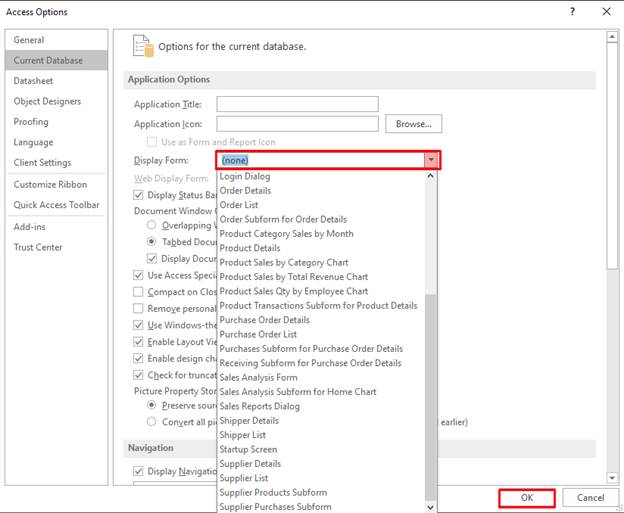
Now, close the database and then reopen it. If you’re still getting the error, follow the next methods.
Sometimes, the error can occur if the Access fails to recognize the form in the macro. It can occur if you are using the incorrect location of the form. To check this, follow the below steps:


Sometimes, incorrect form properties can trigger the “form name is misspelled or doesn’t exist” error in Access. It usually occurs if you set the record set property of the form incorrectly. You can check and correct the property of the form using the below steps:
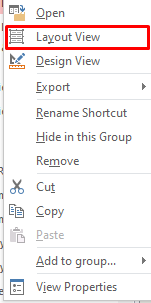
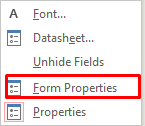
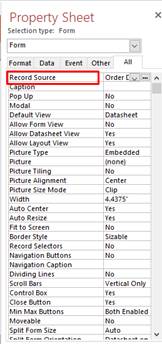
The form name is misspelled or doesn’t exist error can also appear due to incorrect macro settings. Sometimes, the error can occur if you have set the macro settings to control the macros in the database file. You can check the macro settings using the below steps:
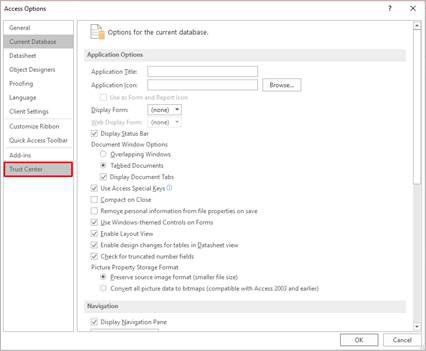
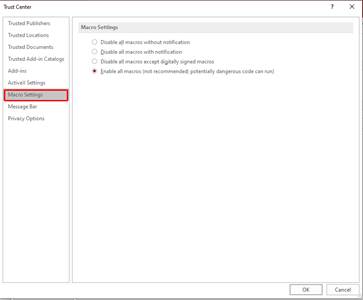
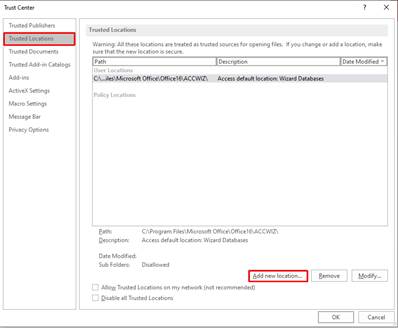
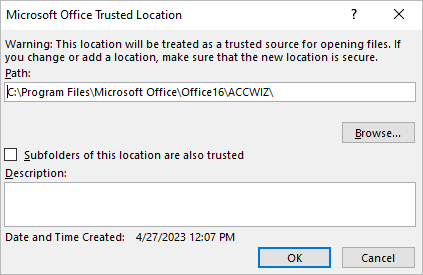
By default, Microsoft Access blocks the macros or code if the source is untrusted. The form does not exist error can occur if the macros have been blocked by the Access application. You can try moving the database file to a trusted location to fix the issue. Before proceeding, make sure you have known the trusted location of the database file. Here are the steps:
The error can occur if there are Missing References in the Access database. To check this, follow the below steps:
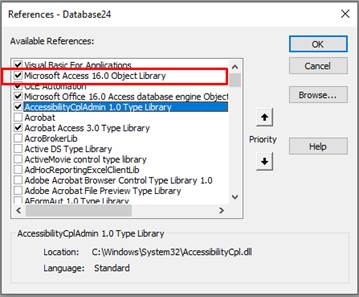
The Access error 2102 can also occur due to corruption in the database. You can try repairing the damaged database files using the built-in free Access utility, named Compact and Repair. Here’s how to fix corrupt database using this utility:
Note: Make sure that no other users have opened the database file.
The tool will create a copy of the repaired database file at the same location.
The Compact and Repair utility may not be able to repair the severely damaged database. In such a case, you can try a third-party Access repair tool, such as Stellar Repair for Access. It can repair MDB/ACCDB files and restore macros. Also, the software allows you to preview the recoverable objects of the database before saving them. The Stellar Repair for Access tool is compatible with MS Access 2019, 2016, 2013, 2007, and earlier versions. You can try the free trial version of the software.
If you experience the “form name is misspelled or doesn’t exist error” in Access, follow the methods mentioned in this post. If the error occurs due to corruption in the database file, you can use the Compact and Repair tool to repair the file. If your database file is severely corrupted, then you can download Stellar Repair for Access. It can even repair password-protected database files with 100% integrity.
Data Recovery Expert
This article was Reviewed by Kuljeet Singh, a Data Recovery Expert at Stellar Data Recovery.
Senior Content Writer
This article was written by Monika Dadool , a Senior Content Writer at Stellar Data Recovery.
August 8, 2025| 7 min read
![[Fixed] This Document is either Deleted or not Currently Accessible](https://www.stellarinfo.com/public/image/article/Fixed-This-document-is-either-deleted-or-not-currently-accessible-1129.jpg)
February 5, 2024| 7 min read
February 5, 2024| 7 min read






 7 min read