Since May 8, 2026, Dell users across multiple product lines, XPS, Inspiron, Latitude, Precision have been dealing with relentless Blue Screens of Death and reboot cycles triggered not by Windows 11 patch update, but by Dell’s own SupportAssist software. If you’re sitting in front of a Dell machine that won’t stop crashing, this blog is for you.
What’s Actually Happening
Two Dell components, Dell SupportAssist Remediation and the Dell SupportAssist OS Recovery Plugin for Dell, which wereupdated on May 8, seem to be the cause behind this issue. After installing these updates, the systems began running into BSoDs roughly every 30 minutes. As per some user reports, the critical error led to kernel power outage and blue screened with a CRITICAL_PROCESS_DIED message – flashing error codes like 0x000000EF.
Initially, most users assumed the crash was caused by a broken Windows 11 update. That’s only reasonable given how often Patch Tuesday problems have come up in the recent past. But community members who dug into the crash dumps using WinDbg, a Windows debugging tool, traced the failures directly to Dell’s own software.
What makes this worse is the crash pattern. These aren’t random, occasional freezes. Systems are locked into a loop where Windows loads, users see their desktop for a few seconds, and then it crashes and restarts over and over. On some machines, this is happening fast enough to make the PC effectively unusable.
Dell Has Been Here Before
This is not the first time Dell SupportAssist is linked to a BSoD-related issue. A similar incident occurred in December 2024 when a SupportAssist update triggered repeated crashes across Dell systems. That time, Dell’s official response was slow, and users had to crowdsource their own fix before any formal guidance arrived.
What worked back then was running the “SupportAssist Scan Hardware” feature, which, once completed, stopped the subsequent crashes for many users. Some users stopped the Dell SupportAssist Remediation service in Windows Services, set its startup type to Disabled, and rebooted. Dell has not released any official statement about the current incident till now.
How to Stop the Crashes?
If your Dell PC is stuck in a BSoD loop, here’s what to do.
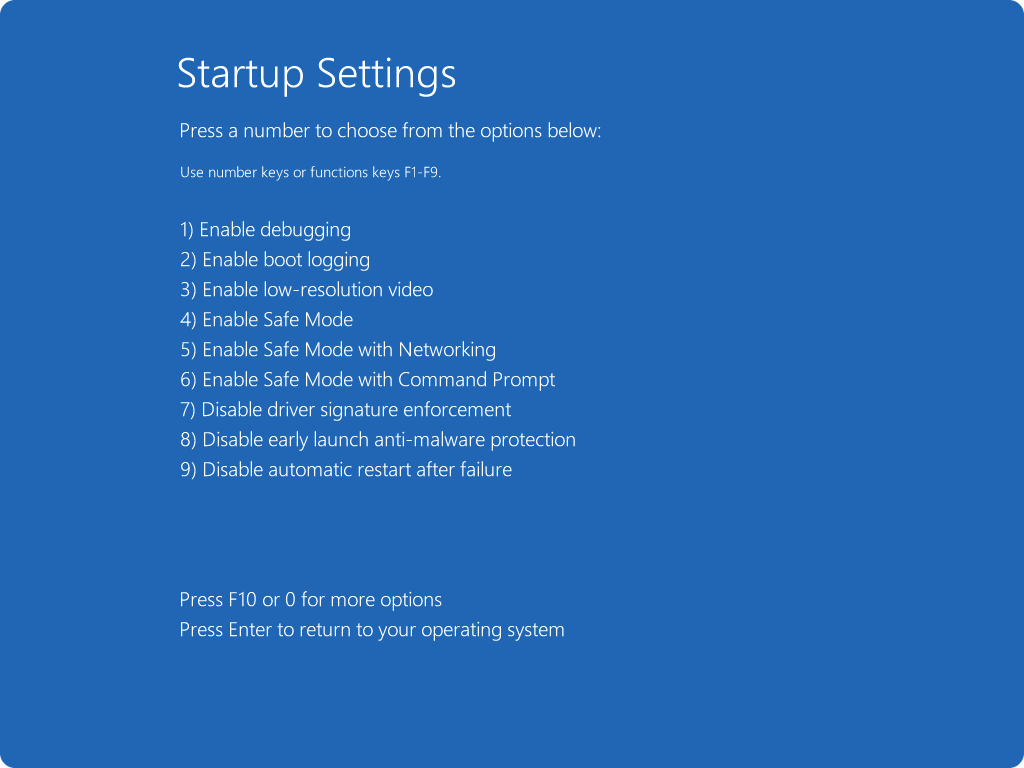
1. Boot into Safe Mode
When your Dell PC is stuck in a BSoD loop, the first thing to do is boot it in Safe Mode. It loads Windows without third-party services, which means SupportAssist won’t run. This gives you a stable environment to actually do something.
- Restart your PC
- Hold Shift while clicking Restart from the login screen
- Select Safe Mode with Networking
2. Uninstall Dell SupportAssist Components
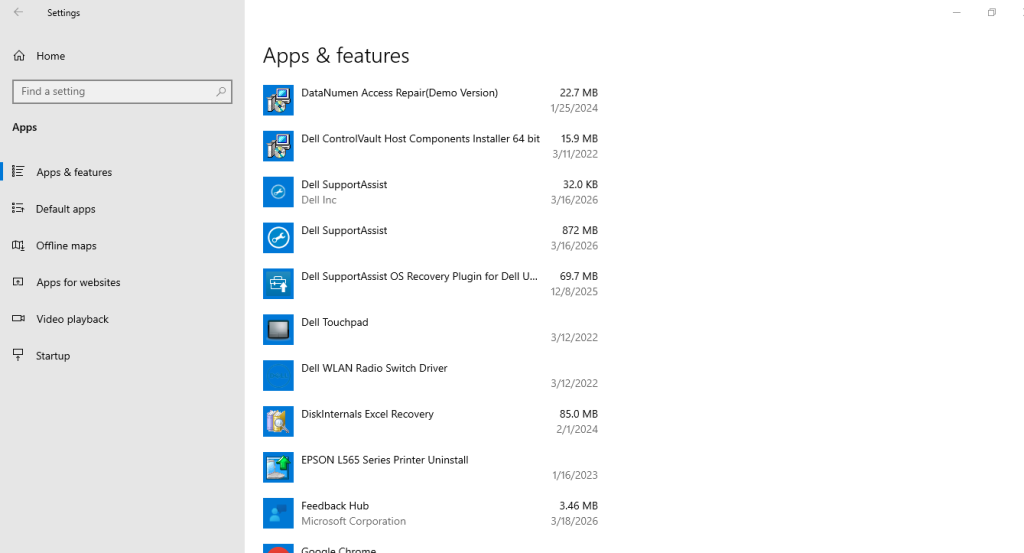
Users who removed the SupportAssist components reported that crashes stopped immediately.
- Go to Settings > Apps > Apps & features.
- Find Dell SupportAssist, Dell SupportAssist Remediation, Dell SupportAssist OS Recovery Plugin for Dell Update.
- Uninstall them.
Recover Data After the Blue Screen of Death Error
Windows writes data to disk constantly in the background. When a blue screen crash occurs, it can cut short a running app, ending the file writing process abruptly, and any unsaved data in the program’s memory at the time might get lost. In such cases, we recommend using a professional data recovery software – Stellar Data Recovery Professional to reclaim your lost files. The software helps you recover data in complex loss scenarios like BSoD errors, logical drive failures, lost partitions, and more.
Bottom Line
Dell hasn’t officially acknowledged the issue or given a timeline for a fix. Dell’s community forums are active with users reporting the same problem and the same workarounds. The removal of SupportAssist Remediation and the OS Recovery Plugin remains the most reliable fix available right now. Until Dell ships a patched version, keep auto-updates paused, stay off SupportAssist entirely, and treat your drive with caution if it’s been through an extended reboot loop.
