To recover deleted photos and videos from SanDisk memory card, you need to have the right approach and right recovery tools. The first and foremost place to look for your deleted photos is the recycle bin on your SanDisk memory card. If you don’t find your photos in the recycle bin, go for recovery options, such as SanDisk Rescue Pro or use a trusted photo recovery tool. These recovery tools can only help if the data has not been overwritten by new files.
No storage device or memory card is completely free from errors. Photos and videos stored in your memory card can be lost due to accidental deletion or card corruption. Backups can help protect your data but they are not always an option. In such scenarios, you can recover the photos and videos with the help of the following methods.
Methods to Recover Deleted Photos From SanDisk Memory Card
If you accidentally deleted the photos or videos on your SanDisk memory card, there are several ways to get them back.
Restore from Recycle Bin
You can restore deleted photos from the Recycle Bin / Trash of your SanDisk SD Card if they were deleted on a computer or Mac. Because deleting photos from a memory card via computer moves them to recycle bin, providing an opportunity to recover the files before permanent deletion.
- Insert the memory card in that computer again.
- Go to the recycle bin /trash folder in your computer.
- Now look for the deleted photos and videos in that folder.
- Select them and hit Restore/ Put back.
- Now, check the folders in the SanDisk memory card – your deleted photos are now restored there.
Use Stellar Photo Recovery
If your deleted SanDisk memory card photos are not in the Recycle Bin or Trash, you can try using Stellar Photo Recovery.
- Download and install the Stellar photo recovery software on your computer.
- Now connect your SanDisk SD card to the computer, and run the software.
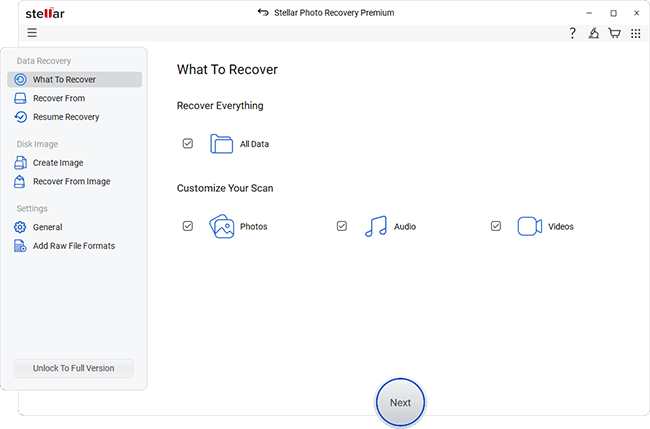
- Select the types of files and the storage drive from where you want to recover the files.
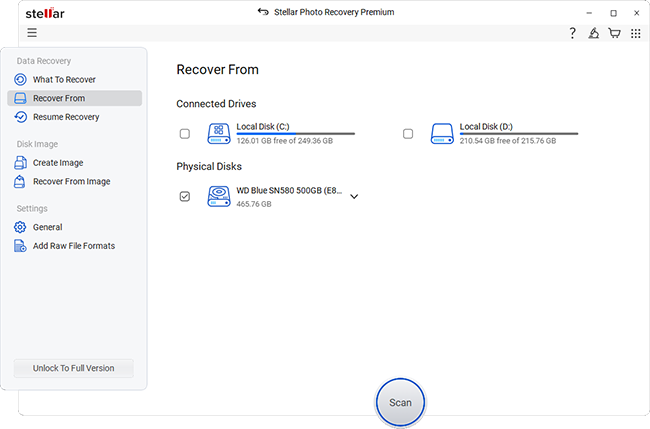
- Now scan the device and wait for the tool to list the recoverable files.
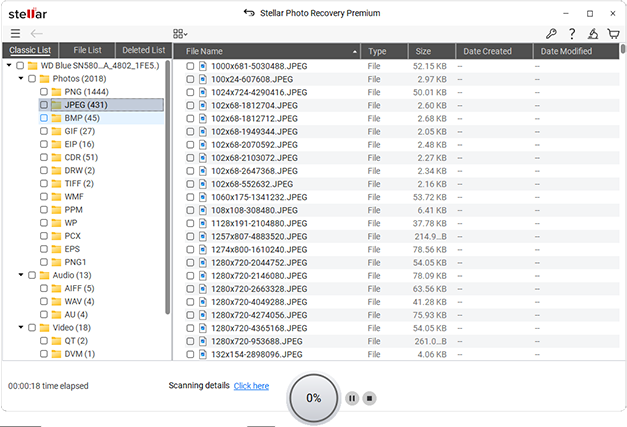
- Once the files are listed, you can preview them one by one.
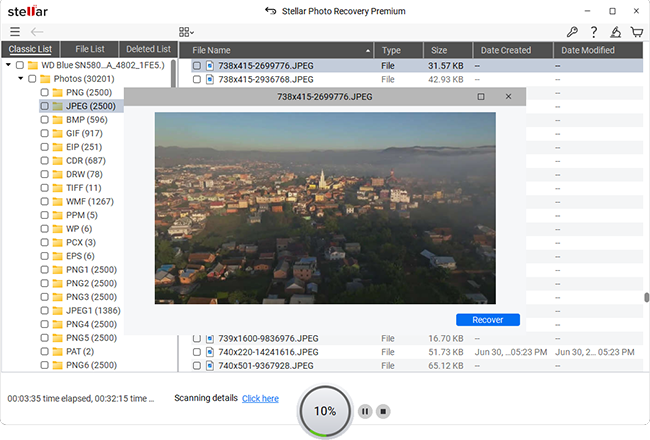
- Then hit Recover to save the files at a desired location on your computer.
Follow the on-screen instructions to scan the card and recover your lost photos and videos. This method is effective for retrieving files that have been permanently deleted or corrupted.
Use SanDisk Rescue PRO
For a customized recovery experience, you can also use SanDisk Rescue PRO, designed specifically for SanDisk products. This is a paid tool and requires an activation before starting with the scan. If you recently purchased the SanDisk memory card, check for the Rescue Pro activation code/key, it will be on the back of the package. However, in case you don’t have the activation key, you must go ahead with Stellar Photo Recovery tool.
- Download and install the SanDisk Rescue PRO tool on your computer.
- Then connect your SanDisk SD card to your computer.
- Launch the software and select the card.
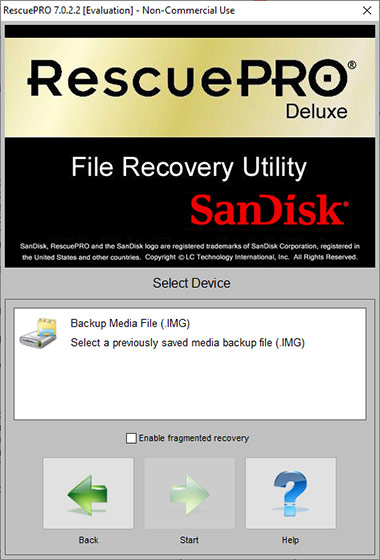
- Then hit the Scan button and let the tool scan for recoverable photos and videos.
- Once completed, you can save the files to your computer.
The software offers very basic recovery and is compatible with your SanDisk memory cards.
How to Recover Photos from Corrupt SanDisk Memory Card?
Deleted files or photo recovery is still a lot easier, but recovering data from a corrupted SD Card can be a real challenge for users. Many users suggest using methods like Command Prompt or Disk Management. Agreed they exist but do they really work? If your aim is only recovering photos from corrupt SD card, these methods might not seem promising.
Now understand this – if your SanDisk memory card is corrupted but is getting detected by the computer, your data is safe. Here, you must not rely on risky and technical data recovery methods that will hardly offer results. Instead, use the free photo recovery tool – Stellar Photo Recovery and recover your files.
However, if the SanDisk memory card is not being detected by the computer, it’s a case of severe corruption and might need an expert or technician’s intervention.
Best Storage Practices for your SanDisk Memory Card
- Do not use your card to store or modify any files if you ever face data loss.
- Never use the memory card if it is broken or damaged to avoid further logical damage.
- Do not use multiple devices or computers to format your SD card, as it can introduce new errors to the SD Card.
- Use only trusted card readers and devices when connecting your SanDisk card.
- Never delete files in a rush, take time to safely delete files.
Conclusion
The photos lost from your SanDisk memory card can be recovered – the best way is using a trusted photo recovery tool – Stellar Photo Recovery. The tool works even if the SD card or memory card is corrupted and can recover the files without much hassle. The key is to avoid using your card in case of data loss or corruption, as this will only further damage and make the data in the card irrecoverable.
