The first thing you can do when the InnoDB tables gets corrupted is to initiate InnoDB force recovery. But if the tables are severely corrupted, you might need to set the value of innodb_force_recovery to more than 4, which involves the risk of data loss. To prevent data loss, you can restore the backup file using the mysqldump command or perform point-in-time recovery. If the backup is not available, then the best way is to take the help of a reliable MySQL repair tool to quickly repair the database without data loss. Let’s understand all these methods in detail.
What is InnoDB Crash Recovery in MySQL?
InnoDB is the default storage engine in MySQL Server 5.5 and later versions. It is also known as a crash-safe storage engine (as compared to MyISAM), owing to its ability to recover data after crash. When the InnoDB table gets corrupted, the data held within the table becomes unreadable.
To better understand how crash recovery works in practice, let’s look at the scenario demonstrated in the video.
What are the Common Causes of InnoDB Table Corruption in MySQL?
Some common causes that may result in corrupted table are as follows:
- MySQL service crashed after reboot
- MySQL Server restarts automatically
- Power failure or bad memory stops MySQL Server when writing to table
- There’s a bug in operating system or in MySQL code
- Hardware failure
- The machine, on which MySQL is running, is shut down unexpectedly
InnoDB tables are more likely to get corrupted when MySQL runs on Windows on a virtual machine. Now, let’s discuss how to diagnose and repair InnoDB tables in MySQL.
How to Diagnose Corruption in InnoDB Tables?
Try identifying precisely what you’re dealing with. Doing so, will help you troubleshoot the issue in a more efficient manner and without wasting time. To diagnose corruption in MySQL database table, you can follow the given methods.
1. Analyze MySQL Server Log
If you suspect or find corruption in InnoDB tables, examine the MySQL Server error log. This will help to find relevant information about specific errors. The error log will help you understand the following:
- If the table gets corrupted due to database page corruption.
- If the failure occurs due to a deadlock, execute with innodb_print_all_deadlocks statement enabled. Details about all the InnoDB deadlocks will be printed to MySQL Server error log.
- If you encounter InnoDB data dictionary failure issues, look for errors like “inability to open .InnoDB files”, “failed CREATE TABLE statement” and “system cannot find the path specified”.
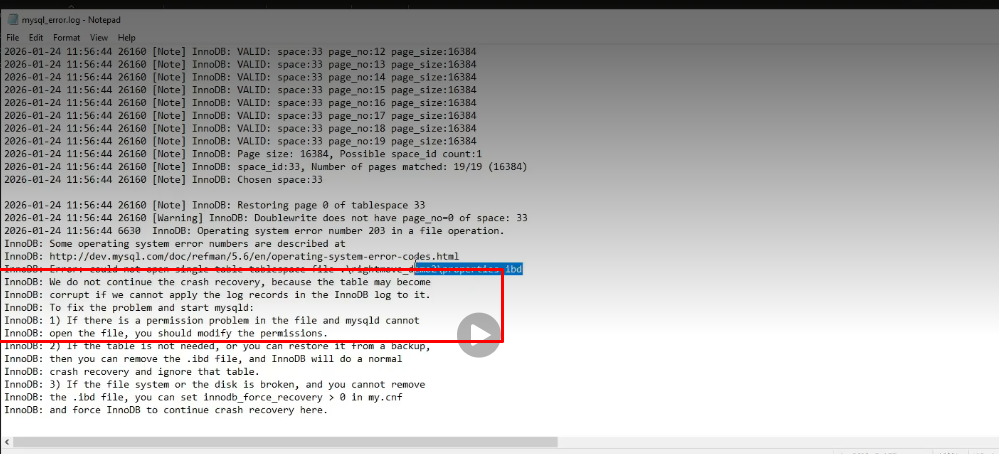
2. Check Table for Errors
Though MySQL error log can help you identify corruption, it may not clearly show which table is affected. You can check InnoDB table for errors by using CHECK TABLE command or Innochecksum utility, depending on whether MySQL Server is running or offline/crashed.
If the server is running, use the CHECK TABLE command to find errors in InnoDB table.
mysql> CHECK TABLE table_name;
If the server is offline or has crashed, use Innochecksum – a command-line utility to check for page corruption errors in InnoDB table.
shell> innochecksum [options] file_name
What are the Best Ways to Repair Corrupt InnoDB Tables in MySQL?
Here are some of the best ways to repair and recover corrupt InnoDB tables or the database.
Method 1 – Use ALTER TABLE Command
You can use the ALTER TABLE command to rebuild the InnoDB tables. It works if the indexes or metadata gets corrupted. It helps in resolving minor corruption in tables without changing their schema or data definition. Here’s the command:
ALTER TABLE t1 ENGINE = InnoDB;
Method 2 – Restore from Backup
If you have an updated and readable backup copy, then you can restore the MySQL database using the mysqldump utility. To restore the database using this utility, follow the steps given below:
- First, create an empty database to save the restored database. Here’s the command:
‘mysql > CREATE DATABASE db_name’
- Then, restore the database using the following command:
mysql -u root -p db_name < dump.sql
- It will restore all the objects of the database. You can check the restored InnoDB tables by using the below command:
‘mysql> use db_name;
mysql > show tables;’
Note: This method does not support restoring the dump file containing InnoDB table with CREATE TABLESPACE statement.
Alternatively, you can do point-in-time recovery. You can perform this, if you have enabled binary logging. You can run the following command in MySQL client to check whether the binary log file is enabled or not.
SHOW VARIABLES LIKE 'log_bin%';
Method 3 – Use Dump and Reload Method
InnoDB comes with a crash recovery mechanism that automatically recovers tables after a crash. Also, you can use the ‘Dump and Reload’ method to rebuild one or more corrupted tables. However, in case of severe corruption, you may find it difficult to restart the MySQL Server. Therefore, you will need to manually fix the InnoDB file in MySQL that has the corrupt table.
Note: Before attempting to repair InnoDB file corruption caused due to a corrupt table, perform recovery from recent backup. If the backup copy is corrupt or it is not the most recent copy, follow the steps discussed below.
Also Read: How to Repair MySQL Database Table Without Downtime?
Follow the below step-by-step procedure to fix corrupted InnoDB table:
Note: Make sure to back up the InnoDB file before performing the repair procedure to avoid further damage to table data.
Step 1: Start the Server
- Press ‘Windows’ and ‘R’ keys together.
- In the dialog box that appears, type services.msc, and then press Enter.
- In the Services dialog box, search for MySQL Service and right-click on it, and click stop, start, or restart service.
Step 2: Enable innodb_force_recovery
If you cannot access the server, forcing InnoDB recovery may help. For this, enable ‘innodb_force_recovery’ option in MySQL my.cnf configuration file.
- Open the configuration file, and in the [mysqld] section, add the following line:
[mysqld]
innodb_force_recovery=1
Note: You can change Innodb_force_recovery value to ‘1’ to start the InnoDB engine and dump the tables. Dumping tables with value of 4 or higher can lead to data loss.
- Now save and close the my.cnf file.
- Try restarting the MySQL service again.
Step 3: Dump and Drop the Table Data
If you’re able to access the corrupt table, dump the table data by using the mysqldump command.
mysqldump -u user -p database_name table_name > single_dbtable_dump.sql
Note: You can dump several tables separated by whitespace in the above command.
Next, drop the table from the db.
mysql -u user -p –execute=”DROP TABLE database_name.table_name”
Now try restoring the table using the newly created dump file:
mysql -u user -p < single_dbtable_dump.sql
Step 4: Reset innodb_force_recovery
Once you’ve dumped and restored the database, then you are required to remove the following line from the configuration file.
#innodb_force_recovery=…
Then, save the applied changes.
Step 5: Restart the MySQL service by using the following command:
service mysqld start
Why InnoDB Force Recovery Fails?
InnoDB_force_recovery only disables certain InnoDB functions to allow limited access for data extraction. It can fail if the system tablespace (ibdata1) is corrupted or unreadable, or if you are not using its level correctly. Choosing the wrong recovery level makes the InnoDB force recovery stop working.
When is Manual MySQL Recovery no Longer Safe?
Manual MySQL recovery using InnoDB force recovery to repair highly corrupted database is no longer safe especially when used at higher levels. At higher recovery levels, InnoDB disables important safety checks, rollback, and flushing, which increases the risk of further data corruption instead of recovery.
What to do when Manual Methods to Repair InnoDB Tables Fail?
If you find any difficulty while manually repairing InnoDB tables of MySQL database or any of the database components appears missing, you can use Stellar Repair for MySQL – an advanced MySQL repair software to repair and restore corrupt InnoDB tables.
Key Features of Stellar Repair for MySQL:
- Recovers all the MySQL database objects, including tables, keys, data types, table properties, triggers, and views.
- Repairs both InnoDB and MyISAM tables.
- Can handle all types of MySQL corruption errors, such as corruption of InnoDB tablespace, missing database file, MySQL index file corruption, etc.
- Repairs MySQL database created on Windows (10, 8.1, 8, 7, Vista & XP) and Linux systems.
- Supports batch processing of corrupt MySQL database files simultaneously in a single attempt.
Best Practices to Prevent Future InnoDB Corruption
Manually repairing corrupt InnoDB tables may result in data loss. So, if you cannot risk losing data, use Stellar Repair for MySQL software to repair InnoDB table corruption in MySQL. The software helps fix corrupt database table and recovers table properties, relationship constraints and keys.
Once you’ve fixed InnoDB file corruption, follow these best practices to prevent InnoDB corruption in future.
- It is a good practice to group sets associated with DML tasks into transactions. This can be done by bracketing the DML operations with START TRANSACTION and COMMIT statements.
- When using most frequently queried columns, specify the primary key for each table. You can also use an auto-increment value in case no primary key exists.
- Enable innodb_file_per_table option to put indexes and data for individual tables into distinct files.
- If any issue persists with the engine indicated in ENGINE= clause of CREATE TABLE, run the server with –sql_mode=NO_ENGINE_SUBSTITUTION option to prevent tables that are formulated with different storage engine.
- It is advisable not to use LOCK TABLES statement and use SELECT … FOR UPDATE syntax for unlocking the rows that are required to be updated in order to acquire exclusive write access to a set of rows. InnoDB possesses the ability to handle multiple read\write sessions to the same table simultaneously.
- Run MySQL Server from the command prompt while troubleshooting InnoDB problems rather than from the Windows service or mysqld_safe.
- Make sure that InnoDB Monitors are enabled to acquire information about the existing problem. If the persisting issue is performance-related and the server freezes, make sure to enable the standard Monitor for printing InnoDB internal state-related information. Else, enable Lock Monitors if the problem appears to be with locks.
Conclusion
Above, we have discussed the best and effective ways to repair InnoDB tables in MySQL. Though the ALTER TABLE command can correct minor corruption, it does not work in case corruption is too severe. If the database is severely corrupted, then you can try recovering it by using innodb_force_recovery. But using it with higher value can result in irreversible data loss. To prevent data loss, use Stellar Repair for MySQL to repair InnoDB tables including tablespace and indexes. The tool can easily address severe damage in the MySQL database and recover all the objects by maintaining data integrity.
