Losing precious memories or important texts from an iPhone can feel like a mini heart attack – and you’re not alone. In fact, a recent survey found out that more than 70% of those iPhone users have experienced data loss at least once, one way or the other. Whether it’s deleted photos, missing messages, or maybe just an iPhone update that went sideways, we know the panic it really causes. That’s why at Stellar Data Recovery for iPhone, we’ve been all ears and we have been taking customer feedback to heart. From fine-tuning our scanning engine to polishing the interface, we’ve been on a mission to make recovery faster, smoother, and friendlier… because when it comes to your data, every byte counts.
“That deep scan took forever!” – We Turbocharged Scan Speed
Many users reported frustration with long scan times. One review bluntly noted the process “is slow and can take a long time”, and our own tests showed scans often crawling at a snail’s pace.

We took that criticism seriously. In response, our developers overhauled the scanning engine under the hood. The result? Our scans are now much faster and more efficient. By optimizing how the software reads iPhone storage and utilizing multi-threaded processing, what used to be a half-hour ordeal can now often complete in just minutes on modern machines. You’ll still have that option of a quick scan for a lightning-fast check or a deep scan too but now far quicker than ever before.
- Before: Slow, single-threaded scans frustrated users.
- After: Multi-threading and optimized code make even deep scans lightning-fast (think seconds per thousand files, not minutes).
- Result: Recovering data feels snappier, so you can get on with getting your stuff back.
Our tech team went ahead and added a “Resume” feature for interrupted scans, so you won’t have to start from zero if your computer sleeps or disconnects. In short, scanning is now smooth and speedy, matching the quick-fix expectations of today’s users.
“It crashed on every attempt!” – Fortifying Stability
Another common grievance was stability. In stressful situations, the last thing you need is the recovery software itself giving up. One in-depth test even reported that the scan “stopped several times and had to be restarted from the beginning each time”.
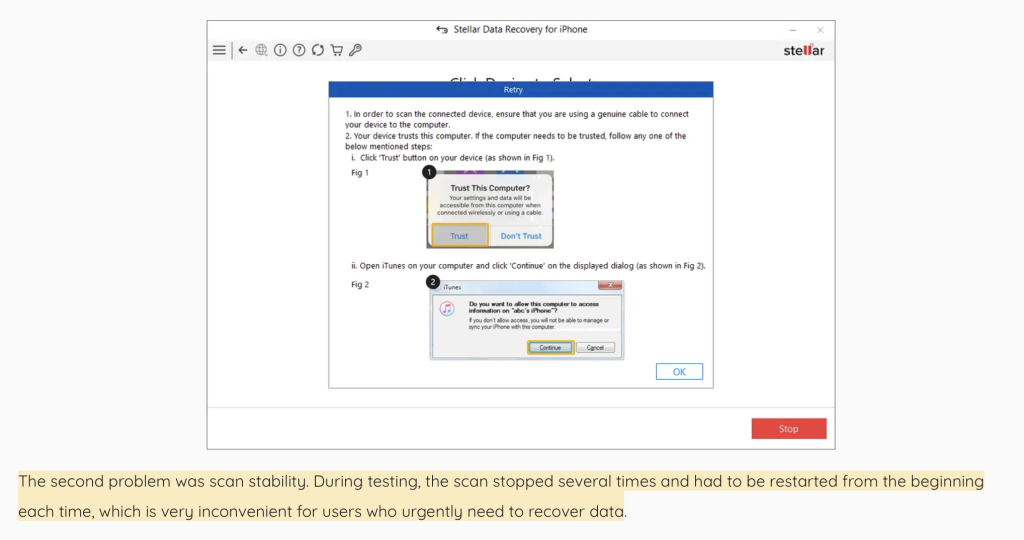
That’s a real headache if you’re racing to rescue your data. We heard this loud and clear, and our engineers sprang into action.
- What Happened: Older versions could encounter glitches during deep scans or large file recoveries, sometimes requiring restarts.
- How We Fixed It: We just bolstered the code to handle those large data loads more gracefully, added some better error-handling, and actually performed extensive stress tests on all sorts of iPhone models just to be sure.
- Benefit to You: The latest Stellar iPhone recovery now completes scans crash-free and without giving you the silent treatment. If something unexpected does happen, like those connection drops, the software can just resume from where it left off.
We also added compatibility with the latest iOS 26 and hardware changes, so you’re less likely to hit a glitch on new devices. The takeaway? You can trust Stellar to stay up even when dealing with tough cases. No more mid-recovery crashes, just reliable data rescue.
“I couldn’t preview my photos properly.” – Sharper Previews & More File Types
Ever recovered files only to find out the pictures or videos are just tiny thumbnails? Some users mentioned that previews of photos and videos were of “low resolution” or incomplete, making it hard to know what you’re getting back. Similarly, a tester pointed out that certain attachments (like images in Notes) couldn’t be opened. We realized that effective recovery isn’t just about finding the data; it’s about identifying the right stuff before you commit to recovery.
So we improved the preview engine. High-resolution previews are now generated for images and videos, making sure you see a clear picture of what’s inside each file. If an image was recovered, you can view it full-size in the interface before saving it – no more guessing games or putting faith in tiny icons. We also added support for more data types and attachments:
- Improved Photo/Video Previews: Scans now generate full-quality thumbnails so you can distinguish your family photo from a random screenshot.
- Expanded Attachments: We enhanced the parser for Notes, Calendar, and messaging apps. Now pictures embedded in Notes or attachments in texts are visible and recoverable.
- New File Categories: In response to requests, we added recovery support for app-specific media (like WhatsApp/Kik/Viber chats and media) and even Safari bookmarks and voice memos.
By broadening what Stellar can see and preview, you’ll find that almost nothing is off-limits. Our goal was simple: when you sift through the scan results, everything should look familiar and complete… just as if nothing was lost.
“The interface felt cluttered” – A Sleeker, More Intuitive UI
Let’s be honest: some recovery programs can look like relics from the last decade. In fact, one reviewer called our old UI “dated and clunky”, noting it used a “folder tree that’s hard to navigate”. We agree that recovering your data shouldn’t be so confusing. So we did some iterations to our interface.

Here’s what changed:
- Modernized Design: We refreshed the look and feel to be clean and contemporary, using larger icons and clearer labels. Think of it as giving Stellar a sleek new outfit.
- Simplified Navigation: Instead of a cramped old-style tree, recovery categories (Photos, Messages, Contacts, etc.) are presented upfront. One click takes you into each section. No more fiddling with tiny folder trees.
- Resizable Windows: Now you can adjust the window to your liking, so preview panes and file lists fit your screen.
- Contextual Help: We added helpful tips and progress indicators so you always know what’s happening and how long it might take.
The result is a UI that feels friendly and intuitive, whether you’re a techie or not. You’ll spend less time figuring out the menus and more time actually choosing which pictures to save. (We even snuck in a light mode and dark mode – because personal preference matters!)

In short, we didn’t just listen, we acted. The app now looks less like retro software and more like the user-friendly tools people expect today.
“Support for encrypted backups?” – Enhanced Backup Recovery
(Ok, maybe this one wasn’t shouted out explicitly, but it’s a common question.) Many iPhone users rely on encrypted iTunes backups, and we’ve made sure Stellar plays nicely with them. In fact, the latest update ensures full support for encrypted backups… just enter your password, and Stellar will unpack the files safely (something not all tools do).
By broadening backup compatibility, Stellar makes sure that data hidden behind those extra layers of Apple’s security can still be recovered, because you told us it mattered.
Top Features of STELLAR® Data Recovery for iPhone
We’ve mentioned the improvements, but let’s not forget what makes Stellar a great recovery tool in the first place. Based on extensive development and those customer insights, here are the standout features that users love:
- All-in-One iOS Data Recovery: Recover lost or deleted data from your iPhone or iPad, or from any iTunes or iCloud backup. Stellar can handle photos, videos, messages, notes, contacts, basically everything.
- Three Recovery Modes: Choose between direct device recovery (via USB cable), iTunes Backup Recovery, or iCloud Recovery. Whatever your situation (even if the phone won’t turn on), there’s a mode to try.
- Wide File Type Support: Stellar digs out virtually every popular file type. Photos, videos, voice memos, call logs, WhatsApp/WeChat/Kik chats, Safari bookmarks… you name it. If it was on your iPhone, Stellar can see it.
- Encrypted Backup Access: Stellar uniquely lets you restore data from encrypted backups. Simply enter the password and we’ll retrieve your secure iPhone backups seamlessly.
- Selective Preview & Recovery: Before you hit “Recover,” you get to preview everything. Found 50 selfies? Pick only the ones you want. This saves time and space on your computer.
- Deep Scan (Up to 100% Recovery): We use advanced signature-based scanning to hunt down even very old or deleted files. This “deep scan” maximizes recovery chances, the engine goes byte by byte, if needed.
- Built-in Toolkit: Beyond recovery, Stellar comes with extras. You can repair iOS issues (like fixing a stuck update, Apple logo loops, black/white screen, etc.), remove an Apple ID from a device without a password, or even erase iPhone data securely, if needed.
- Award-Winning & Trusted: With 30+ years in data recovery, 3M+ happy customers, and 100+ R&D engineers, Stellar isn’t new to this game. Our track record means we’ve built a tool that actually works in the real world.
The combination of these features makes Stellar Data Recovery for iPhone a powerful yet user-friendly solution… whether you’re an everyday user who lost a photo, or an IT pro handling a whole office of iPhones.
Getting Started: How to Recover Your iPhone Data
Ready to give Stellar a try? It’s easier than you might think… even if you’re not a tech wizard. The tool is free to download. The trial version lets you scan and preview your data, and recover up to 1GB (great for testing and small rescues). When you upgrade to the premium version, all the limits drop away. Here’s how to use it:
- Download & Install: Grab the software from our site (Windows or Mac) and just install it. Launch the app.
- Connect Your iPhone: Go ahead and plug your iPhone/iPad in via USB or Wi-Fi with trusted devices enabled. Stellar will definitely detect your device in one of the recovery modes. If prompted, tap that “Trust This Computer” button on your device.
- Choose Recovery Mode: You’ll see all those options like Recover from iPhone or Recover from iTunes Backup. Just pick the one that fits your scenario (Usually start with from iPhone for a connected device.) and choose the kinds of files you lost there.

- Scan for Lost Data: Choose the kind of files that you want to recover, such as Camera Roll, Photos Stream, Apps Library, Messages & Chats, Notes & Reminders, Voice Memos, Contacts & Call Logs, Bookmarks, etc., and just click Next for the next step. Thanks to recent updates, this GUI is now much faster and easy to use than before.
- Connect your Device: Plug your device in and wait for a prompt on the screen. It will just be asking you whether you should trust this system or not. Click Trust and your recovery process is good to go.

- Start the Scan: On the next page, you should now be seeing your device name being displayed. Here, just click Scan to start the recovery process.
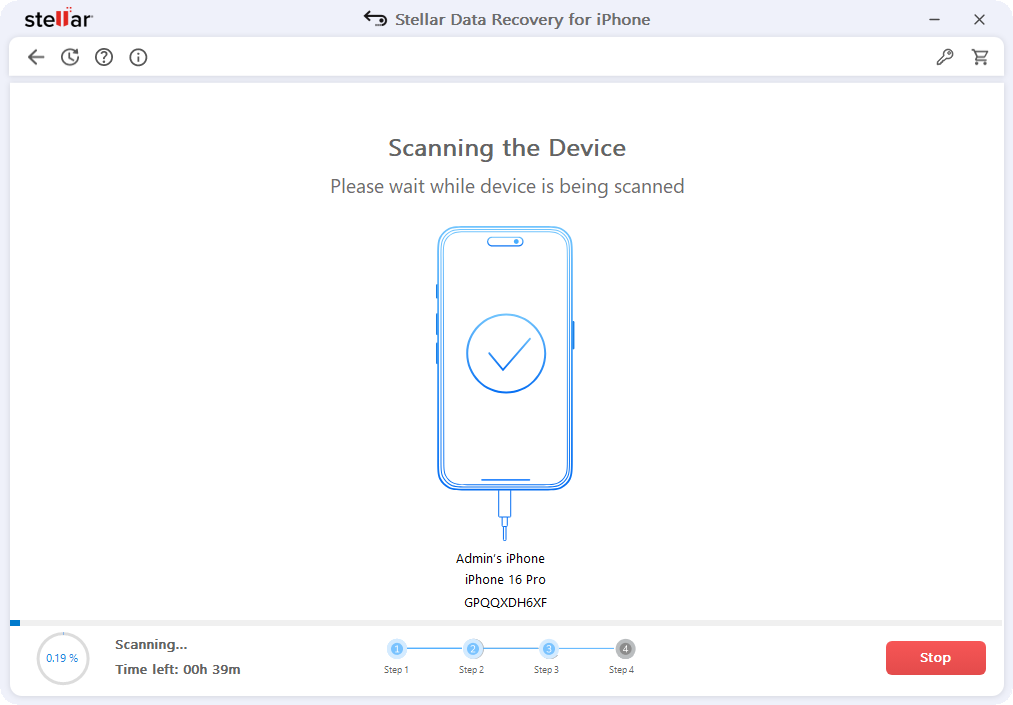
- Preview Found Data: Once scanning finishes, you can browse through categories (Photos, Messages, etc.). Click on an item to preview its contents – images, texts, contacts, whatever.
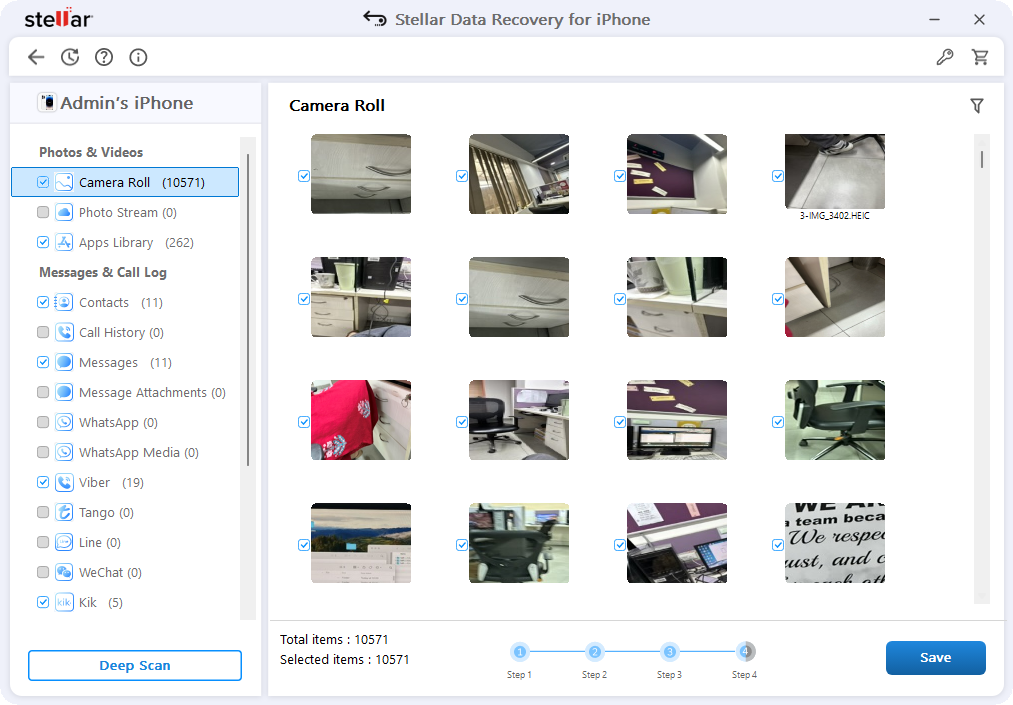
- Select and Recover: Check the boxes next to what you want to retrieve. Click Save. Choose a folder on your computer to save the files. Voilà… your lost data is back!

It’s really as simple as that. Trial version lets you check if Stellar can recover those lost files of yours through a preview window and if it does, you can purchase a 1-year license that gets you unlimited recovery, free tech support, and future updates.
Bonus Tip: If you’re recovering from an iTunes or iCloud backup, Stellar can even handle encrypted backups (just provide the password) and list multiple backup snapshots. That means you can fish data out of an old backup version if you need to.
Finally, as an extra perk – while keeping it robust, we’ve designed the UI to be friendly enough for everyday folks but still detailed enough for IT pros. So go ahead, try this reliable iPhone Data Recovery Software now, see what it finds on your device, and rescue those moments you thought were gone.
Conclusion
Data loss happens to the best of us, but Stellar Data Recovery for iPhone is here to make sure one button (or accidental swipe) doesn’t mean panic. We listened to feedback – from “Is this scan ever going to end?” to “Why can’t I see my photos clearly?” and rolled out fixes and upgrades accordingly. The result is a faster, sturdier, and friendlier recovery tool that doesn’t skimp on features.
Whether you’re a casual iPhone user or an IT guru, our goal is simple: help you get your data back, fast, and fuss-free. And with our free trial (that shows you a preview a preview of those lost files) there’s no harm in trying it on your next data scare. If Stellar shows you what you need to, you can upgrade and just unlock everything.
Next time you find yourself saying “I just wish I hadn’t deleted that!”, just remember that Stellar has definitely got your back. With each and every update and maybe a new feature, we are just aiming to stay worthy of your trust.
