Like other databases, MySQL database is also susceptible to corruption and inconsistencies. The database can get corrupted due to several internal and external factors. In case of corruption in the database, you may experience random corruption-related errors, like “Table ‘.\mysql\user’ is marked as crashed and should be repaired”, “Index for table ‘.\mysql\user’ is corrupt; try to repair it,” etc., when you try to access the database. Sometimes, you even fail to open the database. In this post, we will discuss the causes behind MySQL database corruption and see how to fix corruption in the database.
Common Causes of MySQL Database Corruption
Following are some common reasons behind corruption in MySQL Server database:
- Issues in the hard disk where the database is saved.
- Sudden restart of MySQL server instance.
- Bugs in MySQL code.
- MySQL process gets killed in the middle of writing data to the hard disk.
- System crashes due to sudden power failure.
- Insufficient storage space on the hard disk.
- Malware infection in the system hosting the database.
Signs and Symptoms of MySQL Database Corruption
You can identify MySQL database corruption through error messages that indicate damage to tables, files, or storage engine. Here are the common signs and errors:
Error: Table 'stellarTable' is marked as crashed and should be repaired
Error: Error reading file 'xx' (Errcode: yy)
Error: Corrupted page XX in block YY
Error: Got error xxx from storage engine
Error: InnoDB: Database page corruption detected
How to Check for MySQL Database Corruption?
To confirm whether the MySQL table is corrupted or not, use these methods.
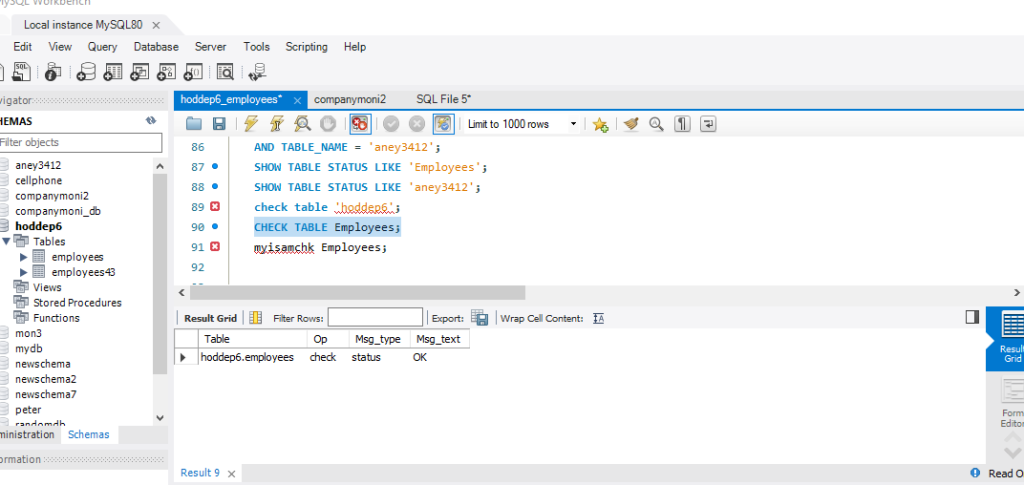
Method 1: Use CHECK TABLE Command
You can use this command to check corruption in MySQL database. It supports databases created in both InnoDB and MyISAM engines.
sql
CHECK TABLE tablename;
Method 2: Use myisamchk Command
You can use this utility to check and manage corruption in tables created with MyISAM. Here’s how to use it:
Myisamchk Employees.MYI
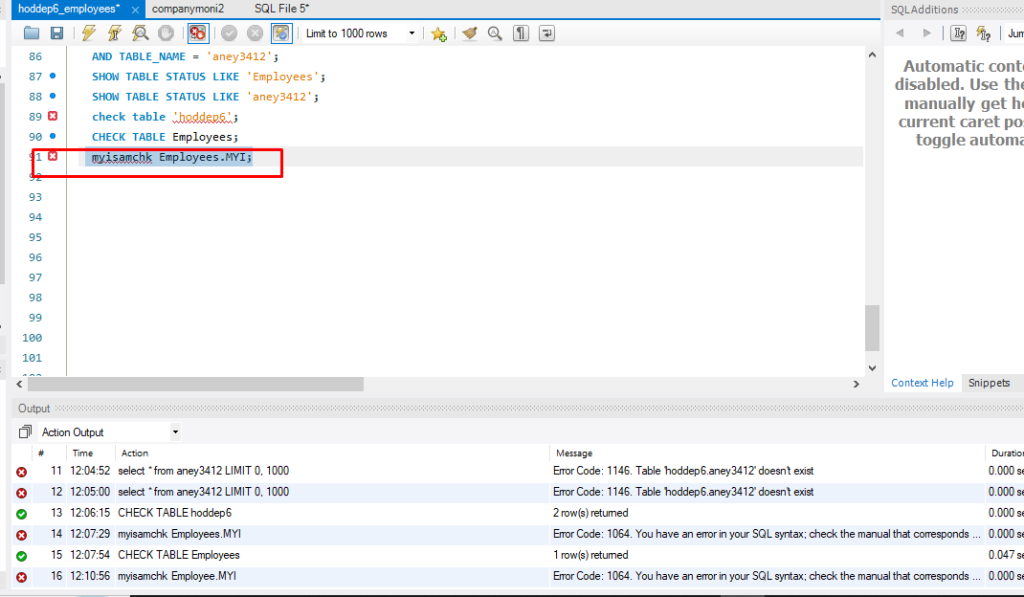
The command checks if the table is fine. If not, some errors will be displayed, such as:
Method 3: Use mysqlcheck Tool
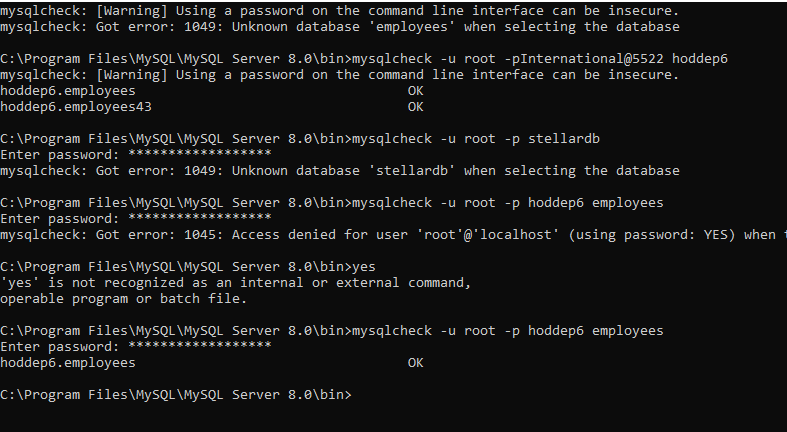
As per MySQL official guide, you can run mysqlcheck on your system’s command line window with the correct syntax and password, to check MySQL database for corruption. It can be used for both MyISAM and InnoDB tables.
The following example shows how to use it:
C:\Program Files\MySQL\MySQL Server 8.0\bin>mysqlcheck -u root -p hoddep6 employees
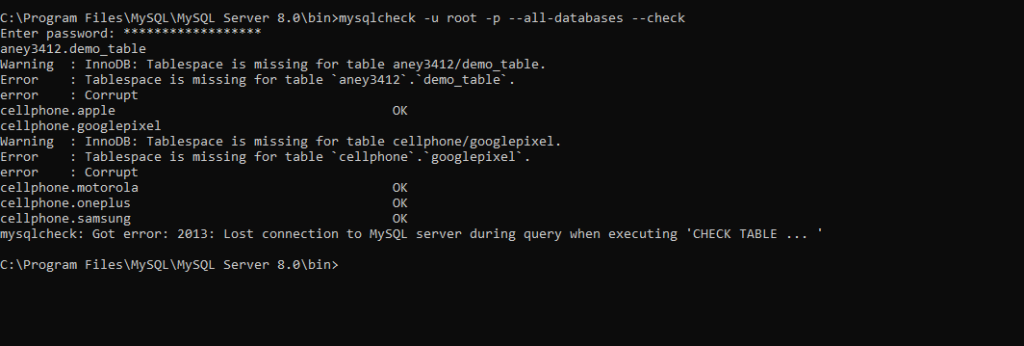
Below command is to check every database in an instance at a single time:
mysqlcheck -u root -p --all-databases --check
Method 4: Check MySQL Error Logs
MySQL Server automatically records every events that occur on the system including errors, storage engine issues, database errors, server startup, and more in the log files. You can check this system-generated log files to troubleshoot
- Database issues, such as failed queries
- Server crashes
- Connection problems
- Configuration errors.
The location of this error log depends on the system configuration and operating system. On Windows OS, it is located at C:\ProgramData\MySQL\MySQL Server X.X\data\hostname.err.
In Linux, the error logs are stored at /var/log/mysql/error.log.
Next, find out the entries such as ERROR or WARNING to highlight the problem.
Here is a comparison table of CHECK TABLE, mysqlcheck, myisamchk, and Error Logs:
| Methods | Works when Server Running | Repair Capability | Purpose |
| CHECK TABLE | Yes | No | Detect corruption |
| mysqlcheck | Yes | Yes | Check + repair + optimize (Resolve minor corruption issues) |
| MySQL ErrorLogs | Yes | No | Resolve corruption issues when SQL is running |
| myisamchk command | No | Yes | Causes of errors in MySQL database |
How to Fix MySQL Database Corruption?
If the corruption in the MySQL database(InnoDB/MyISAM) is confirmed then the first option you can try is to restore the database from the last known good backup (mysqldump backup). If the backup is obsolete or not available, try manual recovery by restoring the MySQL database directly from the data folder in Windows or proceed with other MySQL repair methods given below, based on storage engine.
Methods to Repair Database created in MyISAM Storage Engine
MyISAM storage engine was the default storage engine in MySQL versions prior to 5.5. They store data and indexes separately in files – .MYD and .MYI. They don’t maintain transactional logs, foreign key constraints, table-level locking and most important no crash recovery mechanism, due to which they are more prone to corruption. You can follow these repair methods if you’re using MyISAM storage engine.
Method 1: Run mysqlcheck to Repair MySQL Tables
You can use this command‑line tool to repair tables in MySQL. It also helps to optimize and analyze tables. To repair MyISAM tables, open the terminal on the server where MySQL is installed and run:
mysqlcheck --repair database_name table_name
To learn how to do same, try the example below:
C:\Program Files\MySQL\MySQL Server 8.0\bin>mysqlcheck -u root -p --repair hoddep6 employees
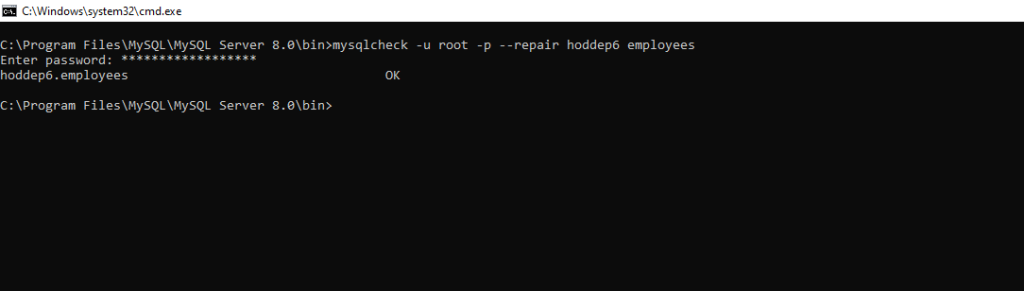
In the above command,–repair option is used to resolve all the issues in table. It may not repair the unique keys.
Note: If you run the above command without table_name, the entire database will be repaired.
If you try to run this command on InnoDB tables, you can get the “The storage engine for the table does not support repair” error.

Method 2: Rebuild MyISAM Database
You can also use myisamchk command to repair or rebuild the MySQL database(MyISAM). This command checks and repairs all tables. It supports .MYI and .MYD files in tables. It also supports repairing indexes in the MyISAM tables in MySQL. To rebuild the database using the same command, here is a procedure:
- Stop the MySQL Server.
- Then, use the following command to repair MyISAM table:
myisamchk –recover TABLE
You can use even use the REPAIR TABLE command to rebuild the MyISAM table. It also supports other engines, like ARCHIVE, and CSV. To repair the corrupt MyISAM table, run the below command:
REPAIR TABLE table name;
Methods to Repair Corrupted Database created in InnoDB Storage Engine
InnoDB tables are created using InnoDB storage engine. They are less prone to corruption due to InnoDB’s automatic crash recovery and other advanced features. However, corruption in the InnoDB tables can still occur. You can follow these methods to repair them:
Method 1: Use ALTER TABLE Command
You can use this command to resolve corruption issues in InnoDB table. It forces the InnoDB to recreate the table and rebuild the data in it. Also, it defragment the InnoDB tables. To use this command, you need the permissions, like CREATE,ALTER, and INSERT. Run this command as given below
ALTER TABLE tbl_name ENGINE=INNODB
Method 2: Rebuild Database by using Dump and Reload method
You can use the dump and reload method to rebuild tables and indexes . Here’s how:
Step 1: Restart the MySQL Service
You need to first restart the MySQL service by following these steps:
- In the Run window, type services.msc.
- In the Services window, search for the MySQL Service, and right-click on it.
- Click Restart service.
Step 2: Use Innodb_force_recovery Option
When you try to access the damaged or corrupt InnoDB tables, MySQL Server may crash or fail to start. If you face trouble while restarting the MySQL service, you can use the InnoDB_force_recovery option to start the MySQL service. Follow these steps:
- Search for the configuration file (my.cnf).
Note: The my.cnf file’s location varies based on the operating system installed. In Windows system, the configuration file is located in ‘/etc’ directory. The default path is /etc/mysql/my.cnf.
- Once you found the my.cnf file, go to the [mysqld] section and then add the below statements:
[mysqld]
Innodb_force_recovery=1
service mysql restart
- Save and close the MySQL configuration file and then try starting the MySQL service again.
Note: The innodb_force_recovery option is set to ‘0’ by default. To start InnoDB and dump MySQL tables, you need to set the value to ‘1’ and increase the value incrementally (from 1 to 6). Dumping tables with value of 4 or higher can lead to data loss. So, take the database backup before proceeding.
Step 3 – Use mysqldump Command
Once you enable the innodb_force_recovery, you will be able to access the corrupt table. Now, dump the table data by using the mysqldump command as given below:
mysqldump -u user -p database_name table_name > single_dbtable_dump.sql
Next, export all the databases to the dump.sql file by executing the below command:
mysqldump --all-databases --add-drop-database --add-drop-table > dump.sql
Now, restart the MySQL Server and use the DROP DATABASE command to delete the database. This command requires DROP privileges. So, check and grant them.
If the above command fails to drop the database, then run the below commands to delete the database manually:
cd /var/lib/mysql
rm -rf db_name
Next, disable the InnoDB recovery mode by commenting on the following line in [mysqld]:
#innodb_force_recovery=...
Now, save the applied changes to the configuration (my.cnf) file and then restart the MySQL Server.
A More Effective Solution – Use an Advanced MySQL Database Repair Software
If the above repair methods fail, then you can use an advanced MySQL database repair software, such as Stellar Repair for MySQL to repair the corrupt database and restore all its objects. The software can repair databases of both InnoDB and MyISAM storage engines and save them in a new database file. It can help you recover all the data, including tables and indexes, from corrupt databases with complete integrity.
Some key features of Stellar Repair for MySQL:
- Repairs MySQL database files with no file size limitations.
- Easily repair InnoDB (.frm, .ibdata, or .idb)files
- Repair MyISAM (.frm, .myd, or .myi) storage engines files.
- Compatible with Windows and Linux operating systems.
- Batch repairs multiple MySQL databases in a single process.
- Recovers all the database objects, including keys, tables, table properties, data types, views, and triggers.
- Previews recoverable database objects.
- Allows to save the repaired database in multiple file formats, such as MySQL, CSV, HTML, and XLS.
- Supports MySQL 8.x, and lower versions.
End Notes
MySQL database can get corrupted due to several reasons. You can follow the methods discussed in this post to easily and effectively repair the corrupted tables in MySQL. In case of severe corruption, you can use Stellar Repair for MySQL. It is a professional MySQL repair software that can easily repair tables created with InnoDB and MyISAM storage engine with complete precision and integrity. It can help you restore all the database objects, such as tables, indexes, log system tables, etc., in the original format.
FAQs
