Stellar Phoenix MSSQL Database Recovery Software V 2.1
SQL Recovery Software
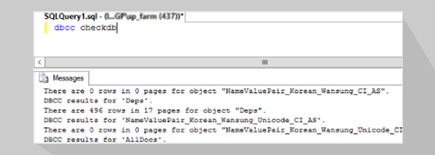
An MS SQL recovery software that repairs and restores corrupted SQL database components (tables, defaults, stored procedures, triggers, views and rules) after all kinds of logical crash scenarios. Stellar Phoenix SQL Recovery v2.1 repairs databases created in Microsoft SQL Server 2008, 2005 and 2000, irrespective of whether DBCC CHECKDB command could repair the database. The SQL database recovery utility never modifies or deletes records saved in the original database file and optimally repairs even the heavily corrupted MDF file(s).
- Overview
- Key Features
- Spec
- FAQs
- Support
- Testimonials
|
MSSQL recovery Features : MS SQL Recovery Software Features |
|
|
SQL Server database corruption primarily happens due to underneath reasons:
In addition from the above logical corruption scenarios, Stellar Phoenix SQL Recovery v2.1 also provides comprehensive database repair in all other corruption scenarios.
|
|
SQL Database Recovery Software Details :
Stellar Phoenix SQL Recovery v2.1 repairs corrupted SQL database components in case of any kind of logical damage of the database without modifying or deleting the records saved in the original file. Stellar Phoenix SQL Recovery v2.1 incorporates scanning methods to scan and repair MS SQL database file and restore it on default or user-specified location. Designed for Windows 7, Vista, 2003, 2008, XP, 2000 operating systems, the SQL Recovery software also recovers User-defined functions and data types
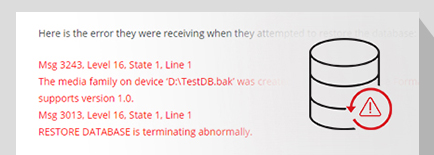
Stellar Phoenix SQL Recovery v2.1 ensures complete recovery after underneath error messages:
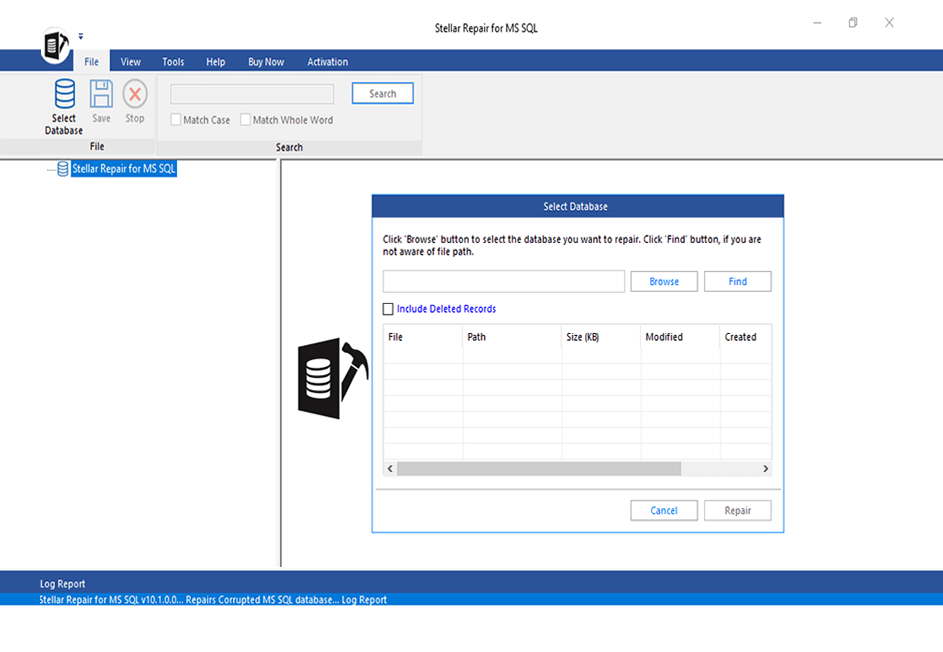
Stellar Phoenix SQL Recovery v2.1 repairs damaged SQL database in few mouse clicks:
Stellar Phoenix SQL Recovery v2.1 comes with an highly interactive user documentation, which makes the process of database repair easily understandable to both database administrators and end-users. The repair tool recovers almost all database constraints including primary key, foreign key, unique key, and check. The SQL repair software allows you to search the SQL databases saved in your system and also you to search specific tables in the computer.
Stellar Phoenix SQL Recovery v2.1 is a toolbar and menubar driven utility that includes different tools to perform various operations. These tools Open MS SQL File to Repair, Start Repair, Stop, Help, Updates, Purchase, and About.
SQL recovery using Toolbar Buttons:
Menubar Options used to perform MDF recovery:
|
|
|
Features of Stellar Phoenix Database Recovery for MSSQL
|
|
|
FAQs – Stellar Phoenix MySQL Database Recovery Software
What versions of ‘SQL server’ does the software support ?
Supports Microsoft SQL Server 2000, 2005 and 2008.
Will the software replace the original corrupted file ?
No, software cannot replace the original corrupted file. Software scans the corrupted file and produce a new repaired file on the destination location which you have selected for the recovery.
Can I repair selective tables using the software ?
Yes, the software can repair selective tables. Once the scanning of the MDF will complete you can check mark the tables that you want to repair and as an output you will get a new MDF file containing the selected tables.
I am getting error 'Invaild Database File Version'. How can i repair this MDF file ?
Make sure that MDF file is of SQL server 2000, 2005, 2008. If it is belongs to the correct version of SQL server then the file is severely corrupted and beyond the capability of any software to repair the file. You can send us your file for the manual repair of the file. Our SQL repair experts will analyze the file and repair it under our services For the same please contact us at support@stellarinfo.com.
What are the components of MDF file that the software can recover ?
The software can recover tables, views, rules, stored procedures, defaults, user defined functions and user defined data types.
Will the software identify the version of the SQL server in which the file was created automatically ?
Yes, the software will identify the SQL server automatically in which the file was originally created.
|
|
|
As a computer technician, I have been using the Stellar/Phoenix recovery software for about 5 years, this newest version really hits a home run! Easy user interface, and 100% recovery of failed raid array. Thanks for a great product, you make my job easier, and really make my business shine!
Jerry Grazie a Stella Phoenix ho recuperato tutti i dati di un Hard Disk esterno, ho trovato il software molto semplice da utilizzare e ottimo come funzionalità. Per la mia esperienza è un software che consiglio anche per il prezzo contenuto. Luca Zanchin
(Padova) Italia "But this computer only prints the labels we put on all our packaging! You mean we were supposed to backup that hard drive too?" That's the story that came with the PC that unexpectedly arrive from one of our satellite warehouses. Stellar Phoenix Windows Data Recovery was able to quickly recover all the contents of the corrupted hard drive for transfer to a new drive. The system went back into production the next day. Thanks to Stellar, we only had one business day of downtime versus the days it would take a recovery service to get around to doing the same thing at four times the cost.. Joe V., Cleveland, OH. Your software worked flawlessly. I had a boot drive that would continually loop and go into "safe mode" upon boot up. I could not boot into DOS to see what was out there. As a matter of fact, when I placed the drive in another machine and tried to access it, the drive was not recognized and I was asked to format it. I thought for sure this drive was trashed. I had over 3gb of photos on this drive. I first ran the free version on the faulty hard drive to see if it would even find what I was looking for. After it found what I was looking for, I purchased the full version and recovered all my data easily. Your software was very easy to used, and I would definitely recommend it to others. Kudos to all involved. Greg |