stellar data recovery
search
data recovery services
My status

Sales Contact Numbers

USA : 1-877-778-6087
UK : +44-203-026-5337
Australia & APAC : +61-280149899
Worldwide : +91-921-395-5509

stellar data recovery
password recovery Stellar Phoenix Password Recovery v1.5

Windows Password Recovery Software


Have you lost your email, chat messenger and web browser password, don’t Panic!! Stellar Phoenix Password Recovery Software helps you to recover/reset lost/forgotten admin and user login passwords from Windows 7/Vista/XP.


Stellar Phoenix Windows Password Recovery that resets passwords of your chat messengers, such as Gtalk, Windows Live Messenger, e-mails, and web browsers, like Internet Explorer, Mozilla Firefox etc. The tool can reset admin/user account passwords which are lost, forgotten, or otherwise unavailable. The Password Recovery software help you to recover all such lost or forgotten passwords. The software also recovers product keys and serial numbers of registered software, and FTP client applications.


Compatible with Windows 7, Vista, XP, 2003, Server (2000-2008), and 2000, this Password Recovery Software can recover usernames and passwords of various accounts accessed through various web browsers, e-mail clients, and FTP clients installed on the computer. For product key and serial number recovery, the application should be pre-activated and pre-registered on your computer.


server password recovery
  • Overview
  • Key Features
  • Spec
  • FAQs
  • Support
  • Testimonials

Stellar Phoenix Windows Password Recovery :

Password Recovery Software Features

  • Supports Windows 7/Vista/XP/Server (2000-2008) and 2003
  • Resets admin/user account password(s)
  • Web Browsers - Internet Explorer (Version 4.x / 5.x / 6.x / 7.x / 8.x), Mozilla Firefox (Version 2.x / 3.x), MSN Explorer (Version 7.x), and Netscape Navigator (Version 9.x)
  • Chat Messengers - MSN Messenger(Version 7.x), Windows Live Messenger (Version 8.x/9.x/14.x), and Google Talk
  • Mail Clients - Outlook Express, Incredimail (Version 6.x/5.x), MS Outlook (Version 2000/ 2002/ 2003/ 2007), Windows Mail, Windows Live Mail, Eudora (Version 4.x /5.x /6.x/ 7.x), and Thunderbird (Version 2.x and 3.x)
  • FTP Client applications - FTP control (Version 4.x), FTP Commander (Version 8.x/9.x), Auto FTP (2x), BulletProof (2009), Cute FTP (7x, 8x), FileZilla (2x, 3x), FlashFXP (3x), FTP Voyager (14x, 15x), FTP Navigator (15x), Smart FTP (4x), and 32bit (2.x)
  • Serial Number and Product Keys - Microsoft Windows XP, Microsoft Office (Version 2007/2003/2002), Internet Explorer, MS SQL Server (Version 2000/2005/2008), MS Visual Studio (Version 2008/2005), and WinZip.
  • Resets all passwords (saved in Windows Security Account Manager (SAM)) that have been used to login to Windows
  • Features an 'Update Wizard' that can install recent software updates
  • Compatible with Windows 7, Vista, XP, 2003, Server (2000-2008), and 2000

Stellar Phoenix password recovery software can retrieve lost or forgotten passwords and serial keys when :


  • You cannot recall or remember Windows account password, website account password, e-mail account password, or serial key of a software.
  • User of a particular computer has left the organization
  • Sheet of paper or the computer file with password written on it is lost


Stellar Phoenix Password Recovery v1.5 is the key solution in all above and similar cases that can recover the passwords, while maintaining the originality of data.

Windows Password Recovery Software Details :


Stellar Phoenix Password Recovery v1.5 helps you to reset and recover lost or forgotten passwords so that you can easily access all your precious data. This is a unique combination of both password recovery software and application key finder. This is an all-inclusive product that can recover lost or forgotten password(s) of multitude of web browsers, mail clients, FTP clients and chat messengers. Equipped with a user-friendly interface, it can also reset forgotten Windows login passwords and recover serial keys of different already-activated software.


The main interface of the software consists of four buttons on the left side and three icons on the top-left corner, each with a specific task to perform. The right side of the interface shows short description of the software capabilities.


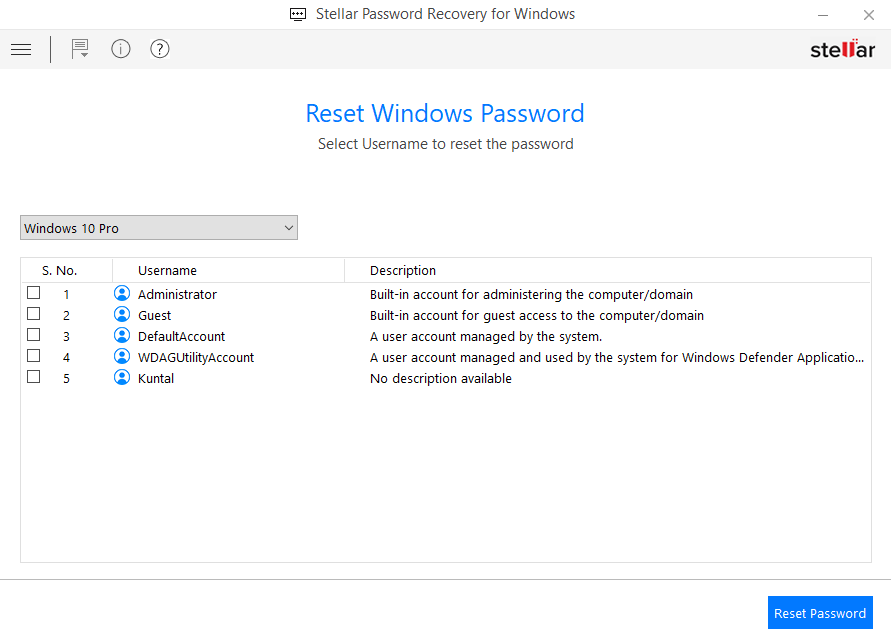
Admin/User Password Button: Clicking 'Admin/User Password' enables you to reset lost or forgotten Windows account password(s). However, this works only with a boot CD or DVD, which can be created once you purchase the software.


Stellar gives you a link for an ISO image that can be burnt to any disk (CD or DVD) and can later be used to boot the affected Windows computer and reset the password.


Password Finder Button: It recovers usernames and passwords of various web browsers, mail clients, chat messengers, and FTP clients. It recovers all the required login details of websites, forums, accounts and blogs. This button when clicked, lists (in a box on the right side of the application) all the web browsers, mail applications, chat messengers and FTP client applications, that it can recover the password(s) for. However, only those applications appear activated (and clickable), which are currently installed on your computer.


On selecting an application in the box, all the recovery details (i.e., the URL, User Name, and Password) of the selected application are shown in a separate box that appears below the list. Below this box, there are two buttons: 'Recover to File' and 'Home'. 'Recover to File' is used to save the recovered data in a user-specified text file. 'Home' opens the main interface of the software.


License Key Finder Button: It recovers software keys of various Microsoft applications including Windows XP, Microsoft Office, and other Windows compatible applications like, Internet Explorer, WinZip, and more. Clicking this button lists all the software for which password recovery is possible, though, only those software names are activated, that are installed on the computer. License key can be searched only for those software, that have been activated and registered on the computer before.


When you select the software out of the list of software, for which license key is required, the box underneath this list shows information like, Key Name and Key Value. 'Recover to File' and 'Home' buttons also appear below this box. 'Recover to File' saves the license key in a .txt file, while 'Help' takes you back to the main interface.


Help: Clicking 'Help' opens the user manual that guides you about how to use the software, and about its working along with the features.


Icons:


About Stellar Phoenix Password Recovery: This icon when clicked gives general information about the software.


Update Wizard: On clicking this icon, all software updates are downloaded. This updation is done when a secure connection to Internet is available.


Admin Password Recovery


To reset lost or forgotten admin or user account password(s) for Windows:


  • Change the boot preference of your computer, so as to boot the computer from CD drive
  • Insert 'Stellar boot disk' and restart your computer
  • When the application starts, click 'Admin/User Password'
  • Choose the required account name and click 'Reset'


Login Password Recovery


To recover login details:


  • Start the application and click 'Password Finder'
  • Choose the web browser, chat messenger, mail client, or FTP client application for which password is required
  • Click 'Recover to File' and select the folder in which .txt file can be saved with the software key


Note: To Recover Windows Passwords, automatic complete feature should be turned on. Also, 'remembering the password' should be turned on, when browsing the Internet. All the applications should be closed before recovering password(s).


Finding Software Key(s)


To recover software keys:


  • Start the application and click 'License Key Finder'
  • Choose the application for which key is to be recovered
  • Click 'Recover to File' and select a folder. Your recovered software key will be stored in this folder in a .txt file


Download and Install the free demo version of this Windows Password Recovery tool to analyze its features. The free evaluation version gives a count of total characters in the password and a preview of the first four characters of a product key.


Stellar Phoenix Password Recovery v1.5 Software Key Features:


  • Resets lost or forgotten Windows account password(s) to blank
  • Supports Windows 7/Vista/XP/Server (2000-2008) and 2003
  • Recovers lost account login details of different websites accessed in Web Browsers including:
    • Internet Explorer (Version 4.x / 5.x / 6.x / 7.x / 8.x)
    • Mozilla Firefox (Version 2.x / 3.x)
    • MSN Explorer (Version 7.x)
    • Netscape Navigator (Version 9.x)
  • Recoves forgotten usernames and passwords of account used in chat messengers including:
    • MSN Messenger(Version 7.x)
    • Windows Live Messenger (Version 8.x/9.x/14.x)
    • Google Talk
  • Recovers lost usernames and passwords of accounts accessed in mail clients:
    • Outlook Express
    • Incredimail (Version 6.x/5.x)
    • MS Outlook (Version 2000/ 2002/ 2003/ 2007)
    • Windows Mail
    • Windows Live Mail, Eudora (Version 4.x /5.x /6.x/ 7.x)
    • Thunderbird (Version 2.x and 3.x)
  • Recovers lost usernames and passwords of accounts accessed in FTP mail clients:
    • FTP control (Version 4.x)
    • FTP Commander (Version 8.x/9.x)
    • Auto FTP (2x), BulletProof (2009)
    • Cute FTP (7x, 8x)
    • FileZilla (2x, 3x), FlashFXP (3x)
    • FTP Voyager (14x, 15x)
    • FTP Navigator (15x)
    • Smart FTP (4x)
    • 32bit (2.x)
  • Recovers lost serial numbers and product keys of various software that have already been activated:
    • Microsoft Windows XP
    • Microsoft Office (Version 2007/2003/2002)
    • Internet Explorer
    • MS SQL Server (Version 2000/2005/2008)
    • MS Visual Studio (Version 2008/2005)
    • WinZip
  • Designed to be compatible with Windows 7, Vista, XP, 2003, Server (2000-2008), and 2000
  • 'Live Update' feature to install recent software updates after a secure connection to Internet is setup
  • Resets Windows login passwords that are saved in SAM database


Stellar Phoenix Password Recovery (Windows)


License Types :


Lifetime License available in :


  • Single User – ESD / Download Format


Languages :


Software Interface Available In :

  • English


Package Details :


Name : Stellar Phoenix Password Recovery (Windows)

  • Version: 1.5
  • Version Launch – 31st March, 2010
  • Do it yourself software


Systems Requirement :


  • Processor : Pentium Class
  • RAM : 256 MB minimum (512 MB recommended)
  • Free space on hard disk : 30 MB
  • Operating Systems : Windows 7/ Vista/ 2003/ XP/ 2000 /Servers (2000-2008)


Support Options :


Phone Support :


USA (Tollfree- Pre Sales Queries) : 1-877-778-6087
USA (Post Sales Queries) : 1-732-584-2700
UK & (Europe) : +44-203-026-5337
Germany : +49-180-110-105-0051
Netherlands ( Pre & Post Sales Support ) +31-208-111-188
Worldwide : +91-921-395-5509


SKYPE : stellarsupport

Support is available
Monday-Friday (except holidays) 24/5


Support :


Free Download --- details :


Free Download – is demo download of the product and offers preview of all the recoverable files using the software. Only those files viewed in preview are recoverable. For Recovering data you will have to purchase the software.


Hi,


I just wanted to compliment you on this product. It does exactly what we need, has a great interface, and just works. Thank you!!


Eric K. Miller