Managing thousands of digital photos collected over the years is difficult. You may have deleted some pictures to free up space on your device or accidentally deleted or lost them due to SD card formatting or corruption.
Unfortunately, deleted photos go to the recycle bin and are permanently deleted from there after 30 days. Recovering permanently deleted photos from the recycle bin is practically impossible unless you use advanced recovery solutions.
Can you recover old deleted photos?
Yes, you can recover old photos deleted a year ago from your device, be it a PC, Mac, smartphone, or SD card, only if you have a backup.
On Windows PCs, you can use File History, Backup & Restore Utility to restore old photos, whereas on Macs and iPhones, you can use Time Machine, iTunes, and iCloud backup. Moreover, you can also use Google Drive and Google Photos to restore old photos deleted a year ago on smartphones and PCs.
However, in the absence of a backup, you can use photo recovery software to retrieve photos deleted long ago from PCs, Macs, smartphones, and removable storage drives unless the data is not overwritten.
Methods to Recover Old Photos Deleted Years Ago
Recovering old deleted photos can be challenging; below are some reliable methods you can try:
1. Recover old deleted pictures with professional photo recovery software
If the photos were deleted from the storage drive years ago, you may not be able to recover them manually unless you have a backup. The only way is to use a professional photo recovery software — Stellar Photo Recovery. This advanced software comprehensively scans old hard drives, SSDs, SD cards, flash drives, and other types of memory cards to retrieve photos deleted years ago.
Some of the key benefits of using recovery software to get back old deleted photos:
- Recover old photographs without hampering their original quality
- View the original date and timestamp of the recovered photos
- Scan and retrieve photos from formatted or corrupt old HDD, SSD, SD cards, etc.
- Recover photos shot with Android or camera
- Recover all image file types from JPEG to RAW file formats of Canon, Olympus, Nikon, Sony, Samsung, Apple, etc.
| Note– The success of photo recovery depends on how much data has been written to the storage device since the photos were deleted. If the storage has been overwritten, the chances of successful recovery decrease. |
Watch this video to know how to recover old photos deleted years ago!
Steps to recover old deleted photos:
- Connect the HDD, SSD, SD card, etc., from which you want to recover old deleted pictures to PC or Mac.
- Download Stellar Photo Recovery on your PC. If you have lost old photos from Mac storage drives, download the macOS version.
- Select the file type to start recovery process.
- Select the storage drive for scanning. Turn on Deep Scan at the bottom and click Scan.
- The software will start scanning your selected drive and show you the scan progress. Be patient, as the scanning may take some time, depending on the size of the storage media.
- Click Stop if you wish to stop the current scan process.
- After the scan finishes, you can see a list of recoverable media files, including your lost photos. Use the preview feature to ensure the photos are of the expected quality.
- If you are satisfied with the recoverable images, select the photos you want to restore and click Recover.
- Click Browse and choose a desired destination to save the recovered old photos. Next, click Start Saving.
Stellar Free Photo Recovery software lets you retrieve up to 10 pictures from any storage drive. To recover more old deleted photos from years ago, download the full version.

A Pro Tip – Don’t save the recovered old pictures in the same storage drive from which they were deleted or retrieved. Always save them at a different location.
2. Recover deleted old photos from File History on PC
Windows File History feature regularly backs up your PC data on an external drive, provided you have enabled it. If you’re looking for missing or deleted old photos, you may find them using File History.
| Note – By default, File History only backs up copies of files stored in the Documents, Pictures, Music, Videos, and Desktop folders. To recover files present another location, use a different recovery method. |
Steps: How to recover old deleted photos with File History on Windows 10/ 11
- Connect your external storage drive to backup files on Windows PC.
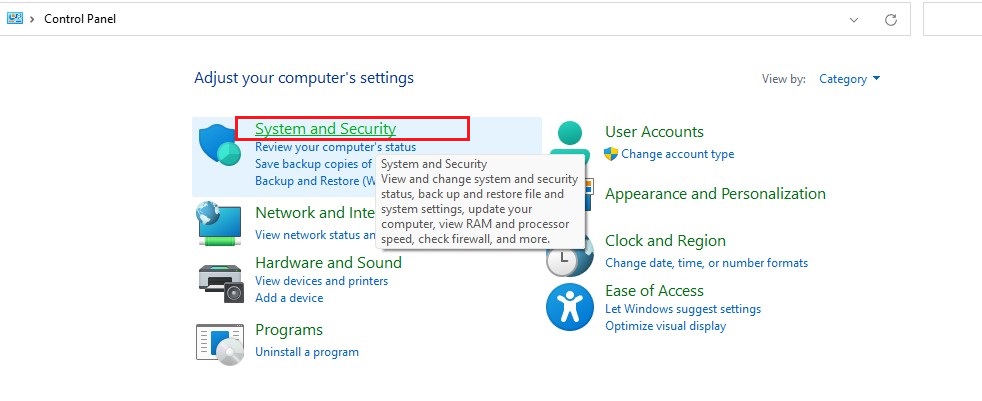
- Open Control Panel and click on System and Security.
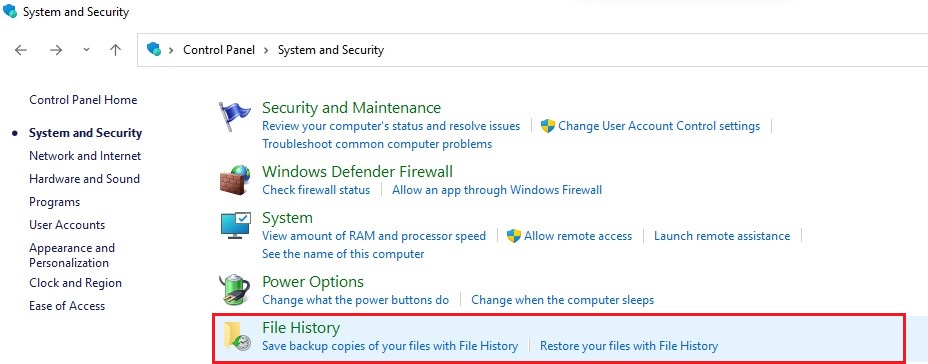
- Next, click File History.
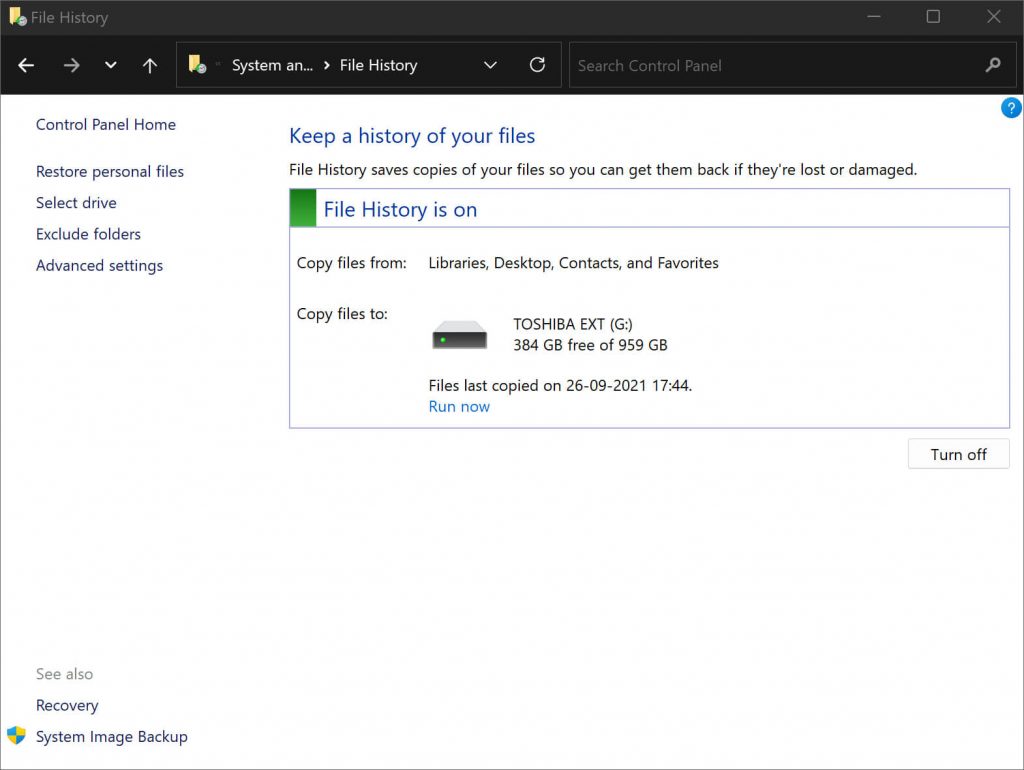
- Click the option of Restore personal files located in the left sidebar.
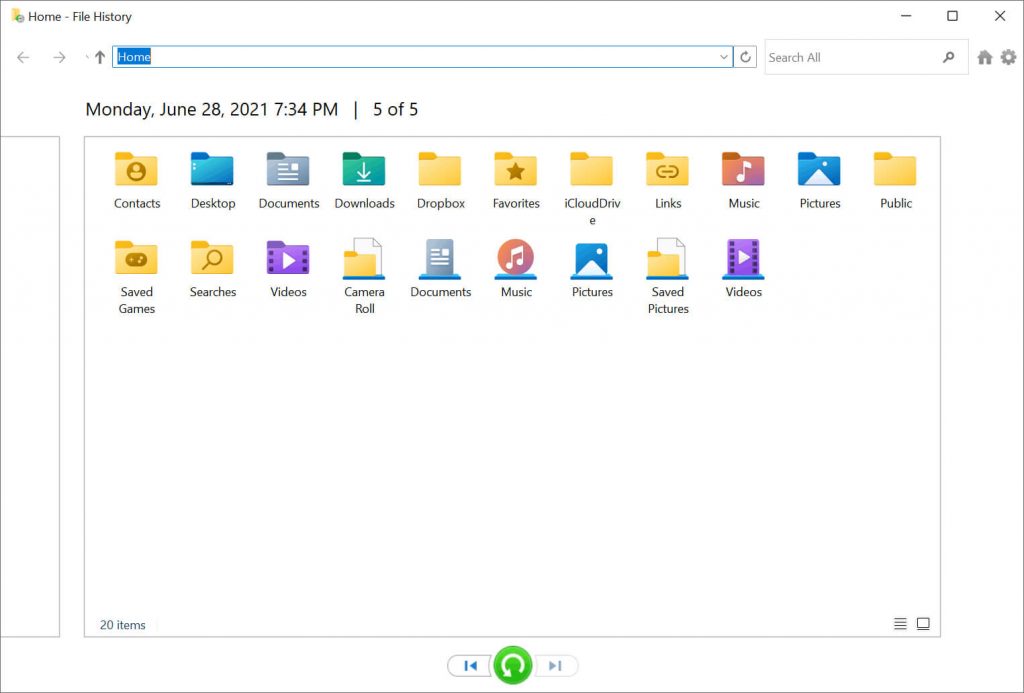
- Find the relevant backup from which you want to restore the old photos. Select the old photo/s and click on the green ‘Restore’ button. The old photos are restored to their original location on your PC.
3. Recover old photos using Windows Backup and Restore Utility
If you’re using ‘Backup and Restore’ feature on Windows 10, 8.1, 8, or below, try to recover old deleted photos using this feature. Below are the steps to get your old photos back from Windows backup:
- Connect the storage media drive to your computer.
- Open Control Panel.
- Go to Backup and Restore in Windows 10.
- To restore your image files, select Restore my files. But if you want to recover the photos of other users, choose Restore all users’ files.
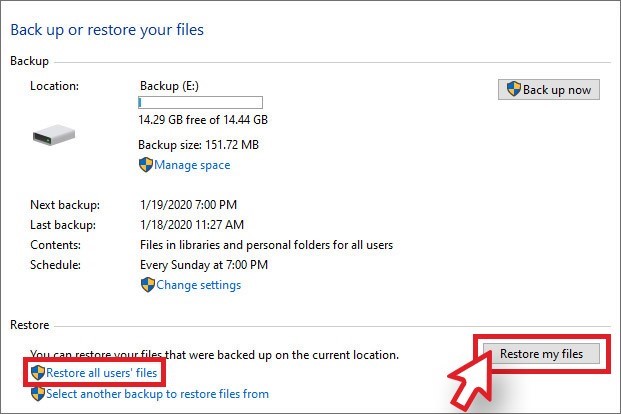
- Select Browse for files or Browse for folders to view old photos in the backup.
| Note: If you want to view specific photos in the backup, then select ‘Browse for files’. When you browse for folders, individual files won’t be visible. |
- Click on Search to find any specific old photos. Type the part or whole name or extension of the required image file. Try with special characters for example, *.jpg or *.cr2 to search for JPG or CR2 files in the backup.
- Next, select the desired photos from the results and click Next.
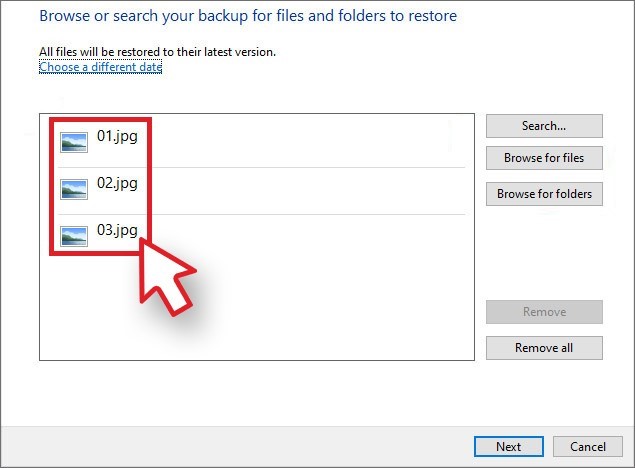
- Click Restore to save the recovered old photos.
| Note – If the deleted photos were backed up using File History or Windows Backup and Restore Utility, then you can easily restore them; otherwise try using Photo Recovery Software. |
4. Recover old photos from a backup created on another computer
Are you looking for old photos saved on another Windows computer? You can recover old photos from another computer if a backup was created from the old PC using Windows Backup and Restore.
When you restore the backup of an old PC, the recovered files are saved in a folder named after a user. For instance, if the user name was ‘Jim’ on the old PC on which the backup was created, the backup will be restored in a folder named ‘Jim’.
5. Use Google Drive Backup to recover photos from old Google account
Google Drive allows users to save data in the cloud and sync files across all their devices. If you use Google Drive, try to recover photos from old Google account. Google Drive may contain your old deleted pictures on your Android phone and computer.
Steps: How to recover old photos with Google Drive:
- Sign in to your Google Drive account on your smartphone or a computer.
- Use the Search tab at the top to find the old photos by using the date, keyword, place or any specific content in the image.
- Select the required image, click on the 3 dots, and then select the Download option to save recovered old photos on your device.
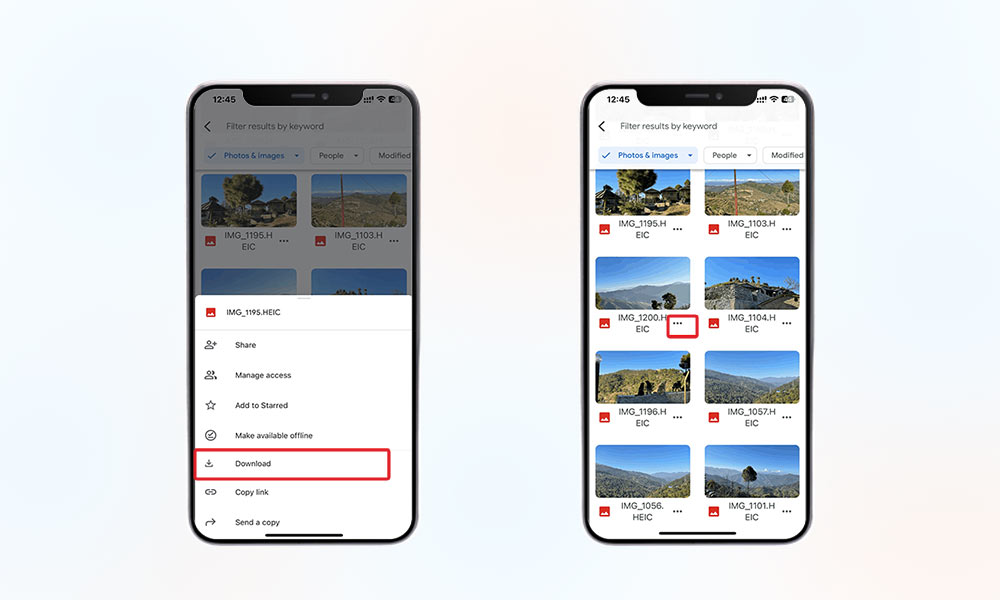
You may be able to recover old photos deleted years ago from Google Drive.
6. How to Restore Old Photos with Google Photos
If you have been using the Google Photos backup and sync feature, the old deleted photos on Android or PC must be residing there. Just look for your old photographs in the cloud backup and download them on your system.
Steps to restore old photos deleted years ago by using Google Photos:
- Open the Google Photos on your PC or smartphone.
- Sign in to your Google Account.
- Tap on the Search icon at the bottom to search old deleted photos by year, location, name, file type, event, and more in Google Photos. Next, select those images.
- Now, tap on the Share icon at the top and select Save to device option to save the selected old photos on your smartphone.
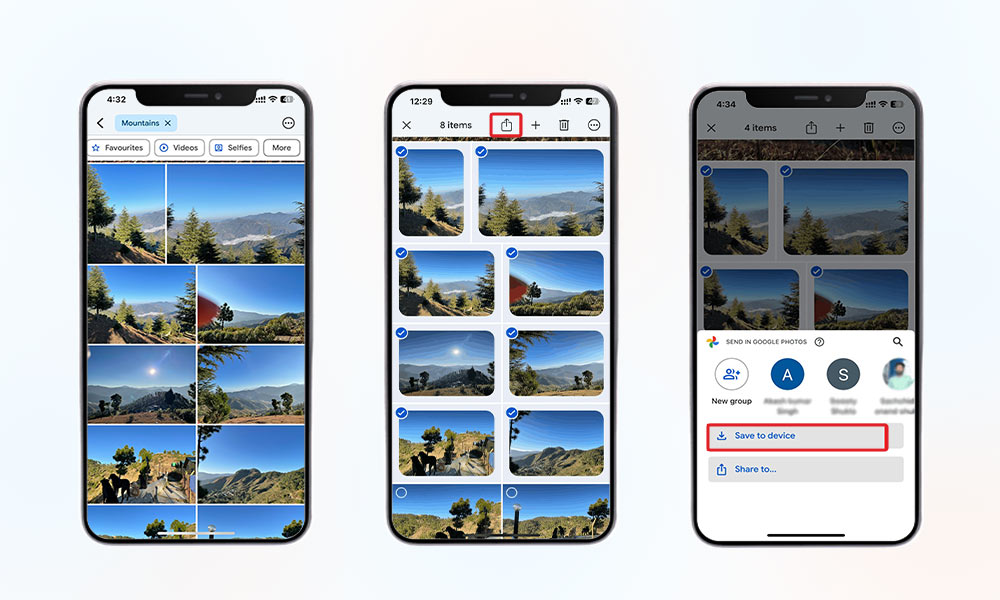
If you cannot recover old photos from Google Photos, they are probably lost forever. Try other backup drives, if available, or get photo recovery software.
7. Recover old photos deleted from iPhone using iCloud/iTunes backup
Do you want to recover pictures deleted 2-3 years back from your iPhone?
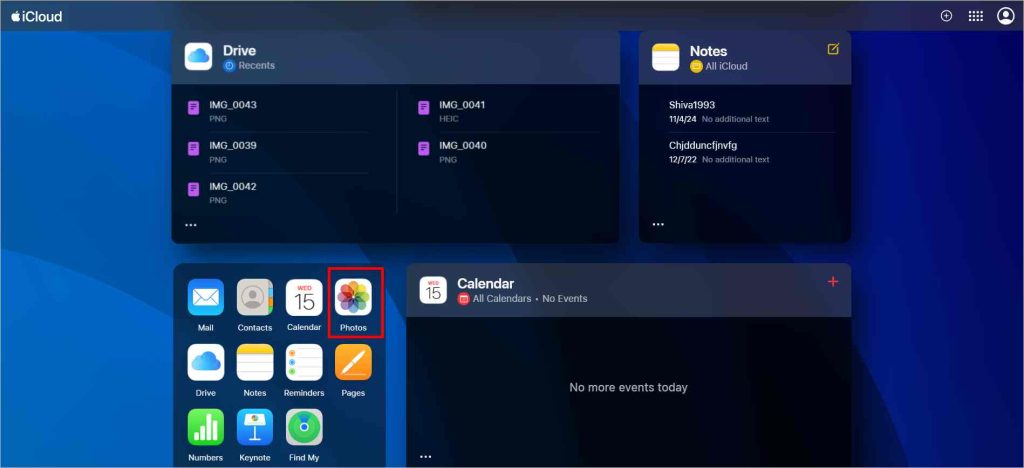
Then Apple’s iCloud and iTunes backup helps you recover old deleted photos from your iPhone. Restore old photos from your iCloud by following the below method:
| Note– This method will only work if you have enabled iCloud Photos on your device. |

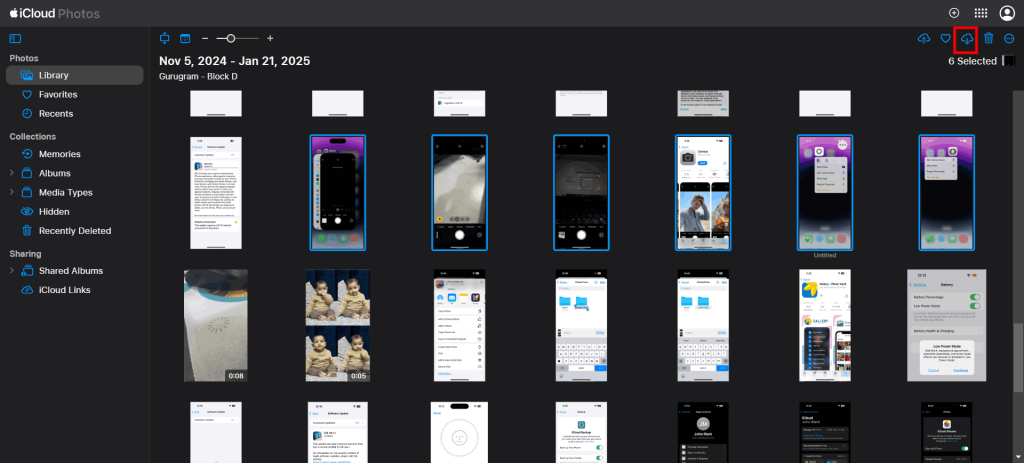
- Look for the images you want to restore and select it, then click on the Download icon to download them.
Follow the below steps to recover deleted old photos from iTunes backup:
- Connect your iPhone to your PC.
- Click on the iPhone icon at the upper-left corner of your iTunes window.

- Click the Summary tab in the left pane. Then, in the Backups section, click on Restore Backup.

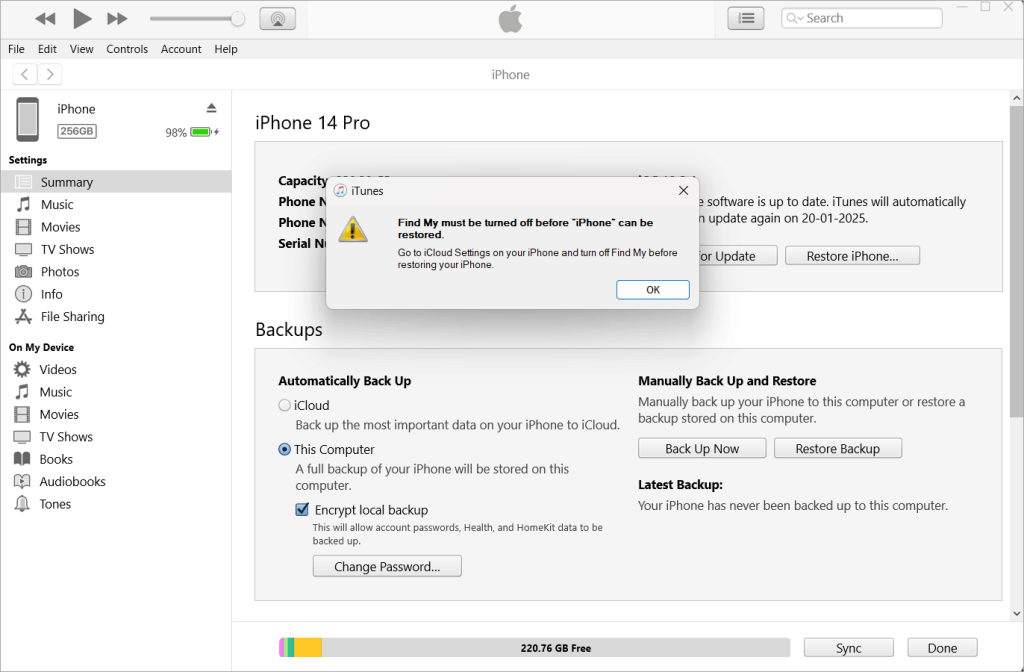
- You will see a warning message, ‘Find My must be turned off before iPhone can be restored.’ Click OK.
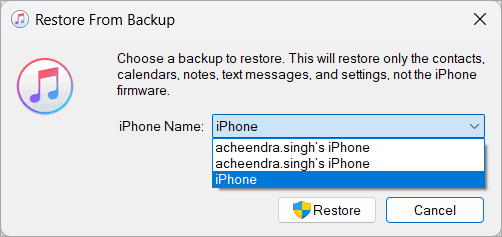
- Then, select the backup you want your phone to use from the drop-down menu.
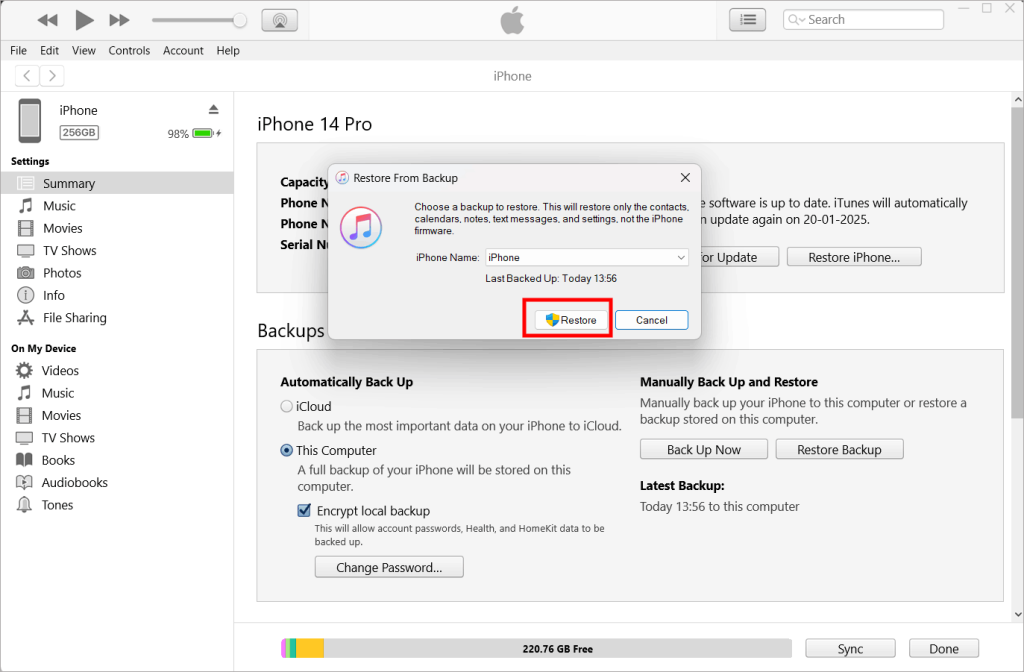
- Once the restoration process is complete, check the Photos app to see if the deleted photos were recovered. If not, try repeating the process and return to the most recent backup or choose an older backup.
If the photos were deleted years ago, you might have had another Apple account back then. So make sure to enter the correct Apple ID and password.
8. Recover old photos deleted from Mac using Time Machine
When it comes to Mac photo recovery, Mac users should look into Time Machine backup for deleted old photos. This built-in backup feature regularly backs up your photos and other data present on Mac.
To recover old pictures from Time Machine:
- Connect your Time Machine backup drive to your Mac.
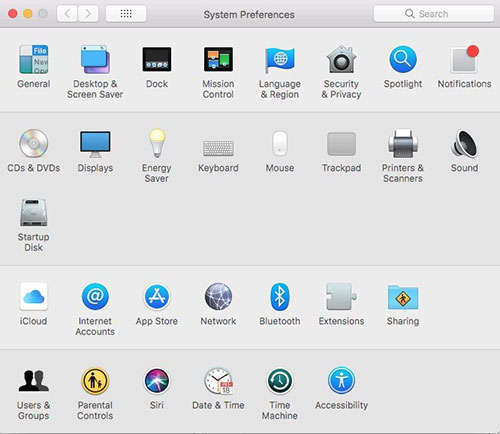
- Go to Apple menu > System Preferences > Time Machine.
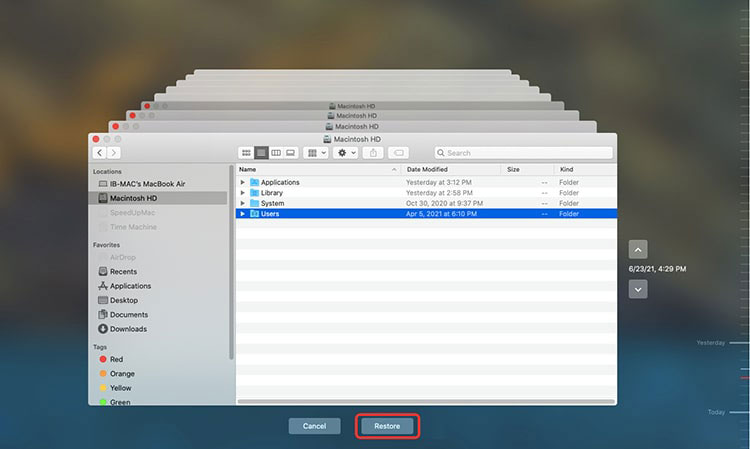
- Navigate to the backups using the TimeLine or Up/down arrow button.
- Select the date of your last backup, look for your photo library backup, and click Restore to recover it.
Click for other methods to recover deleted photos from Mac.
9. Use Lab services to restore old photos deleted years ago
Go for the in-lab photo recovery services when you cannot recover old pictures deleted over 2-3 years ago or more due to drive failure or physical damage. The data recovery experts retrieve your precious photos from a damaged storage drive in the sophisticated Class 100 Clean Room lab. These labs are ISO-certified, contamination-free, and secure. The lab experts are equipped to recover old pictures in tough cases of water-damaged, broken, or burnt hard drives, camera memory cards, pen drives, etc.
Besides, while recovering or treating, they protect your personal photographs by strictly following data privacy and safety regulations. You can contact Stellar Data Recovery services via call or online.
Wrapping up
Updated photo backups and archives are quick ways to recover old photos deleted years ago. Always first look for your pictures in Google Drive, Google Photos, Time Machine, File Manager of smartphones, iCloud, or other backup drives that are readily available. However, without backup, Stellar Photo Recovery comes in handy. It can recover deleted photos from a computer, SSD, SD card, or other storage drive. Further, if your storage drive is inaccessible or physically damaged, seek the help of in-lab service experts for old photo recovery.
