





 428 reviews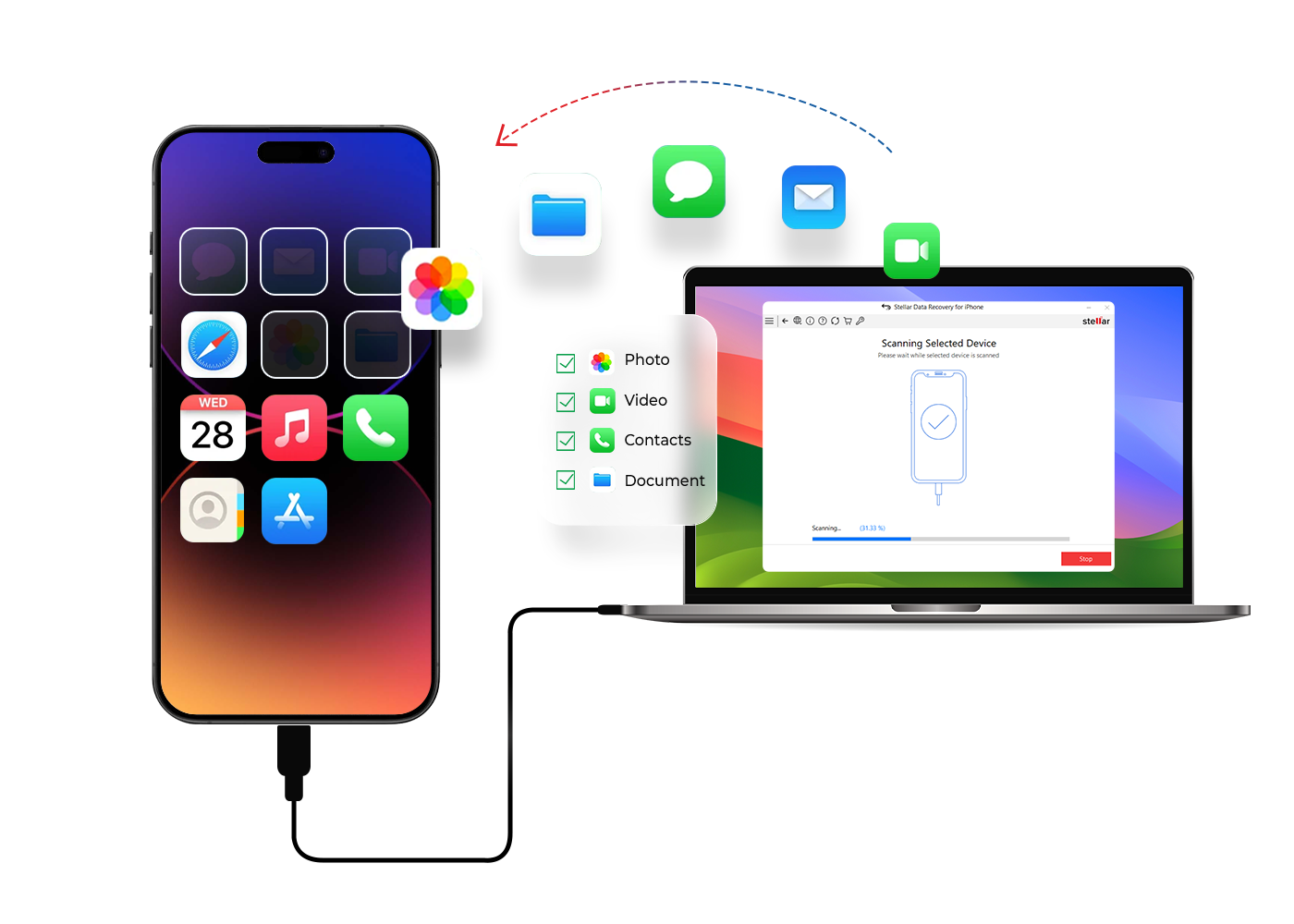

 Features
 Price
Price Specs
Specs Help
Help FAQ
FAQ Step 1
: Select What To Recover
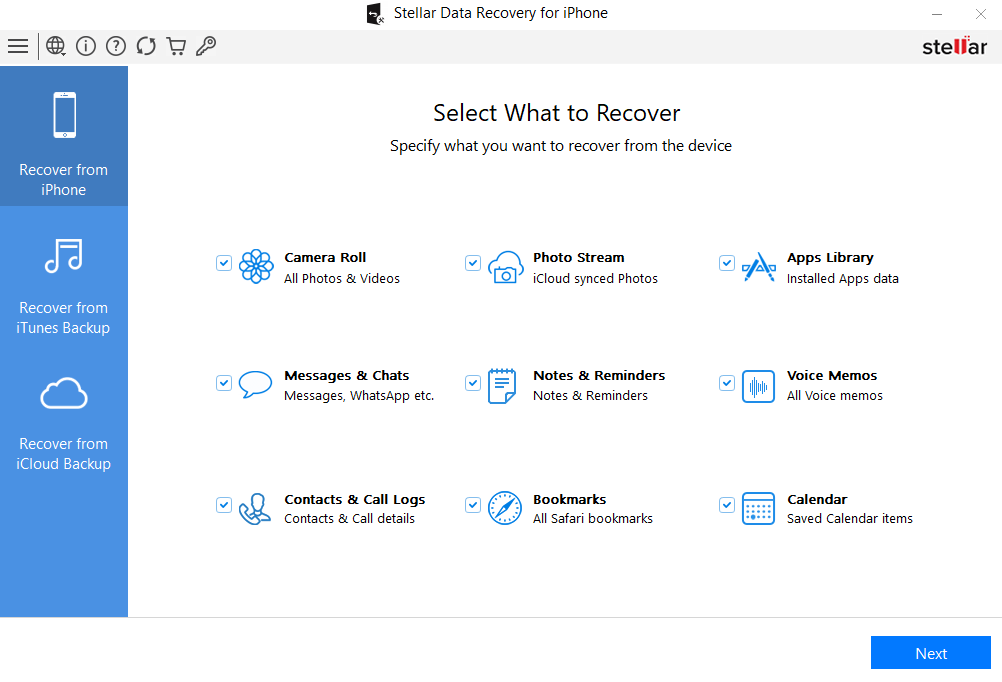
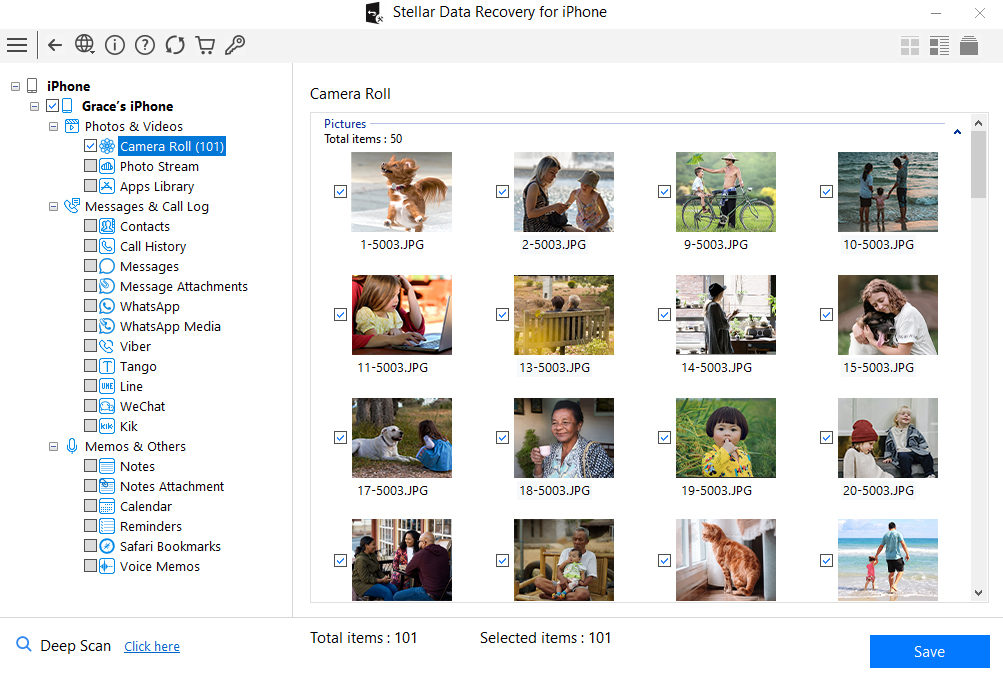
Select type of data from the checklist that you want to recover & click ‘Next’.
Easily recover lost or deleted photos, videos, messages, contacts, and call history from iPhone, iPad, and iTunes or Finder backup files.
*Software works only on your Desktop/Laptop
* Demo version lets you scan, preview, and recover up to 10 photos/videos.
STELLAR DATA RECOVERY FOR IPHONE
Stellar Data Recovery for iPhone is the best tool for PC and Mac to recover data (photos, audio, videos, etc.) lost from iOS devices due to accidental deletion, system crash, forgotten password, device damage, factory reset, failed iOS update, and more. It seamlessly extracts data directly from iOS devices or via iTunes/Finder backups.












* Demo version lets you scan, preview, and recover up to 10 photos/videos.
KEY FEATURES

Stellar Data Recovery for iPhone is a complete iOS data recovery software that facilitates the recovery of lost and deleted data from iPhone, iPad, and iTunes. The iPhone recovery software works in diverse data loss scenarios and recovers all types of iPhone data, including WhatsApp, WeChat, Kik messages, Notes, Contacts, Photos, and Videos. You can also restore data from encrypted iTunes backup files. The demo version lets you restore up to 10 photo or video files for free.

The tool enables users to preview all recoverable files before saving them. Whether it’s photos, videos, contacts, messages, call history, or app data, the software displays everything clearly, allowing you to recover only the files you truly need. This selective recovery instantly recovers 10 iPhone photos & videos for free with Stellar Data Recovery for iPhone to save time, prevent unwanted data clutter, and ensure efficient data restoration with accuracy.

Restore deleted Contacts, Photo Stream, Camera Roll, etc. from iTunes or Finder backup files. The software's advanced algorithms let you access and recover lost data stored in encrypted backups on both Windows and Mac devices. Moreover, the entire backup recovery process doesn’t demand any technical expertise.

Loss of photos and videos due to accidental deletion, factory reset, failed iOS update, and other common reasons. Stellar Data Recovery for iPhone recovers deleted videos and photos on iPhone, iPad, and iTunes. In addition, the software lets you select and save the desired photos and videos of Camera Roll, Photo Stream, WhatsApp, Kik, Viber, Tango, and other apps.
OTHER FEATURES

Losing important text messages or attachments from your iPhone can be a huge loss. Stellar Data Recovery for iPhone performs enhanced scanning to recover deleted iMessages, text messages, and attachments from your iPhone, iPad, and iTunes backup.

While transferring or deleting unwanted contacts in bulk, important contacts might get deleted from your iPhone. Stellar iPhone recovery software retrieves such lost contacts on iPhone or iTunes backup and lets you restore contacts in VCF, CSV, or HTML formats. The software also saves various attributes associated with the contacts in HTML format.

Voice Memo can be lost due to deletion, app crash, iOS update, water-damaged iPhone, etc. Stellar Data Recovery for iPhone recovers deleted Voice Memos from iPhone, and iTunes backup in any situation. The software is easy-to-use, fast, and lets you select and save only those voice memos recordings you wish to keep.

Call logs may get deleted due to phone restoration, accidental deletion, or other reasons. Stellar iPhone data recovery software helps you get back the call log of your iPhone that has been either lost or deleted. It recovers deleted call logs on iPhone and displays them as per the category.

The software recovers deleted Notes on iPhone, and iTunes backup files. It can also retrieve large-sized iOS Notes and inserted photos deleted from your iPhone. The iPhone recovery software runs an algorithm to scan the device for deleted 'Notes' and attachments and lists them in the preview pane. So, no matter how large the Notes are, this software can easily recover them.

Bookmarking websites on a web browser is common as it helps in quick and easy access while revisiting the website. You may have bookmarked several websites on your Safari browser, the default browser of your iPhone and iPad. But there can be situations when you might lose them suddenly. With this software, you can easily restore Safari bookmarks from iTunes, iPhone, or iPad.

The software provides data recovery from iPhone in common loss scenarios, such as accidental deletion, data loss after iPhone update, broken/lost/stolen, Jailbreak, iPhone stuck in recovery mode/ Apple logo screen/factory reset loop, virus attack, Black Screen of Death, etc. Using this advanced software, you can recover photos, videos, contacts, messages, and other data from iPhone without backup.

The Deep Scan feature searches for lost files based on the file signature. If you are unable to find the deleted files in the Preview on Windows or Mac, switch to Deep Scan. This feature thoroughly scans your iOS device or iTunes/Finder backup to recover lost iPhone data. This option can be seen once the normal scan process completes.

The multi-purpose advanced Toolkit version of the software erases all content and settings, contacts, photos, videos, and other system data from all kinds of iOS devices. It securely clears data on iPhone and iPad, making it unrecoverable by any data recovery software. Thus, the software ensures that your data remains safe and private.

Stellar Toolkit for iPhone efficiently wipes all third-party apps data, Photos, Videos, Contacts, Call Logs, Text messages, Photo Stream, Voice Memos, Camera Roll, Notes & Reminders, Calendar, FaceTime calls, Safari Bookmarks, Siri, WhatsApp, WeChat, Line, Viber, Tango, and Kik messages & attachments. The advanced software also clears system data or ‘other storage’ on iPhone that mostly stores apps data and cache files.

The Toolkit version of Stellar Data Recovery for iPhone offers an advanced feature that repairs iPhone and iPad that are not working smoothly or are inaccessible due to iOS issues. The software repairs iOS system and fixes black screen, iOS crash, iPhone stuck at Apple logo/reboot loop, iTunes errors, white screen of death, and more. The iPhone recovery software performs iOS system recovery without deleting the existing data on the device

For all those users, who cannot access iPhone data as they forgot the Apple ID password, Stellar Toolkit for iPhone brings ‘Remove Apple ID’ module. Users can delete the configured Apple ID on their iPhone without the password. They can create a new Apple account and reset Apple ID password to reuse their iOS device. The feature is available for all variants of iPads as well.
CUSTOMER REVIEWS




It even recovers data in the worst data loss scenarios that users fear, including iOS crashes, water damage, lost iPhone, or Jailbreak.
This tool meets the highest demands when it comes to users who have an active lifestyle and prefer convenience above anything these.
See Windows Report Review

Stellar can recover data from a wide variety of iOS devices with an added option of importing to iPhone.
The algorithm and recovery technology is so powerful that you can even get back encrypted iTunes backup files.
See iLounge Review

Specially designed to recover lost data from an iPhone.
Recover deleted photos, videos, and more from your iPhone in just a few clicks with Stellar Data Recovery for iPhone.
See Phandroid Review

Stellar Data Recovery for iPhone also recovers the user's encrypted data from iTunes.
Software helps to recover things like; deleted contacts, deleted messages from popular mobile apps.
See Tech Times Review

Particularly suitable for users looking for effective solutions without spending excessively.
Offers a reliable solution for retrieving lost or deleted data across various file types.
See Apple Daily Review
DATA SHEET

| Version: | 9.0.0.2 (Windows) & 9.0.0.3 (Mac) |
| License: | Single System |
| Editions: | Standard, Toolkit |
| Language Supported: | English, Deutsch, Français, Italiano, Español |
| Release Date: | July 2026 (Windows) & October 2026 (Mac) |
| Processor: | Intel, AMD (x64-based) and Apple Silicon (M1/M2/M3/M4/M5) |
| Memory: | 4 GB minimum (8 GB recommended) |
| Hard Disk: | 250 MB for installation files |
| Operating System: (64 Bit only) |
Windows 11, 10, 8.1, & 8 and macOS 27 Golden Gate, Tahoe 26, Sequoia 15, Sonoma 14, Ventura 13, Monterey 12, Big Sur 11, Catalina 10.x & below |
TRY BEFORE YOU BUY
* Demo version lets you scan, preview, and recover up to 10 photos/videos.
USEFUL ARTICLES
FIND YOUR ANSWERS
The Demo version of Stellar Data Recovery for iPhone allows you to recover up to 10 files (photos and videos) for free, with each file up to 10 MB in size. Once this 10-file limit is exhausted, you will need to purchase and activate the full version to continue recovering more files.
Yes, you can save the recovered contacts from iPhone in HTML as well as VCF and CSV formats.
Stellar Data Recovery for iPhone natively supports both backup architectures. If you are on a Windows PC or older macOS, the software scans iTunes backup files. If you are on macOS Catalina or newer (including Golden Gate and Tahoe), it automatically detects and extracts data from Finder backups. You can selectively recover photos, messages, and contacts from encrypted or unencrypted local backups without needing to restore the entire device.
Yes, you can see preview of Contacts, Messages, Call history, Calendar, Notes, Reminders and Safari Bookmarks before recovering them.
Yes, if you have the backup stored on iTunes, you can use 2nd i.e. Recover from iTunes to restore the backup files on your computer.
Yes, the software is fully optimized for Apple Silicon (M1, M2, M3, M4, M5, and M6 chips) as well as Intel-based Macs and Windows PCs. It guarantees full compatibility with the latest iOS 27, iPadOS 27, and the newest iPhone 18 series, ensuring seamless recovery of HEIC photos, 4K/8K videos, and system data without requiring a jailbreak.
For Windows
Processor: Intel and AMD | Operating System: Windows 11 /10/ 8.1 / 8 / 7 | Memory: 4 GB RAM | iPhone series: iPhone 18, iPhone E, 17, AIR, 16, 15, 14, 13, 12, 11, X, XS, XS Max, XR, X, 8, 7, 6, 5S, 5C, 5, 4S, 4 | Hard Disc: 250 MB free space | Latest Version of iTunes
For Mac
Processor: Intel and Apple Silicon Processors | Operating System: Mac OS X 10.8 and above | Memory: 4 GB RAM | iPhone series: iPhone 18, iPhone E, 17, AIR, 16, 15, 14, 13, 12, 11, X, XS, XS Max, XR, X, 8, 7, 6, 5S, 5C, 5, 4S, 4 | Hard Disc: 250 MB free space
Yes. The free Demo version allows you to scan your iPhone or iTunes/Finder backup and preview all recoverable data, including deleted iMessages, contacts, and photos. The Demo version allows you to instantly recover up to 10 files for free. Once verified, you can upgrade to the Standard or Toolkit version to perform unlimited, selective recovery, ensuring you only restore the exact files you need.
To update the software: (1) Click on the Update Wizard button from the Tools menu bar. The Update Wizard is displayed. (2) Click Next. If it finds any new version, a message indicates the availability. (3) If a message displays that no updates are available, click Cancel to close the wizard. (4) Click Next. The software starts downloading the update files from the server. The software upgrades to the latest version, when the process completes.
Data loss after iOS update is a very common issue and with the help of Stellar Data Recovery for iPhone you can selectively retrieve your lost data like Contacts, Messages, Calendar, Reminders, Notes, Calendar, Reminders, Notes, photos, videos, chat history etc
Stellar Data Recovery for iPhone can recover Camera Roll, Photo Stream, Contacts, iMessages, Message Attachments, Call history, Calendar, Notes, Notes Attachments, Voice Memo, Safari Bookmarks, Reminder, FaceTime, WhatsApp, Viber, Tango, WeChat, Line, Kik and Apps Library.
No, you don't need to install iTunes as our latest version of software doesn't require it.
No, as of the latest software update, direct extraction from iCloud backups is no longer supported due to Apple's enhanced privacy and encryption protocols. However, you can easily recover your lost data by scanning the iOS device directly or by extracting data from local iTunes/Finder backups stored on your Windows or Mac computer.
No, there is no need to jailbreak your iPhone to use the software - Stellar Data Recovery for iPhone to recover your iPhone data.
No, there is no scope for the software to write any data or to modify any existing data on your iPhone/iPad while using the software.
It depends on the severity of the iOS device. You can use our other software- Stellar Toolkit for iPhone, if the iOS device is not responding properly. The iOS Repair module in the toolkit software can help with issues related to iOS/iPadOS. It will help the device to make it responsive.
Yes, we offer our experts support via calls, chat, and emails. You can connect with our expert team for support from here. We also offer a no-questions-asked refund policy for 30 days from the purchase date, if the software is unable to recover your lost data.
Yes, Stellar Data Recovery for iPhone, is capable of recovering permanently deleted photos until the storage is not overwritten with new data. It is recommended to not use your device to maximize the chances of data recovery.
Yes, you can recover videos even if they have been deleted from the Recently Deleted folder with the help of Stellar Data Recovery for iPhone. The software can recover deleted videos until the data is overwritten by new files.
Yes. Unlike standard recovery tools that only target native Apple apps, Stellar Data Recovery for iPhone performs a deep scan to extract deleted chat histories, media attachments, and documents from third-party messaging apps including WhatsApp, WeChat, Viber, Tango, Kik, and Line. This works for data stored directly on the iOS device or within local iTunes/Finder backups.
WHY STELLAR® IS GLOBAL LEADER
3M+
Customers
30+
Years of Excellence
100+
R&D Engineers
190+
Countries
8000+
PARTNERS
120+
Awards Received
Listening...
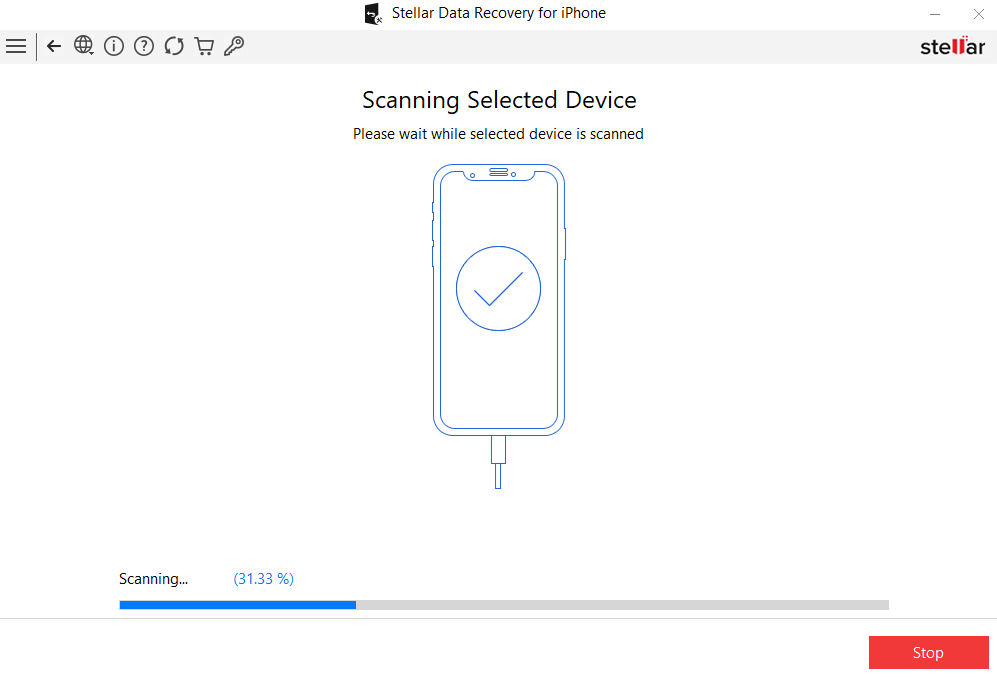

 Installation
  Uninstallation
  License Agreement
 Knowledge Base