It may seem to you that hitting Delete or reformatting drives makes your data vanish, but in reality that data often lingers in storage. This article will explain why deleted files can be recovered and how you can truly erase your data using simple methods. By the end, you’ll know proven steps to ensure your files are completely gone… whether you use Windows or Mac.
A Shocking Study of Residual Data on Used Devices
Stellar Data Recovery conducted one of the largest systematic analysis of residual data on second-hand storage devices. Through it, they wanted to measure if your deleted information remains recoverable or not. The study sampled 311 used devices, including HDDs, memory cards, and mobile phones, that were sourced from resale markets to understand sanitization practices in the real world and the risks that follow.
Key observations from the study
- 71% of devices still contained sensitive data. A large majority held personally identifiable information (PII), financial records, or business documents that could be recovered.
- Many devices were never securely wiped. Sellers often assumed simple formatting or factory resets were sufficient, but those measures frequently left data intact.
- 1 in 4 devices showed only superficial formatting. Quick formats and basic resets left file remnants that standard recovery tools could retrieve.
- High-impact data types were commonly recovered. Personal IDs and contact lists, banking and tax documents, login credentials, private photos/videos, and business files, such as invoices and accounting data.
- Both individual and corporate risk are exposed. The presence of company invoices and proprietary files alongside personal records shows the threat spans consumer and enterprise contexts.
In short, the research makes one thing clear: a visible “blank” drive is not proof of privacy. Without deliberate, secure erasure, discarded, or resold devices routinely expose recoverable data… so proper wiping (or physical destruction when appropriate) is essential before disposal or transfer.
Why “Delete” Isn’t Enough?
Modern file systems are designed for your convenience and not privacy. When you delete a file or format a drive, the operating system just removes the index (pointer) to the data. The actual bits of that remain on disk until they get overwritten by new files. This leftover information is called residual data or data remanence commonly and it can be recovered with recovery tools. To make sure that you erase your files safely and leave no way for anyone to retrieve them, let’s just dive into the recommended erasure methods below.
How to Permanently Erase Your Data
Method 1: Built-in OS Secure Delete Options:
Both Windows and macOS include tools to help you erase your data permanently. Let’s know how it is done on either:
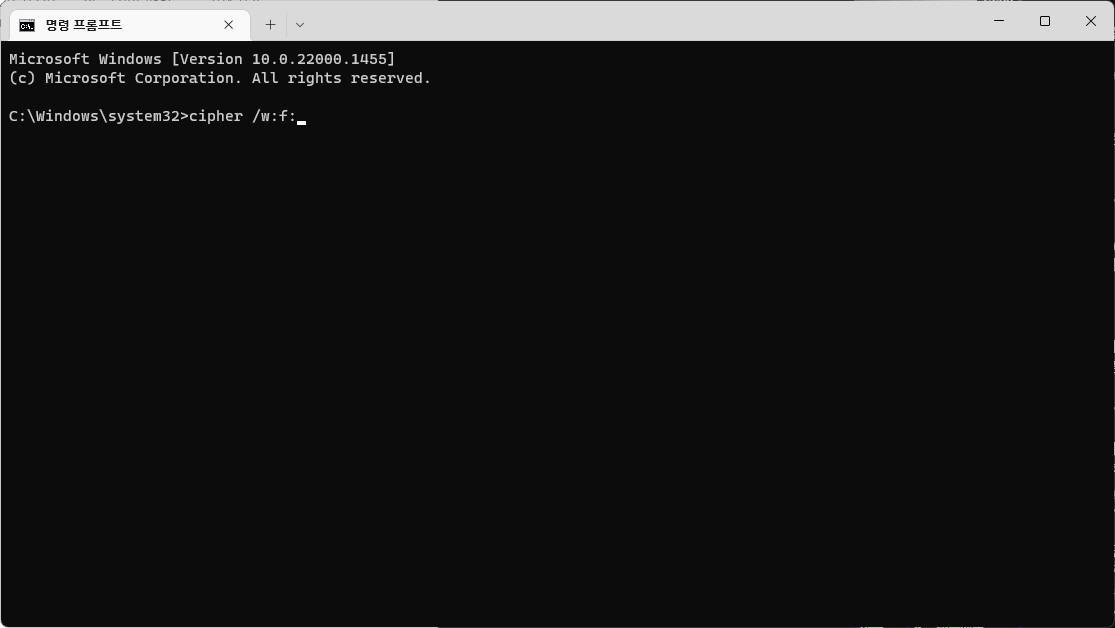
On Windows, once you have deleted your data, you can just use the Cipher command below to overwrite free space:
cipher /w f: (replace f with the drive letter)
On a Mac, after normal deletion of your data, you can use Disk Utility’s “Erase Free Space” (or the diskutil secureErase command in Terminal) to overwrite the disk.
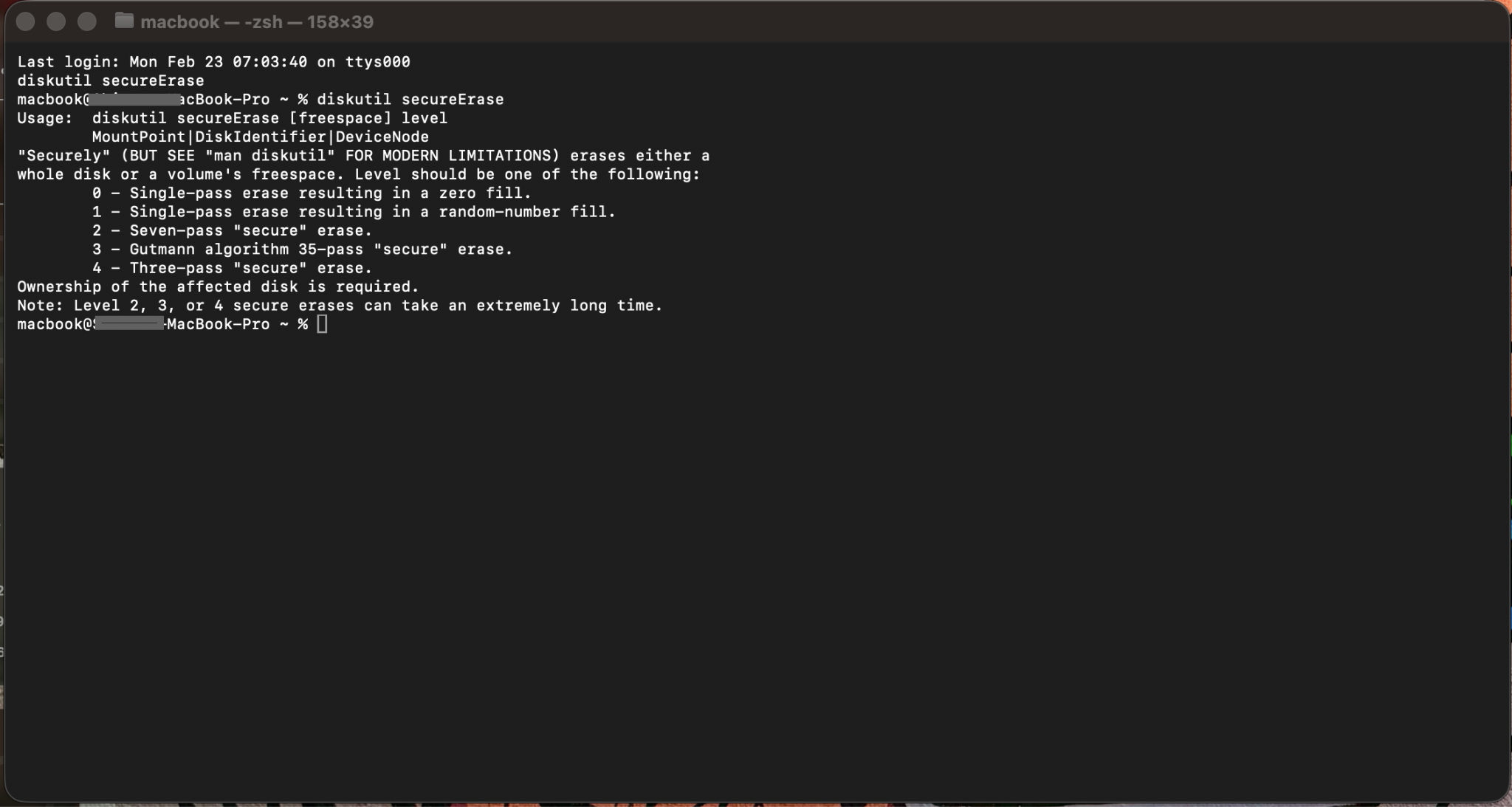
While command-line utilities perform basic overwrite operations, they have their shortcomings. They overwrite the free space on the drive but the process sometimes takes hours and the process might also fail in the middle. You actually need a fast and effective solution that implements storage-aware sanitization, supports firmware-level secure erase for SSDs and verifies erasure completion. This is to make sure of a comprehensive data destruction beyond simple free-space wiping. This is where professional data erasure tools come into the picture.
Method 2: Use a Professional File Erasure Tool
A powerful free data erasure tool will overwrite your files and even that free space with random data multiple times and make your original content unrecoverable for anyone. Stellar File Eraser (free for Windows, also available for Mac) is one such widely-recommended tool that permanently deletes files, temporary files, and traces like browsing history and passwords. It uses government-grade algorithms like DoD 3-pass, NIST, etc. so “data once erased cannot be retrieved using any data recovery tool.” The best part: It's free to use, no payment plans attached. Let’s see how it is in practice:
- Download and install Stellar File Eraser from the official website.
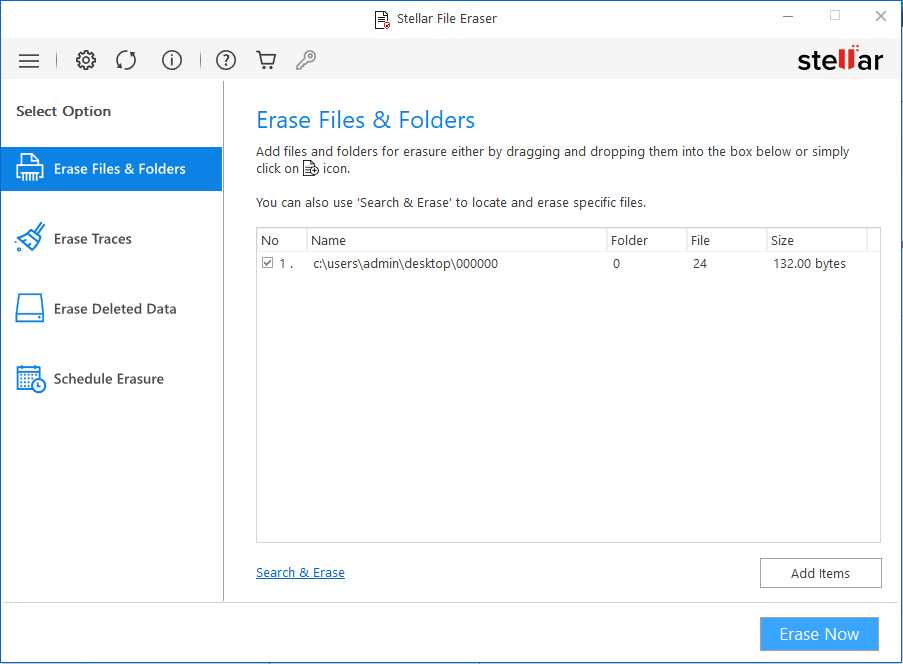
- Launch the tool, click Erase Files and Folders from the navigation menu and add the files or folders you want to erase, and click Erase Now. It's that simple!
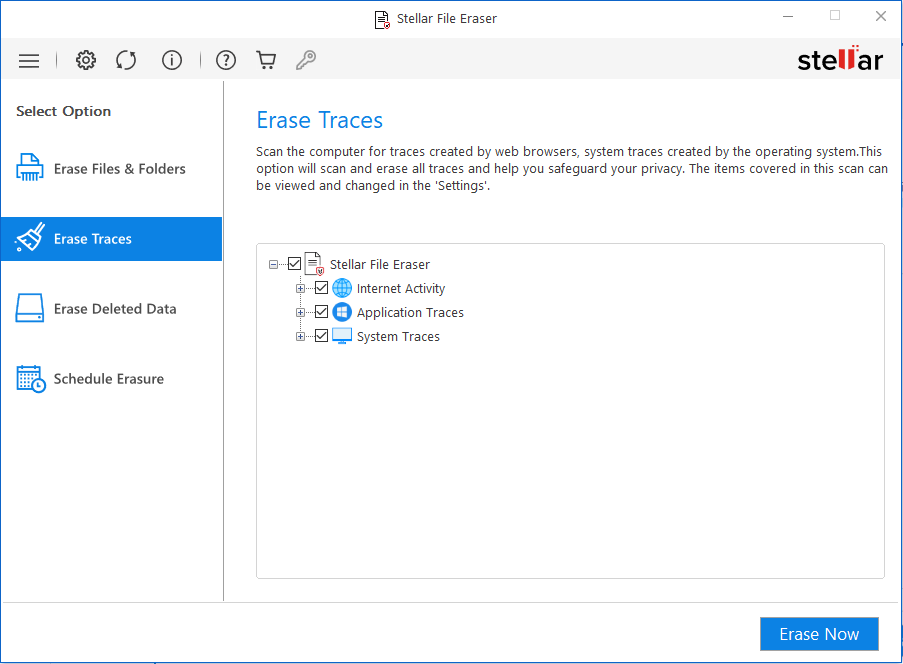
- Now, select Erase Traces from the navigation menu and hit Erase Now.
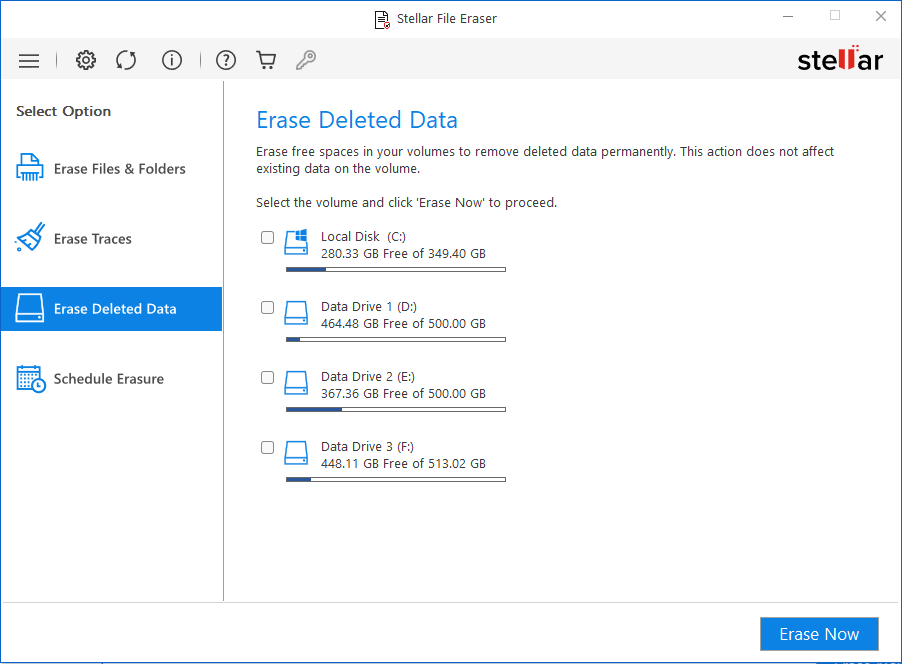
- Now, go to Erase Deleted Data, select the storage device from where you deleted those files and click Erase Now. This is going to overwrite the free space that was created after you proceeded with deletion… so that nobody can recover it.
Stellar also has a data erasure software for Mac in its lineup and the steps are as easy as they are in the Windows version. This is in fact way safer than a normal Delete and ensures even specialized recovery software finds nothing.
Method 3: Physically Destroy Old Drives
If a hard drive or SSD is being permanently retired (beyond reuse), physical destruction is the ultimate assurance. Shredding the disk, degaussing it, or disassembling and crushing the platters will guarantee data cannot be read. (However, note that some parts like SSDs have wear-leveling; specialized tools or multiple passes might be needed before destruction.) Physical destruction is often done by recycling companies or shredding services – but remember, by the time you’re destroying it, all sensitive data should already have been wiped. Experts stress wiping the drive entirely first and documenting the process for compliance.
Bonus Tip: Encryption can also help you secure your data.
If your drive is encrypted using FileVault on Mac or BitLocker on Windows, even those deleted files of yours remain encrypted. After that, if you securely erase the encryption keys, the data is unreachable effectively. So a proactive step is to encrypt your hard drive up front. That way, accidental residual data is protected by encryption even if you haven’t run a shredder tool yet.
Preventive Measures
Preventing data leakage from your device is far easier than actually trying to fix it after exposure. Here are some practical steps that can actually reduce risk:
Encrypt Your Drives: Enable full-disk encryption using BitLocker on Windows and FileVault on Mac. If your device needs to be disposed, just securely erase the encryption key or use the SSD manufacturer’s secure erase utility. Without that encryption key, the data shall become unreadable.
Use Trusted Shredding Software Regularly: Make secure file deletion a part of your routine and this especially goes for financial documents, IDs, contracts, or even HR files. Tools like Stellar File Eraser allow scheduled wiping so sensitive files don’t linger in recoverable form.
Secure Your Backups: Old backup drives and archived folders often contain years of sensitive information. Don’t just delete backup files… securely erase them or just encrypt whatever backup medium you use.
Avoid Quick Formats: A quick format only rebuilds the file system structure. Always choose full/secure formatting or follow up with a data wiping tool to overwrite the drive completely.
Remove Credentials Before Disposal: Before selling or donating your device, just log out of all accounts, clear browser data, remove SIM cards (if applicable), perform a factory reset and don’t forget to run a secure erase. For added assurance, attempt recovery with a recovery tool so as to know that nothing meaningful is appearing.
By combining encryption, disciplined wiping and these proper disposal practices, you reduce the likelihood of data remanence and unauthorized recovery.
Conclusion
Deleting files is rarely the end of the story. As both the study of second-hand drives and security experts show, simply hitting Delete or formatting leaves your data vulnerable. To be absolutely sure your files are gone, use secure-erasure tools, like Stellar File Eraser, that overwrite data and remove all traces. Stellar File Eraser (available for Mac and Windows) permanently wipes files, internet history, passwords and more, ensuring even “deleted” documents can’t be recovered. In the digital age, safeguarding privacy means going the extra mile: do not assume deletion is enough. Adopt secure disposal practices (encrypting, overwriting, destroying) and you’ll have peace of mind that your personal or business data truly stays with you not lurking on an old laptop or phone.


 4 min read