-
 For IndividualsBack to main menu
For Individuals
-
 Data Recovery
 -
 File Repair
 -
 Data Erasure
-
-
 For BusinessBack to main menu
For Business
-
 Email Repair
 -
 Email Converter
 -
 Email Migration
 -
 File & Database Repair
 -
Data Recovery
-
Data Erasure
-
 Toolkit
 -
 Forensic
-
-
 Lab Services
 -
 Our Partners
 -
 About
About -
 Resources
 -
 Support
 -
 Contact us
 Company
 Leadership
  Media Coverage
 Press Releases
 Career
  Case Studies
 Blogs
Blogs  Articles
  Videos
NTFS Data Recovery Software
An NTFS Data Recovery Software that promises seamless recovery of lost, deleted, or inaccessible files, folders, documents, photos, and videos from NTFS partitions.
- Recover data from NTFS formatted drive and removable media
- Performs NTFS Raw Recovery on the basis of file signature type
- Compatible with Windows 11, 10, 8 & 7.

*Free download to scan and recover your lost or deleted data.
*Download the free trial version on your Desktop or Laptop to scan & preview your recoverable items.



Top Award By
Techradar.pro

The best data recovery tools we've used, with highly customizable searches, a huge file-type library, and deep scan abilities.
 Features
 How it Works?
 FAQ's
FAQ'sMore Awesome Features

NTFS Data Recovery
Whether you have intentionally or inadvertently deleted your precious photos, treasured videos, complex documents, sensitive files, and important folders from your NTFS based volumes and drives, the NTFS file recovery utility is your true companion. It employs two powerful recovery options—‘Quick Scan’ and ‘Deep Scan,’ to efficiently recover the deleted files. Using this software, you can ensure quality recovery of data that has been lost due to software or hardware crash, media formatting, etc.

Robust Scan Engine
The powerful scan is one of the key distinguishing traits of this ultimate Data Recovery software. It has two options—‘Quick Scan’ and ‘Deep Scan.’ This quick scan allows you to scan fast all the recoverable files;and, the Deep Scan option carries out a more comprehensive scan, therefore, providing better results for recovery.

Formatted Volume Recovery
Recovering data that has been lost due to the formatting of NTFS drives is no more a tedious task. It is because of the ‘Deep Scan’ option that ensures efficient recovery even in the circumstances where the drive becomes inaccessible. Therefore, owing to this, you can easily salvage your complex data with ease.

Searches for lost or deleted volumes
Irrespective of the fact whether you are performing Quick Scan or Deep Scan, this efficient data recovery tool systematically scans your hard disk and lists out all the recovered volume data in defined hierarchy as well as folder structure. It implies no change with the integrity of the volume data.

Advanced Setting Option
In case you want to configure the advanced option, you can also do this efficiently using high-end “Advanced Settings” option. It allows you to state the files details at the beginning of the scanning operation. With the help of this innovative feature, you can edit the existing header of a predefined file, or can add both new and unknown file headers.

Resume Recovery Option
Undoubtedly, a smart feature that offers you the flexibility to recover your lost data as per your convenience. Owing to this smart feature, you can easily resume recovery later anytime. It ensures easy recovery from saved scan information as well as the image file. Apart from convenience, it also saves your time, as you can resume the recovery process instead of starting from a scratch.

Raw Recovery
An impressive feature for those users whose hard attempts to recover lost, inaccessible, or accidentally deleted files fails. This cutting-edge Raw Recovery feature searches for every hidden file based on file signature and recover them.

Image Creation Option of NTFS Partitions
Another excellent option to recover your lost or deleted data without compromising on data integrity. It effectively creates an image of the hard drive by replicating. Further, you can also create an image of selected region by specifying the defined disk area. You can also create removable media images using this software.

Turn On/Off Preview
Though it may seem like a minor feature yet it is considerably critical. This on/off feature helps boost the scan speed of the process as you simply have to turn off the file preview. This enables to speed up the NTFS data recovery process.
File Preview Option
Stellar NTFS Data Recovery software is a professional recovery software that not only aims to recover lost files but also meets user’s requirements. Thus, with its innovative file preview option, it allows you to have a look at all the recoverable lost or deleted files and folders, prior to its recovery. The preview is available in tabbed view of three different viewing perspective — ‘File Type,’ ‘Tree View,’ and ‘Deleted List,’ for more clarity.

Scan Status
The Scan Status feature of this professional NTFS Data Recovery software is a perfect monitoring tool. It helps you keep track of the scanning program by providing you details such as required time, the elapsed time, and the time left to complete the scanning. In addition to these, it also defines a number of recovered files until that particular instant.

Progressive Search Options
In case where you wish to find the specific folder for lost & deleted files and defined types of files in a logical drive or specific folder, this feature of NTFS Data Recovery is a suitable pick. It enables you to efficiently search the required file type or file with ease.

Recovered File Compression Before Recovery
The NTFS Data Recovery software has an option to compress recovered files. The main intent of this is to save your disk space substantially. Using this option, you can easily compress your entire data as well as a single file. This compressed data will save in a single ‘zip’ folder at a defined location.
How Stellar Data Recovery Professional Works
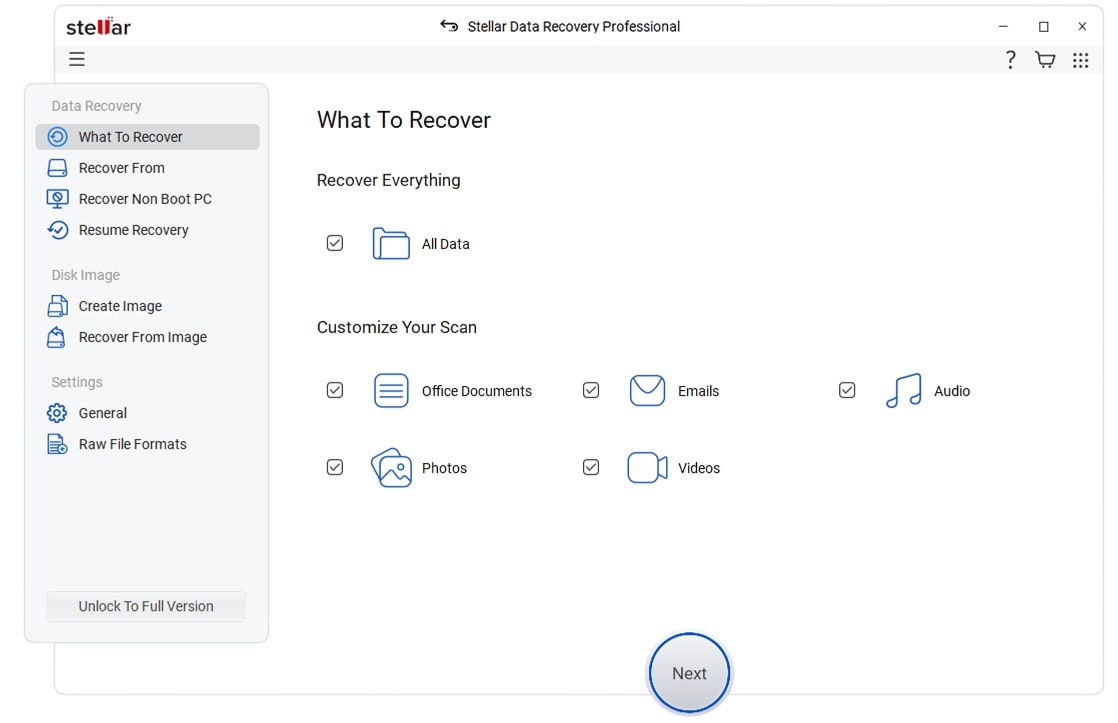
Step 1 : Select File Type
Select the type of data that you want to recover and click 'Next.'
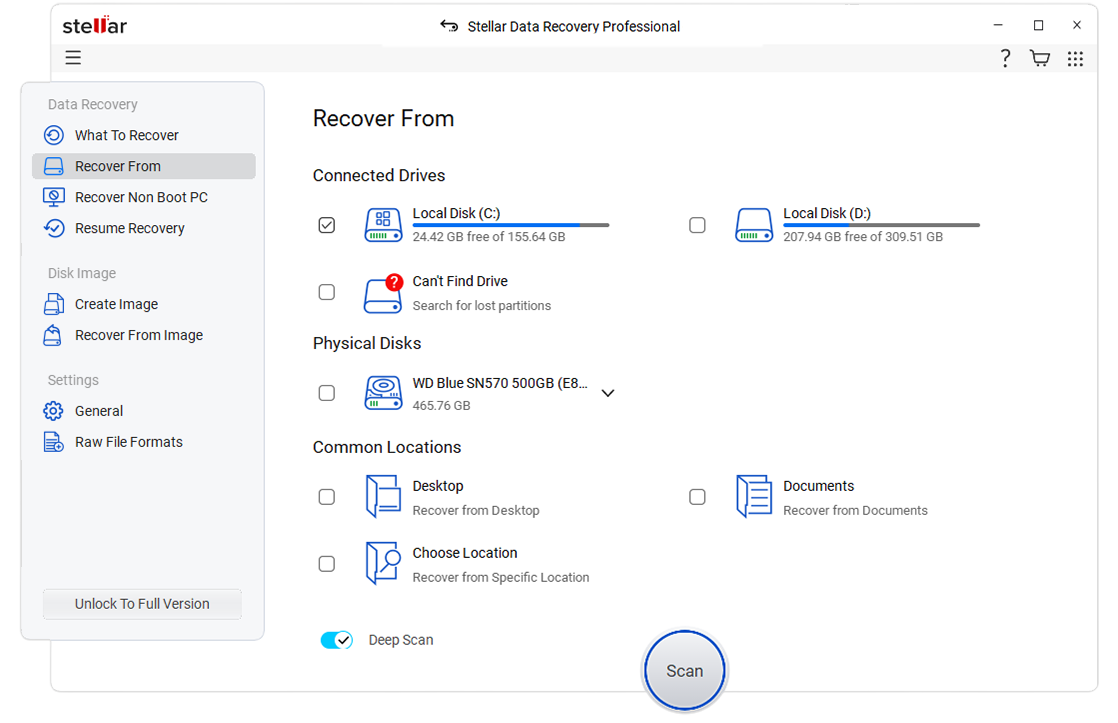
Step 2 : Select Recover From
Select the folder location or drive volume and click 'Scan.'
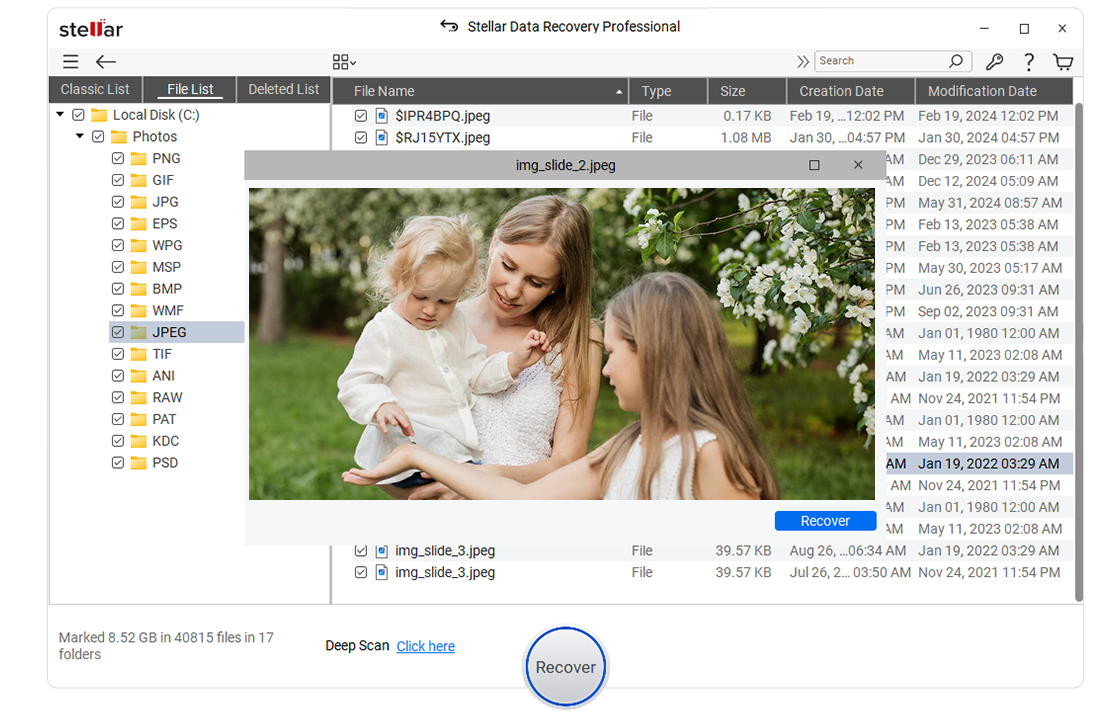
Step 3 : Scan & Recover
Select files after the scan and click 'Recover' to save recovered data.
You're in Good Hands


Technical Specifications

About Product
Stellar Data Recovery Professional
| Version: | 11.0.0.8 |
| License: | Single System |
| Edition: | Professional, Premium, Technician, Toolkit |
| Language Supported: | English, Deutsch, Français, Italiano, Español, 日本語 , 한국어, Português Brasileiro, Dutch, हिंदी |
| Release Date: | July, 2024 |

System Requirement
| Processor: | Intel compatible (x64-based processor) |
| Memory: | 4 GB minimum (8 GB recommended) |
| Hard Disk: | 250 MB for installation files |
| Operating System: (64 Bit only) |
Windows 11, 10, 8.1, & 8 (Service Pack 1) |

Documents
 Installation Guide
  User Manual
  Knowledge Base
 Installation
 Uninstallation
 EULA
EULAPowerful NTFS data recovery software
- Unlimited Recovery
- 24*5 Free Technical Support
- 100% Safe & Secure to Use
*Free download to scan and recover your lost or deleted data.
FAQ's
'Quick Scan' feature carries out a fast scan on your selected volume or removable media to recover all lost, deleted, or formatted data. This mode of scan is generally useful in all instances of data loss in Windows. Alternatively, 'Deep Scan' method is a more rigorous way of searching data on a Windows-based drive or volume. It usually takes more time than 'Quick Scan', but facilitates a reliable and complete Windows data recovery.
The software provides a number of options for saving your recovered files. You can either save files on your local hard disk or restore them to an FTP server. To recover files to FTP server, you need to specify the 'Server Name/ IP Address', 'Port No.', 'Username', and 'Password'. You can also apply compression to save all your recovered files as single '.zip' file or choose to compress each file individually.
You can use the 'Formatted/Lost File & Folder Recovery' feature of the software to recover data from formatted volumes. In case you have converted your NTFS based volume to a FAT partition, you can still recover data by scanning this volume as NTFS. The software will list all data stored on your previous NTFS volume. You can choose the desired files and folders that you need to recover.
'Raw Recovery' is an advanced feature of Stellar Data Recovery Professional. Using this feature, you can perform a signature-based search for your lost or deleted files. You can specify the desired file types that you need to recover by applying various filters. The software extensively searches your drive or volume for all the selected file types and gives you optimum recovery results. This feature is advantageous in all cases where recovery is not possible using the conventional method.
The software enables you to apply 'Mask' after the completion of scan process. Masking helps you to narrow down the scan results and create a new tree structure containing only the desired file types. You can set file mask based on several parameters, such as file type, match case, size, data, etc. You should use this feature to perform selective recovery of files.
Facing hard luck with your storage media recovery? Don't Worry!
Have experts for professional data recovery with utmost security and privacy in the certified state-of-the-art labs. If your device is crashed, water/ fire/physically-damaged, or you simply want an expert to handle your data recovery job, our Lab Experts can help you.
Learn MoreWHY STELLAR® IS GLOBAL LEADER
Why Choose Stellar?
-
3M+
Customers
-
30+
Years of Excellence
-
100+
R&D Engineers
-
190+
Countries
-
8000+
Partners
-
120+
Awards Received

Technology You Can Trust
Data Care Experts since 1993




Listening...
